
About the Cycle Identifier Signals indicator
The Cycle Identifier Signals indicator for MT4 is a technical trading tool that generates buy and sell signals based on market cycles and momentum behavior.
It combines classic indicators with a built-in price action filter to highlight higher-probability trading opportunities while reducing weak or late entries.
The indicator uses a blend of a simple moving average, the RSI, and a dedicated price action component.
These elements work together to identify cycle shifts in the market.
Signals appear as colored bars plotted around the zero level, making them easy to spot during active trading conditions.
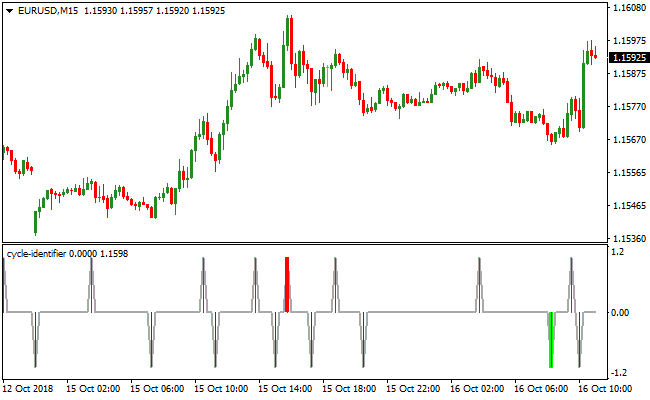
Green bars below the zero line point to bullish cycle phases, while red bars above the zero line indicate bearish cycle phases.
The added price action filter helps screen out many false signals that typically occur during sideways conditions.
This makes the indicator effective as both a standalone signal tool and a confirmation layer alongside other analysis methods.
Free Download
Download the “cycle-identifier.mq4” MT4 indicator
Key Features
- Cycle-based buy and sell signals filtered by price action.
- Uses SMA and RSI for momentum confirmation.
- Clear visual signals plotted around the zero level.
- Works across scalping, intraday, and swing trading styles.
- Fully adjustable inputs for fine-tuning performance.
Indicator Chart
The image displays the Cycle Identifier Signals indicator applied to a live EUR/USD forex price chart.
Green and red cycle bars appear around the zero level, highlighting bullish and bearish phases filtered by price behavior.
Guide to Trade with the Cycle Identifier Signals indicator
Buy Rules
- Wait for a green cycle bar to appear below the zero level.
- Confirm that recent price action supports upward movement.
- Enter a buy trade after the signal bar is fully formed.
- Avoid buying if signals alternate rapidly around zero.
Sell Rules
- Wait for a red cycle bar to appear above the zero level.
- Confirm that bearish momentum aligns with recent candles.
- Enter a sell trade after the signal bar closes.
- Skip entries during low-momentum consolidation.
Stop Loss
- Place the stop loss below the most recent support for buy signals.
- Place the stop loss above the most recent resistance for sell signals.
- Widen stops slightly on lower timeframes to handle noise.
Take Profit
- Close the buy trade when a red bar forms above zero.
- Close the sell trade when a green bar forms below zero.
- Alternatively, scale out near prior support or resistance.
- Let profits run if consecutive bars confirm trend strength.
Cycle Identifier + CCI MTF Signals Forex Strategy for MT4
This strategy combines the cycle detection of the Cycle Identifier Signals MT4 Indicator with trend confirmation from the CCI MTF Signals MT4 Indicator.
The Cycle Identifier displays green bars below the 0.00 level as buy signals and red bars above the 0.00 level as sell signals.
The CCI MTF Signals indicator confirms the overall trend with histogram bars above 0 indicating a buy trend and below 0 indicating a sell trend.
This combination allows traders to enter trades with momentum and trend alignment for higher probability setups.
The strategy works well on M15 and H1 charts.
Trades are taken only when both indicators align, ensuring that entries are supported by cycle momentum and overall trend direction.
Buy Entry Rules
- Cycle Identifier shows a green bar below the 0.00 level.
- CCI MTF histogram is above 0, confirming a buy trend.
- Enter a buy trade at the close of the signal candle or the next candle open.
- Place a stop loss below the recent swing low or support area.
- Take profit at the next swing high or exit when the Cycle Identifier turns red or the CCI MTF histogram falls below 0.
Sell Entry Rules
- Cycle Identifier shows a red bar above the 0.00 level.
- CCI MTF histogram is below 0, confirming a sell trend.
- Enter a sell trade at the close of the signal candle or the next candle open.
- Place a stop loss above the recent swing high or resistance area.
- Take profit at the next swing low or exit when the Cycle Identifier turns green or the CCI MTF histogram rises above 0.
Advantages
- Combining cycle signals with trend confirmation reduces the likelihood of false entries.
- Indicators provide clear and objective trade signals, making it easier to follow a systematic approach.
- Works on multiple timeframes, giving flexibility for both intraday and swing trading.
- Helps identify momentum shifts early, allowing timely entries and exits.
- Stop loss and take profit levels are easy to determine based on recent price action.
- Can be applied to a variety of currency pairs, increasing trade opportunities.
Drawbacks
- Requires careful monitoring, as rapid price movements can trigger stop losses quickly.
- Signals may lag slightly during fast-moving trends, reducing profit potential.
- Not suitable for very short-term scalping unless combined with additional timing filters.
Case Study 1 – Buy Trade on AUDNZD M15
During the London session, the Cycle Identifier showed a green bar below 0.00, and the CCI MTF histogram was above 0.
A buy trade was entered at 1.0850 with a stop loss at 1.0830.
Price moved upward to 1.0890, and the trade was closed for a profit of 40 pips when the Cycle Identifier turned red.
Case Study 2 – Sell Trade on USDCAD H1
On USDCAD H1, the Cycle Identifier showed a red bar above 0.00 while the CCI MTF histogram was below 0.
A sell trade was opened at 1.3350 with a stop loss at 1.3380.
Price dropped to 1.3285 before the Cycle Identifier signaled green, resulting in a gain of 65 pips.
Strategy Tips
- Trade only when both indicators confirm the same direction to improve the probability of success.
- Focus on currency pairs with clear trends rather than choppy or range-bound markets.
- Use higher timeframes like H1 for more reliable trend signals and lower timeframes like M15 for faster setups.
- Adjust stop loss levels according to recent swing highs or lows to minimize risk.
- Monitor market volatility and avoid trading during major news events to reduce unexpected reversals.
- Consider partial profit-taking if price approaches strong support or resistance levels.
- Keep a trading journal to review how the indicators perform on different pairs and timeframes.
Download Now
Download the “cycle-identifier.mq4” Metatrader 4 indicator
FAQ
Does the price action filter delay signals?
The filter prioritizes quality over speed. Signals may appear slightly later, but they often avoid weak cycle shifts.
Can this indicator be combined with moving averages?
Yes. Many traders pair it with longer-term averages such as 200-period SMA or 100-period EMA for trend alignment.
Are the indicator settings customizable?
All parameters can be adjusted through the inputs menu to match volatility and personal trading preferences.
Summary
The Cycle Identifier Signals indicator delivers cycle-based trading signals enhanced by momentum and price action filtering.
It simplifies signal interpretation while focusing on market phases that matter.
The indicator works well as a standalone solution or as part of a broader strategy.
While additional confirmation can improve consistency, its built-in filtering already offers a solid balance between responsiveness and reliability.


