About the Demarker Indicator
The Demarker Indicator for MT5 is an oscillator that helps traders identify potential buy and sell opportunities based on overbought and oversold conditions.
Analyzing price highs and lows highlights areas where trends may reverse or continue.
A buy signal appears when the indicator crosses above the 30 level from below during an uptrend, signaling a potential bullish opportunity.
Conversely, a sell signal occurs when the indicator crosses below the 70 level from above during a downtrend, indicating a potential bearish move.
The Demarker can be used as a standalone trading tool for entries and exits or as a complementary oscillator to enhance an existing strategy.
Its non-repainting design ensures that signals remain reliable once generated.
Traders can combine it with trend-following indicators to improve signal accuracy and timing.
Free Download
Key Features
- An oscillator that detects overbought and oversold market conditions.
- Buy signals when crossing above 30 in an uptrend; sell signals when crossing below 70 in a downtrend.
- Non-repainting for reliable trade decisions.
- Can be used alone or alongside existing trading strategies.
- Helps traders identify potential trend reversals and continuation points.
Indicator Chart
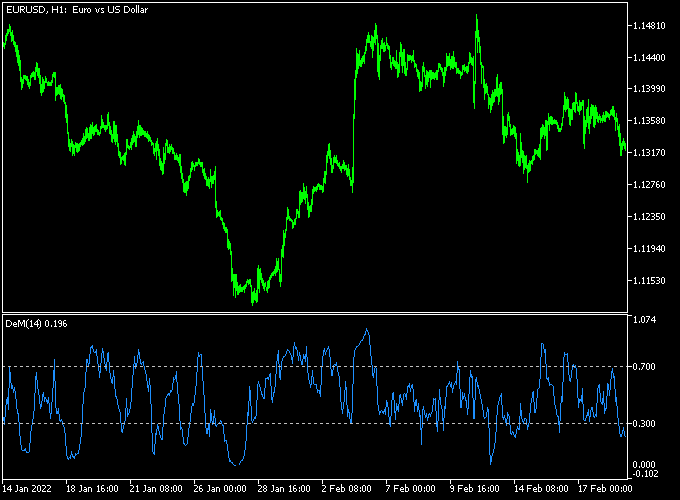
The Demarker Indicator appears beneath the price as a fluctuating oscillator.
Crossing above the 30 level signals potential buy conditions, while crossing below 70 signals potential sell conditions.
The chart below shows how traders can interpret these levels to make timely trade entries and exits.
Guide to Trade with the Demarker Indicator
Buy Rules
- Confirm that the underlying trend is upward.
- Wait for the Demarker to cross back above 30 from below.
- Check that price momentum supports a bullish move.
- Open a buy trade once conditions are validated.
Sell Rules
- Confirm that the underlying trend is downward.
- Wait for the Demarker to cross back below 70 from above.
- Check that price momentum supports a bearish move.
- Open a sell trade once conditions are validated.
Stop Loss
- Place stop losses a few pips below the most recent swing low for buy trades.
- Place stop losses a few pips above the most recent swing high for sell trades.
- Alternatively, use the last significant overbought or oversold reversal point as a dynamic stop.
Take Profit
- Close buy trades near the next resistance level or previous swing high.
- Close sell trades near the next support level or previous swing low.
- Exit early if the oscillator reverses against the trade direction.
- Optionally trail profits to capture extended moves in the trend direction.
Download Now
FAQ
How does the Demarker indicator signal trades?
Buy signals occur when the oscillator crosses above 30 from below during an uptrend, while sell signals occur when it crosses below 70 from above during a downtrend.
Is the Demarker indicator reliable on its own?
Yes, it can be used as a standalone tool, but combining it with trend-following indicators can improve accuracy.
Does the indicator repaint?
No. Signals remain fixed once generated, ensuring consistent guidance for trade entries and exits.
Summary
The Demarker Indicator is an effective oscillator for spotting overbought and oversold conditions in trending markets.
Its clear signals allow traders to time entries and exits efficiently, whether used alone or alongside other strategies.
By combining trend confirmation with dynamic stop loss and take profit management, traders can enhance accuracy and manage risk effectively.
Its adaptability across currency pairs and timeframes makes the Demarker Indicator a practical tool for scalping, intraday, and swing trading.




