About the Donchian Channels Indicator
The Donchian Channels Indicator for MT5 is a volatility-based trend tool created by Richard Donchian, a pioneer of trend-following systems.
It calculates price ranges using recent highs and lows to form a channel that highlights breakout and reversal zones.
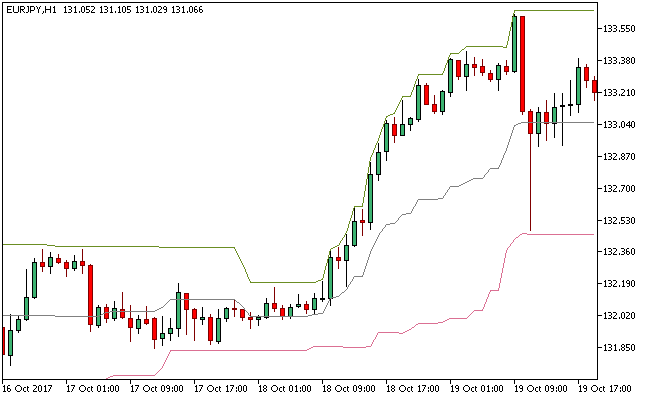
The indicator consists of three lines: an upper band marking the highest high, a lower band marking the lowest low, and a middle line representing the channel center.
The default period is 20, reflecting the average number of trading days in a month, though it can be adjusted for different timeframes.
Traders use Donchian Channels to detect trend continuation, identify breakouts, and manage risk.
It provides clear signals for potential entries and exits, allowing both short-term and long-term traders to make more confident decisions.
Free Download
Key Features
- Upper and lower bands track recent highs and lows over a defined period.
- The middle line provides a central reference for trend bias.
- Detects breakouts and potential reversal points.
- Adaptable period settings for different timeframes.
- Helps manage risk and set logical stop and profit levels.
Indicator Chart
The Donchian Channels Indicator displays a three-line channel directly on the main price chart, highlighting trend direction and potential breakout zones.
Price closing above the middle line along the upper band signals bullish momentum, while closing below the middle line along the lower band indicates bearish pressure.

Guide to Trade with the Donchian Channels Indicator
Buy Rules
- Enter a buy trade when price opens and closes above the middle line.
- Confirm the price is trending toward or along the upper band.
- Check for momentum using candles or supporting indicators.
Sell Rules
- Enter a sell trade when price opens and closes below the middle line.
- Confirm the price is trending toward or along the lower band.
- Check for downward momentum with supporting signals.
Stop Loss
- For buy trades, place the stop loss just below the lower band.
- For sell trades, place the stop above the upper band.
- Keep risk consistent, generally 1–2% of the account per trade.
Take Profit
- Close buy trades if the candle closes back below the middle line.
- Close sell trades if the candle closes back above the middle line.
- Alternatively, target the opposite Donchian band to capture full moves.
Download Now
FAQ
How do Donchian Channels help identify trends?
Price positioning relative to the upper, lower, and middle bands reveals trend direction.
Sustained closes above the middle line indicate bullish bias, while closes below suggest bearish bias.
What period is best for different timeframes?
Short-term traders can use the default period of 20, while longer-term charts benefit from higher periods to reduce false signals and better capture trends.
Can Donchian Channels be combined with other tools?
Yes, combining with momentum indicators, moving averages, or support/resistance levels improves accuracy and filters low-probability setups.
Are these signals reliable for intraday trading?
Yes, when adjusted to the timeframe and volatility, Donchian Channels offer strong guidance for short-term entries and exits, especially during trending markets.
Summary
The Donchian Channels Indicator provides a clear method to identify trends, breakouts, and potential reversals using a three-line volatility channel.
Its adaptability across timeframes makes it a versatile tool for traders.
By observing price relative to the middle and outer bands, traders can enter with confidence, manage risk effectively, and plan exits logically.
It performs strongly when combined with trend or momentum filters.
For intraday and swing trading, this indicator simplifies the process of spotting high-probability trades and enhances decision-making in volatile markets.




