
About the Dynamic Balance Point with Support and Resistance Indicator
The Dynamic Balance Point with Support and Resistance indicator for MT5 is a trend-based trading tool that generates buy and sell signals using dynamic support and resistance calculations.
It plots a dual-colored signal line directly on the price area, allowing traders to quickly determine whether the market is in a bullish or bearish phase.
A blue line indicates that the market is moving in a bullish trend, while a brown line signals a bearish phase.
Traders can also adjust several parameters including the balance point period, timeframe selection, colors, and line style to match their preferred trading approach.
Free Download
Dynamic balance point – support and resistance.mq5 Indicator (MT5)
Key Features
- Plots a dynamic signal line based on support and resistance calculations.
- Uses two colors to represent bullish and bearish market conditions.
- The blue line signals an upward trend while the brown line signals a downward trend.
- Built-in multi-timeframe analysis for broader market perspective.
Indicator Chart
The Dynamic Balance Point with Support and Resistance Indicator appears on the main price area as a continuous signal line that changes color with market direction.
The example shows the blue line marking bullish phases and the brown line highlighting bearish momentum.
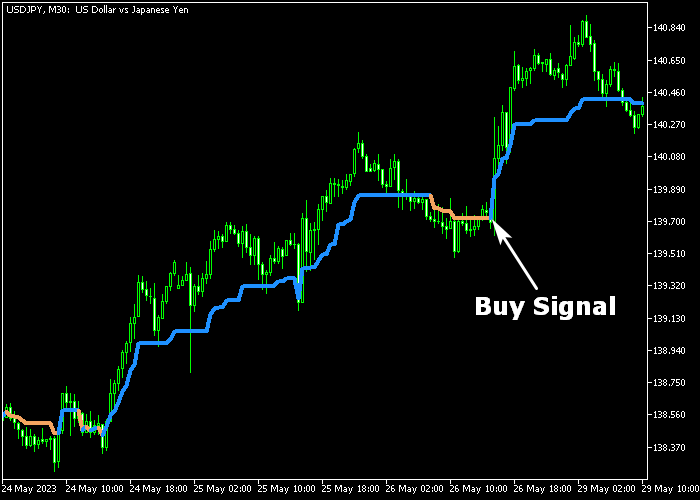
Guide to Trade with Dynamic Balance Point with Support and Resistance Indicator
Buy Rules
- Watch for the signal line to change from brown to blue.
- The beginning of the blue colored line signals bullish momentum.
- This color change suggests buyers are gaining control of the market.
- Open a buy position once the blue signal line begins.
Sell Rules
- Watch for the signal line to change from blue to brown.
- The beginning of the brown colored line signals bearish momentum.
- This shift indicates sellers are starting to dominate the market.
- Open a sell position when the brown signal line appears.
Stop Loss
- Place the stop loss 3 pips below the most recent swing low for buy trades.
- For sell trades, place the stop loss 3 pips above the most recent swing high.
- Traders can also tighten the stop as the trend progresses.
Take Profit
- Close the buy trade if the signal line changes from blue to brown.
- Close the sell trade if the signal line switches from brown to blue.
- Alternatively, target the next strong support or resistance level.
Download Now
Dynamic balance point – support and resistance.mq5 Indicator (MT5)
FAQ
Is the Dynamic Balance Point indicator multi-timeframe?
Yes. The indicator includes built-in multi-timeframe functionality.
This allows traders to analyze signals derived from higher timeframe data while trading on a lower timeframe.
Can this indicator be used as a standalone strategy?
Yes. Some traders use the color changes of the signal line as their primary trading signals.
Others combine it with additional tools such as moving averages or price action analysis.
Summary
The Dynamic Balance Point with Support and Resistance Indicator helps traders follow market direction using a simple color-changing signal line.
The blue line signals bullish conditions, while the brown line highlights bearish momentum.
Its multi-timeframe calculation and customizable settings make it adaptable to many trading styles.
When combined with price action or other indicators, it can help traders identify reliable trend-based trading opportunities.




