
About the Ehlers Laguerre Filter Indicator
The Ehlers Laguerre Filter indicator for MT5 is a simplified version of the classic Laguerre oscillator.
It produces clear buy and sell signal lines on the main chart, forming a crossover system suitable for multiple trading styles.
Green lines indicate bullish momentum, while red lines indicate bearish momentum.
The indicator is designed to help identify trend changes and potential entry points without relying on complex analysis.
The gamma period and visual settings can be adjusted to refine signals.
You can experiment with these inputs to match your preferred trading timeframe or strategy.
Free Download
EhlersLaguerreFilter.mq5 Indicator (MT5)
Key Features
- Simplified Laguerre oscillator for easy trend identification.
- Green and red signal lines for bullish and bearish trends.
- Visual crossover system suitable for multiple trading styles.
- Adjustable gamma period to fine-tune sensitivity.
- Customizable line colors and styles for clarity.
- Provides clear entry points without additional indicators.
Indicator Chart
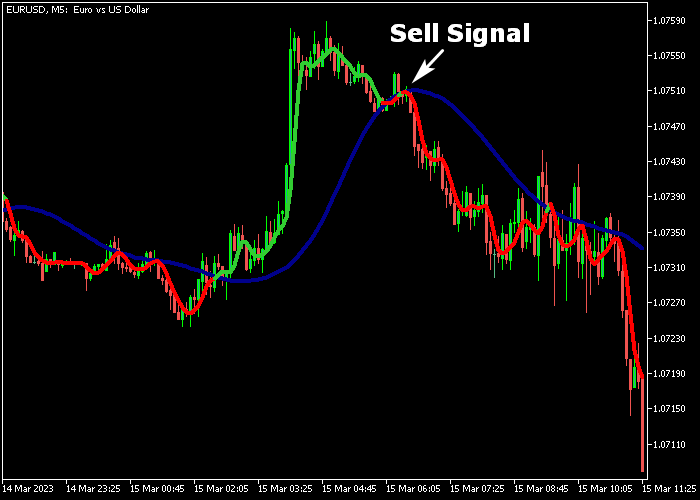
The Ehlers Laguerre Filter plots colored signal lines directly on the main chart.
Green lines indicate potential bullish setups, red lines indicate bearish setups.
Crossovers between these lines can be used to confirm trend changes and potential trade entries.
Guide to Trade with Ehlers Laguerre Filter Indicator
Buy Rules
- Enter a buy position when a green signal line appears on the chart.
- Confirm that momentum aligns with upward price movement.
- Wait for the signal line to stabilize before opening the trade.
- Use the crossover and previous swing points as confirmation for timing.
Sell Rules
- Enter a sell position when a red signal line appears on the chart.
- Confirm that downward momentum is present.
- Wait for the signal line to stabilize before opening the trade.
- Use the crossover and previous swing points as confirmation for timing.
Stop Loss
- For buy trades, place the stop below the nearest support cluster.
- For sell trades, place the stop above the nearest resistance cluster.
- Alternatively, use the recent price volatility range multiplied by 1.2 as a dynamic stop.
Take Profit
- Exit buy trades near previous resistance or when a red signal line appears.
- Exit sell trades near previous support or when a green signal line appears.
- Alternatively, exit trades using a fixed reward-to-risk ratio according to your strategy.
Download Now
EhlersLaguerreFilter.mq5 Indicator (MT5)
FAQ
How does the Ehlers Laguerre Filter indicator generate signals?
The indicator uses simplified Laguerre oscillation to draw green and red signal lines. Crossovers and line colors indicate bullish or bearish market conditions.
Can the gamma period be adjusted?
Yes. The gamma input allows fine-tuning of the signal sensitivity, which can affect how early or late signals appear.
How should stop loss and take profit be set?
Stops should be placed beyond the nearest swing high/low, while take profit can follow opposite signals or key support/resistance zones.
Summary
The Ehlers Laguerre Filter indicator provides a simple yet effective system to identify trend changes.
Its colored signal lines allow clear entries and exits, while adjustable gamma settings let you tailor sensitivity to your preferred strategy.
Using separate stop loss and take profit levels ensures proper risk management and maximizes the potential of each trade, making this indicator suitable for traders seeking straightforward trend signals.




