
About the Elliott Wave Oscillator
The Elliott Wave Oscillator Indicator for MT5 converts the principles of Elliott Wave theory into a practical technical oscillator that traders can easily follow.
The indicator appears beneath the main price area and displays colored bars that represent market momentum.
These bars move above and below the zero level, allowing traders to quickly identify shifts in trend direction.
When the oscillator rises above zero, it signals strengthening bullish momentum. When it moves below zero, it indicates increasing bearish pressure.
The indicator can be used for scalping, intraday trading, or trend following strategies depending on the timeframe selected.
Several inputs can be customized including the fast moving average period, slow moving average period, calculation method, and applied price.
These parameters allow traders to fine tune the indicator to match their preferred trading style.
Free Download
Key Features
- Transforms Elliott Wave theory into a practical momentum oscillator.
- Displays colored histogram bars to represent bullish and bearish momentum.
- Uses the zero level to identify trend direction changes.
- Green bars appear when the oscillator moves above zero.
- Orange and red bars appear when the oscillator moves below zero.
- Helps traders follow momentum shifts in trending markets.
- Adjustable parameters including fast MA period and slow MA period.
- Compatible with all currency pairs and timeframes.
Indicator Chart
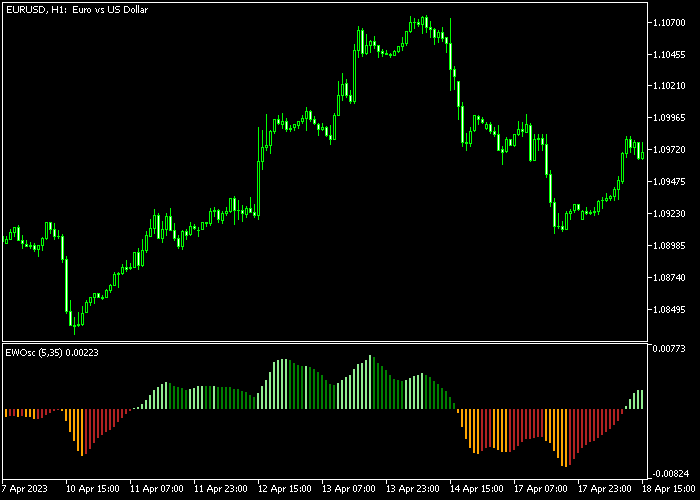
The Elliott Wave Oscillator appears beneath the main price area as a momentum histogram that moves above and below the zero level.
Green bars highlight bullish phases while orange and red bars indicate bearish momentum shifts.
Guide to Trade with Elliott Wave Oscillator
Buy Rules
- Wait for the Elliott Wave Oscillator to turn back above the zero level.
- Confirm that green bars begin forming on the oscillator.
- Open a buy position as bullish momentum starts building.
- Ensure price is not approaching strong resistance.
Sell Rules
- Wait for the Elliott Wave Oscillator to turn back below the zero level.
- Confirm that orange or red bars appear on the oscillator.
- Open a sell position as bearish momentum strengthens.
- Avoid selling directly into strong support levels.
Stop Loss
- Place the stop loss 3 pips below technical support for buy trades.
- Place the stop loss 3 pips above technical resistance for sell trades.
Take Profit
- Close all buy trades when the oscillator moves back below the zero level.
- Close all sell trades when the oscillator moves back above the zero level.
- Consider taking partial profits near major support or resistance areas.
Download Now
FAQ
What does the zero level represent in the Elliott Wave Oscillator?
The zero level acts as the dividing line between bullish and bearish momentum.
When the oscillator moves above zero it indicates positive momentum, while movement below zero signals negative momentum.
Can the Elliott Wave Oscillator be customized?
Yes. Traders can modify the fast moving average period, slow moving average period, calculation method, and the applied price used in the indicator.
Summary
The Elliott Wave Oscillator Indicator provides a simplified way to follow market momentum using the principles of Elliott Wave analysis.
By transforming wave calculations into a visual oscillator, the indicator helps traders quickly identify bullish and bearish phases.
The zero line serves as the key level that separates positive and negative momentum.
When combined with price action and support or resistance analysis, the signals can help traders improve entry timing and exit decisions.
With adjustable moving average settings and a straightforward visual display, the Elliott Wave Oscillator can be integrated into many trading strategies across different markets and timeframes.




