
About the Entropy Indicator
The Entropy Indicator for MT5 is a momentum oscillator that identifies shifts in market sentiment using a zero line system.
It plots in a separate window beneath the main price chart and fluctuates above and below the 0 level.
When the indicator crosses above zero, it signals strengthening bullish pressure. When it crosses below zero, it indicates increasing bearish momentum.
These transitions often align with early reversals or continuation phases in trending conditions.
Traders can adjust the entropy period, colors, and display style to match their strategy.
Its straightforward logic makes it practical for scalping, intraday trading, and higher timeframe setups.
By focusing purely on momentum shifts, traders can react quickly while maintaining disciplined risk control.
Free Download
Key Features
- Zero line crossover signals for bullish and bearish momentum shifts.
- Adjustable entropy period for faster or smoother signals.
- Displayed as an oscillator beneath the main price area.
- Simple logic that fits rule based trading plans.
Indicator Chart
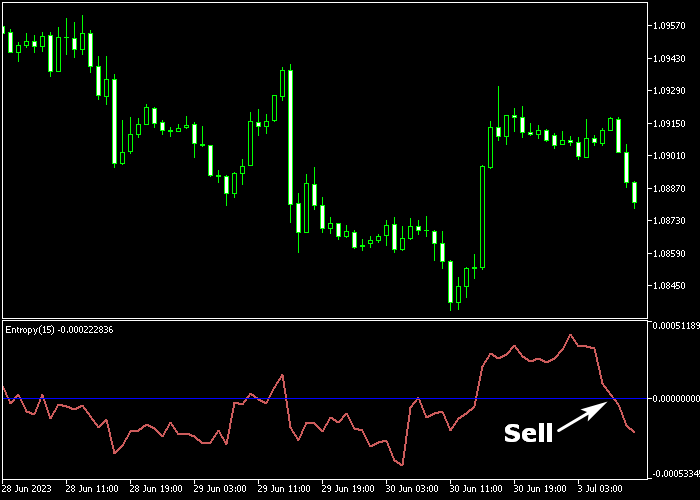
The Entropy Indicator appears beneath the main price area as an oscillator moving around the zero level.
Buy signals occur when the line crosses upward through 0 from below.
Sell signals form when the line crosses downward through 0 from above.
These crossovers highlight changes in bullish and bearish sentiment and help traders time entries with precision.
Guide to Trade with the Entropy Indicator
Buy Rules
- Wait for the Entropy line to cross above 0 from below.
- Confirm the candle closes after the bullish crossover.
- Open a buy trade at the start of the next candle.
Sell Rules
- Wait for the Entropy line to cross below 0 from above.
- Confirm the candle closes after the bearish crossover.
- Open a sell trade at the start of the next candle.
Stop Loss
- Place the stop loss 3 pips below recent support for buy trades.
- Place the stop loss 3 pips above recent resistance for sell trades.
Take Profit
- Close all buy trades when the Entropy line crosses back below 0.
- Close all sell trades when the Entropy line crosses back above 0.
- Optional: Use a fixed target of your preference to exit the trade.
Entropy Forex Indicator Scalping Strategy for MT5
This scalping strategy combines the Entropy Forex Indicator with the Ehlers Laguerre Filter Indicator to capture short-term price movements with clear momentum and trend alignment.
It focuses on quick entries when momentum shifts around the zero level while staying in the direction of the prevailing trend.
The Entropy Forex Indicator revolves around a central zero line.
When it moves above zero, it signals growing bullish momentum. When it drops below zero, it reflects increasing bearish pressure.
This makes it effective for identifying entry timing on lower timeframes.
The Ehlers Laguerre Filter Indicator smooths market noise and highlights the underlying direction.
A green line indicates a buy trend, while a red line shows a sell trend.
This helps traders avoid countertrend trades and stay aligned with momentum.
This setup works best on M1 and M5 charts, especially during active trading sessions where price moves quickly and cleanly.
Buy Entry Rules
- Confirm that the Ehlers Laguerre Filter line is green, indicating a bullish environment.
- Wait for the Entropy indicator to move above the zero level.
- Enter a buy trade at the close of the confirmation candle.
- Place the stop loss below the most recent minor low or consolidation area.
- Close the trade when the Entropy indicator drops back below zero or when the trend line turns red.
Sell Entry Rules
- Confirm that the Ehlers Laguerre Filter is red, indicating a bearish environment.
- Wait for the Entropy indicator to move below the zero level.
- Enter a sell trade at the close of the confirmation candle.
- Place the stop loss above the most recent minor high or consolidation area.
- Close the trade when the Entropy indicator moves back above zero or when the trend line turns green.
Case Study 1: EURJPY M5 Momentum Shift
On EURJPY M5, the Entropy indicator pushed above the zero level after a short consolidation phase, signaling the start of bullish momentum.
At the same time, the Ehlers Laguerre Filter line was green, confirming upward pressure.
A buy trade was taken at candle close with the stop placed just below the recent price base. Price moved upward with steady momentum.
After several candles, the Entropy indicator dropped back below zero, indicating that bullish momentum was fading.
This marked the moment to exit and secure the profit from the move.
Case Study 2: GBPUSD M1 Quick Reversal
On GBPUSD M1 during a volatile session, the Ehlers Laguerre Filter line turned red, showing a shift toward bearish conditions.
Shortly after, the Entropy indicator crossed below zero, confirming selling pressure.
A sell position was opened at the close of the signal candle. The stop loss was placed above the recent high to control risk.
Price declined quickly in a short burst.
When the Entropy indicator moved back above zero and the trend line began shifting, that was the signal to exit the trade and capture the quick scalp.
Download Now
FAQ
How are signals generated?
Signals are generated when the indicator crosses the zero line.
A move above 0 signals bullish momentum. A move below 0 signals bearish momentum.
Which entropy period setting should I use?
Shorter periods create faster signals suited for scalping.
Higher periods smooth the oscillator and reduce noise on larger timeframes. Testing different values per pair improves performance.
Can the Entropy Indicator be used on higher timeframes?
Yes. On H1 and H4, signals tend to be more stable and suitable for swing trading.
Lower timeframes produce more frequent setups but require tighter risk control.
Summary
The Entropy Indicator delivers direct momentum signals through zero line crossovers.
It adapts to any currency pair and timeframe while keeping trading decisions simple and systematic.
With adjustable sensitivity, the Entropy Indicator provides simple buy and sell signals for capturing momentum driven trading opportunities.




