
About the Fibo Pivot Candle Bar Indicator
The Fibo Pivot Candle Bar indicator for MT5 is a multi-analysis trading tool that combines several technical indicators and price action techniques into a single signal system.
It evaluates market conditions using Fibonacci levels, MACD momentum, pivot points, moving averages, and ZigZag analysis.
The indicator continuously scans the market and generates trading recommendations through a simple alert system.
The system produces three types of alerts: Wait, Buy, and Sell.
A wait signal indicates that the market is not ready for a trade yet, while buy and sell alerts highlight potential entry opportunities.
These signals appear directly on the trading window and help traders react quickly when market conditions align.
Traders can also customize alert behavior by enabling notifications, email alerts, or visual alerts depending on their preferences.
Free Download
FiboPivotCandleBarMT5.mq5 Indicator (MT5)
Key Features
- Combines Fibonacci analysis, MACD, pivot points, moving averages, and ZigZag.
- Generates buy and sell signals using an arrow-based alert system.
- Displays three signal types including wait, buy, and sell alerts.
- Supports email alerts and mobile notifications.
- Customizable visual settings including fonts and colors.
Indicator Chart
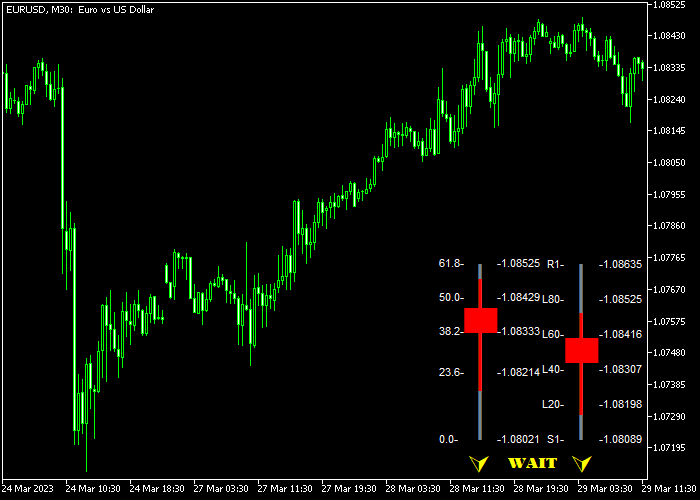
The Fibo Pivot Candle Bar indicator displays alert signals on the trading window that highlight potential trading opportunities.
Traders will see wait, buy, or sell alerts appear on the screen while the indicator analyzes market conditions using several technical indicators.
Guide to Trade with Fibo Pivot Candle Bar Indicator
Buy Rules
- Wait for a yellow buy alert to appear in the lower right area of the trading window.
- This alert indicates that the indicator has detected a potential bullish opportunity.
- Open a buy trade once the buy alert is displayed.
- Confirm the signal using your own market analysis if needed.
Sell Rules
- Watch for a red sell alert to appear in the lower right area of the trading window.
- This signal indicates that bearish market conditions may be developing.
- Open a sell trade once the alert appears.
- Consider confirming the signal with additional analysis before entering.
Stop Loss
- Place the stop loss below the nearest technical support for buy trades.
- Place the stop loss above the nearest technical resistance for sell trades.
Take Profit
- Close the trade when the reward to risk ratio reaches at least 1.5.
- Traders may also close the trade when an opposite signal appears.
- Follow your trading plan when managing exits.
Download Now
FiboPivotCandleBarMT5.mq5 Indicator (MT5)
FAQ
Which technical indicators are used in the Fibo Pivot Candle Bar indicator?
The indicator combines Fibonacci levels, MACD, pivot points, moving averages, and ZigZag analysis to evaluate market conditions and generate trading alerts.
Can traders receive notifications from the indicator?
Yes. The indicator supports visual alerts, email notifications, and push notifications depending on the settings chosen by the trader.
Does the indicator work on all trading instruments?
The indicator can be applied to any trading instrument available in the MT5 platform, including forex pairs, commodities, and indices.
Summary
The Fibo Pivot Candle Bar indicator combines several technical analysis tools into a single alert-based trading system.
By merging Fibonacci analysis, momentum indicators, and pivot point levels, it attempts to identify potential trading opportunities automatically.
The alert system simplifies the trading process by highlighting possible buy and sell opportunities directly on the platform.
Traders can then decide whether to act on the signal based on their own strategy.
Overall, the Fibo Pivot Candle Bar indicator can serve as a helpful signal assistant for traders who prefer automated analysis combined with manual decision making.




