
About the Flat Trend Indicator
The Flat Trend indicator for MT5 is a momentum tool designed to categorize market behavior into four distinct strength levels.
It uses a tiered threshold system to distinguish between a “flat” sideways market and an active trend.
By monitoring price smoothing and momentum velocity, the indicator highlights the transition from consolidation to weak, strong, and extremely strong directional moves.
This allows traders to filter out low-volatility periods and focus exclusively on high-probability trend expansions with sufficient market conviction.
Free Download
Key Features
- The indicator classifies market states into three strength levels and one sideways phase.
- Level 20 marks the transition from a flat market to the start of a trend.
- Level 40 indicates a strong trending environment suitable for trade entries.
- Level 60 identifies an extremely powerful trend with maximum momentum.
- Customizable smoothing and price types allow for tailored sensitivity and frequency.
- Visual colored dots provide immediate feedback on current market intensity in a sub-window.
Indicator Chart
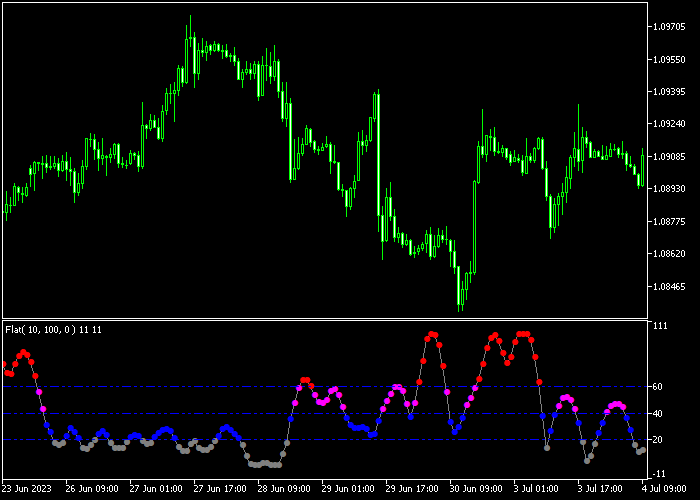
The chart shows the Flat Trend indicator displaying a series of dots at various heights.
You can see the dots fluctuating between the 20, 40, and 60 levels, providing a roadmap of trend development.
This visualization helps traders identify when the market leaves a sideways phase and enters a tradable trend.
Guide to Trade with Flat Trend Indicator
Buy Rules
- Enter a buy trade when the indicator dots rise above the 20 threshold during a bullish move.
- Confirm that the dots are climbing toward the 40 level to ensure the trend is gaining strength.
- Wait for a candle close above a local resistance level to validate the entry.
- Maintain the long position as long as the dots stay above the 20 level.
Sell Rules
- Initiate a sell market order when the indicator dots appear above the 20 level with a bearish bias.
- Verify that the momentum is significant enough to push the dots toward the 40 or 60 thresholds.
- Check that the dots have cleared the 20 mark to confirm the sideways market has ended.
- Keep the short trade active until the dots drop back into the “flat” zone below 20.
Stop Loss
- Set a fixed stop loss based on the Average True Range (ATR) to account for current market volatility.
- Use a dynamic exit by closing the trade if the indicator dots fall back into the sideways zone below 20.
- Utilize a trailing stop that follows the slope of a 50-period moving average to lock in gains.
Take Profit
- Exit the trade once the indicator dots begin to decline back toward the 20 level.
- Target a fixed profit based on recent market volatility when the 60 level is reached.
- Close the position if the market enters a “flat” state by dropping below the 20 mark.
- Consider scaling out of the trade as the dots reach higher threshold milestones.
Download Now
FAQ
What happens when the indicator is below the 20 level?
Below 20, the market is considered “flat” or sideways.
During this time, there is usually not enough momentum for trend-following trades, and it is often best to stay on the sidelines to avoid choppy price action.
Can I change the threshold levels?
Yes, the threshold levels (20, 40, 60) can be adjusted in the settings to better fit the volatility of specific assets like Gold or Indices, which might require higher thresholds to confirm a trend.
Is the smoothing period important?
The smoothing period determines how quickly the dots react to price changes.
A shorter period provides faster signals but may include more noise, while a longer period offers more stable trend confirmation.
Summary
The Flat Trend indicator provides a unique tiered system that identifies the specific intensity of market moves.
By clearly marking the difference between a sideways market and a tradable trend, it assists in filtering out low-probability setups.
The visual simplicity of the thresholds makes it easy to integrate into any existing trading plan.
Overall, it is a robust tool for improving trend selection and risk management.
Testing the smoothing settings on a demo account is recommended to match your specific trading frequency.




