About the Forex Indicator PRO
Forex Indicator PRO for MT4 is a simple yet effective trading system that provides clear buy and sell signals through arrows on the chart.
Designed for traders of all levels, it delivers actionable trade alerts in real-time without complicated settings.
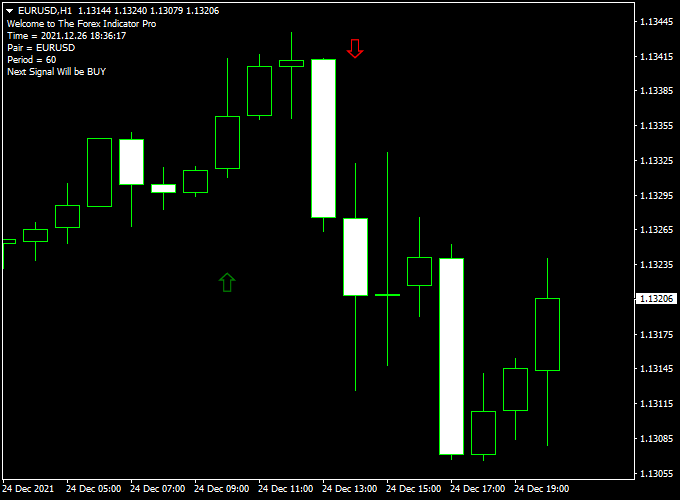
Displayed on the main MT4 chart window, the green and red arrows indicate potential entry points.
A green arrow signals a bullish setup, while a red arrow marks a bearish opportunity.
The system is built to be intuitive, allowing traders to follow signals with confidence.
This indicator is suitable for scalping, intraday, or swing trading and can be combined with other trend or confirmation tools to improve trade accuracy.
Free Download
Download the “Forex Indicator Pro.ex4” indicator for MT4
Key Features
- Green and red arrows indicate buy and sell signals
- Simple and easy-to-follow trading system
- Real-time alerts for quick decision-making
- Non-repainting arrows ensure reliable signals
- Can be combined with other indicators for confirmation
Indicator Chart
The chart shows green arrows for buy signals and red arrows for sell signals.
Each arrow corresponds to an optimal entry point, helping traders capture market moves efficiently.
The indicator makes following trends straightforward and visually intuitive.

Guide to Trade with Forex Indicator PRO
Buy Rules
- Open a buy trade when a green arrow appears on the chart.
- Optional: confirm with a recent bullish candle or a short-term trend filter.
- Consider entering after a minor pullback to improve the risk-reward ratio.
Sell Rules
- Open a sell trade when a red arrow appears on the chart.
- Optional: confirm with a bearish candle or short-term momentum indicator.
- Avoid entering trades near strong support/resistance to reduce false signals.
Stop Loss Placement
- Buy trades: place slightly below the recent swing low or minor support.
- Sell trades: place slightly above the recent swing high or minor resistance.
Take Profit Targets
- Set TP at the next major support/resistance level or pivot point.
- Partial exits can be taken when opposite signal arrows appear.
- Trailing stops can be used to capture extended trends.
Practical Trading Tips
- Best used in trending market conditions for higher probability trades.
- Combine with longer-term trend indicators or oscillators for confirmation.
- Adjust arrow size and color for improved visibility on the chart.
- Follow a consistent risk management plan to protect capital.
MT4 Scalping Strategy: Forex Indicator Pro + Turbo JRSX
This scalping strategy combines the Forex Indicator Pro with the Turbo JRSX Indicator to provide precise intraday entries.
The Forex Indicator Pro displays arrows on the chart: green arrows signal bullish entries and red arrows signal bearish entries.
The Turbo JRSX adds trend confirmation in the subchart: a red line indicates bullish momentum, while a blue line (or a reversed color depending on your settings) indicates bearish momentum.
By combining both indicators, traders can filter out false signals and scalp high-probability trades on 1-minute, 5-minute, or 15-minute charts.
Buy Entry Rules
- A green arrow appears on the Forex Indicator Pro chart.
- The Turbo JRSX line in the subchart is red, confirming bullish momentum.
- Enter a buy trade at the close of the confirming candle.
- Place a stop loss a few pips below the recent swing low.
- Set take profit at the next minor resistance level or use a fixed pip target (e.g., 12–20 pips for scalping).
Sell Entry Rules
- A red arrow appears on the Forex Indicator Pro chart.
- The Turbo JRSX line in the subchart is blue, confirming bearish momentum.
- Enter a sell trade at the close of the confirming candle.
- Place a stop loss a few pips above the recent swing high.
- Set take profit at the next minor support level or a fixed pip target (e.g., 12–20 pips for scalping).
Advantages
- Combines clear signals with trend confirmation for higher probability trades.
- Works well for fast intraday scalping setups.
- Easy to monitor with arrows and colored lines, reducing guesswork.
- Flexible take profit options based on support/resistance or pip targets.
Drawbacks
- Signals require both arrow and subchart line alignment, which may reduce trade frequency.
- Less suitable for long-term trades or swing trading.
- Requires fast execution on lower timeframes.
Case Study 1: EUR/CHF on 5-Minute Chart
During the London session, a green arrow appeared on the Forex Indicator Pro chart while the Turbo JRSX line in the subchart was red, confirming bullish momentum.
A buy trade was entered at 1.0932.
The recent swing low was 1.0920, and the stop loss was placed at 1.0918 (14 pips risk).
The next minor resistance was at 1.0945, which was used as the take profit target.
Price moved upward and hit the target, giving 13 pips profit.
Case Study 2: GBP/JPY on 1-Minute Chart
During the New York session, a red arrow appeared on the Forex Indicator Pro chart while the Turbo JRSX line in the subchart was blue, confirming bearish momentum.
A sell trade was entered at 164.85.
The recent swing high was 164.95, and the stop loss was placed at 165.00 (15 pips risk).
The next minor support was at 164.70, which became the take profit target.
Price dropped quickly and reached the target, providing 15 pips profit.
Strategy Tips
- Use high-liquidity pairs to reduce spreads and slippage during scalping.
- Confirm that both the arrow and Turbo JRSX line align before entering a trade.
- Set take profit according to nearby support/resistance or fixed pip ranges for fast scalp exits.
- Use proper risk management and consistent position sizing for intraday trades.
Download Now
Download the “Forex Indicator Pro.ex4” indicator for Metatrader 4
FAQ
What makes Forex Indicator PRO different from other arrow indicators?
Unlike many repaint arrow systems, this indicator provides fixed, non-repainting signals that traders can rely on for real-time decisions.
Can I use it for short-term scalping or longer-term trades?
Yes. The signals are versatile and can be applied to scalping, intraday, or even swing trading depending on the chosen timeframe.
How should I manage risk with this indicator?
Use recent swing highs/lows or nearby support/resistance as stop placement. You can also use a dynamic stop based on the average true range (ATR) to adapt to volatility.
Do I need additional indicators to trade effectively?
Not necessarily, but adding trend filters or moving averages can help confirm signals and reduce false entries in choppy markets.
Summary
Forex Indicator PRO for MT4 is a user-friendly system that delivers clear green and red arrow signals for buy and sell opportunities.
Its non-repainting design ensures reliable alerts, making it a solid choice for traders looking for simplicity and efficiency.
Combining its signals with trend confirmation tools can further enhance accuracy and help traders maximize profits while controlling risk.





