
About the Forex Market Hours 4.0 Indicator
The Forex Market Hours 4.0 indicator for MT5 is a practical trading tool that displays the active global trading sessions directly on the platform.
It helps traders understand when the major forex markets are open and which sessions are currently active.
The indicator shows the main trading sessions including Sydney, Tokyo, Frankfurt, London, and New York.
These sessions appear visually on the trading window so traders can easily identify when market activity is likely to increase.
Understanding market hours is important because volatility often changes depending on which financial centers are open.
For example, the London and New York overlap period is widely known for higher trading volume and stronger price movements.
The indicator also includes an optional economic events calendar that can be displayed on the screen if enabled in the settings.
Traders can customize the appearance of the session panel using adjustable parameters such as color settings, panel zoom, and panel position.
Free Download
Forex_Market_Hours_GMT_v4.0.mq5 Indicator (MT5)
Key Features
- Displays global forex trading sessions directly on the trading window.
- Shows Sydney, Tokyo, Frankfurt, London, and New York market hours.
- An optional economic events calendar that can be enabled from the settings.
- Customizable panel zoom and position settings.
- Adjustable color options for each trading session.
Indicator Chart
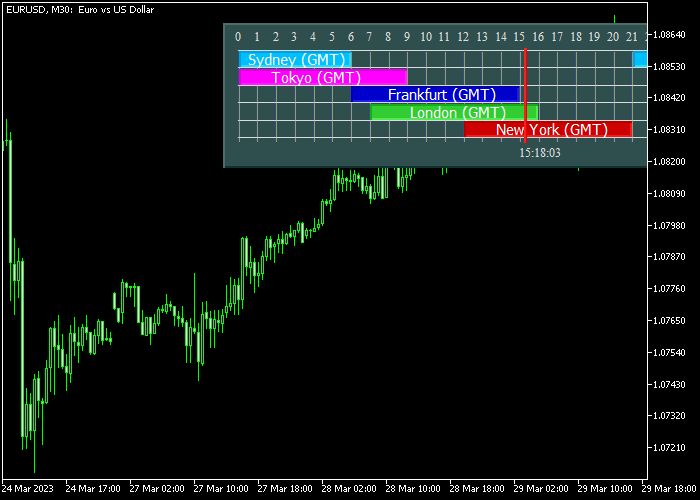
The Forex Market Hours 4.0 indicator displays a session panel on the trading window that highlights the active global trading sessions.
Traders can quickly see when Sydney, Tokyo, London, or New York sessions are open and monitor periods where market activity may increase.
Guide to Trade with Forex Market Hours 4.0 Indicator
Buy Rules
- Monitor the trading sessions displayed by the indicator.
- Focus on periods when major markets such as London or New York are open.
- Look for buy opportunities during strong market activity or session overlaps.
- Confirm entries using your preferred trading strategy or analysis.
Sell Rules
- Watch the session panel to identify active market hours.
- Look for sell setups when volatility increases during major sessions.
- Session overlaps such as London and New York often provide stronger movement.
- Confirm the entry using technical or price action analysis.
Stop Loss
- Place the stop loss below support levels when opening buy trades.
- Place the stop loss above resistance levels when opening sell trades.
- Adjust stop loss distance according to volatility during the active session.
Take Profit
- Close the trade near predefined profit targets.
- Exit the trade when volatility begins slowing after the session peak.
- Follow your overall trading plan when managing exits.
Download Now
Forex_Market_Hours_GMT_v4.0.mq5 Indicator (MT5)
FAQ
Why are forex market hours important for traders?
Market hours influence volatility and liquidity.
When major financial centers are open, trading activity often increases and price movements can become stronger.
Which trading sessions are displayed by the indicator?
The indicator displays the Sydney, Tokyo, Frankfurt, London, and New York trading sessions so traders can easily monitor global market activity.
Does the indicator include economic news events?
Yes. The indicator includes an optional economic calendar feature that can display economic events on the chart when enabled in the settings.
Can traders customize the appearance of the session panel?
Yes. Traders can adjust settings such as panel position, zoom level, and color settings for each trading session.
Summary
The Forex Market Hours 4.0 indicator helps traders track global trading sessions directly within the MT5 platform.
By showing when major financial markets are open, the tool makes it easier to identify periods of higher activity.
Understanding these sessions can improve trade timing because volatility often increases when large financial centers are active.
Traders can focus on periods where market participation is strongest.
With customizable settings and an optional economic calendar feature, this tool provides a practical way to monitor market timing and trading conditions.




