About the Forex Profit Calculator Indicator
The Forex Profit Calculator indicator for MT5 tracks and displays your trading performance directly on the platform.
It calculates account profit or loss in real time and presents the results in a simple on-screen panel.
The indicator summarizes results for several time periods including the current day, previous day, week, month, and year.
This allows traders to quickly review performance without opening the account history tab.
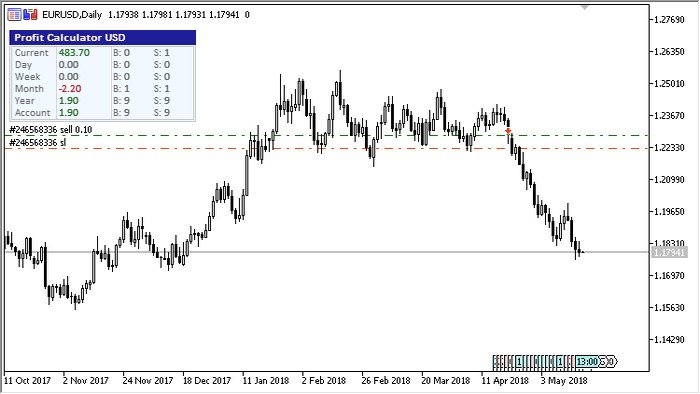
A compact panel appears in the upper left area by default, though traders can move it to any chart corner and adjust its position.
The panel also shows the number of closed trades, giving a quick overview of trading activity.
With customizable colors, panel placement, and week start settings, the indicator fits easily into any trading layout.
It works as a practical tool for traders who want fast access to performance statistics while monitoring the market.
Free Download
ProfitCalculator.mq5 Indicator (MT5)
Key Features
- Displays real-time profit or loss for the current trading day.
- Shows results for the previous day, week, month, and year.
- Counts the total number of closed trading positions.
- Adjustable panel corner and position offset.
- Configurable start day for weekly calculations.
Indicator Chart
The Forex Profit Calculator Indicator appears beneath the main price area and displays a performance panel showing profit statistics for different trading periods.
The panel lists results for daily, weekly, monthly, and yearly activity while also showing the number of closed trades.
This allows traders to monitor account performance in real time while analyzing market opportunities.
Guide to Trade with Forex Profit Calculator Indicator
Buy Rules
- Open a buy trade based on your primary trading strategy or indicator signals.
- Check the Forex Profit Calculator panel to monitor your daily and weekly performance.
- A rising profit value confirms positive trading performance during the session.
- Use the statistics panel to manage risk and avoid excessive trading during losing periods.
Sell Rules
- Open a sell trade when your trading system generates a valid bearish signal.
- Observe the profit statistics panel while managing active positions.
- Use the displayed profit data to evaluate current trading performance.
- Pause trading if the panel shows consistent losses for the day.
Stop Loss
- Place the stop loss according to the rules of your main trading strategy.
- Many traders use the previous swing high or swing low for protection.
- Keep position risk within a fixed percentage of account balance.
- Avoid increasing stop loss distance during losing sessions.
Take Profit
- Close the trade when your strategy produces an opposite market signal.
- Exit positions when the planned risk-to-reward ratio is reached.
- You can also close trades at important support or resistance levels.
- Use the profit panel to review session performance before opening new trades.
Download Now
ProfitCalculator.mq5 Indicator (MT5)
FAQ
What does the Forex Profit Calculator Indicator display?
The indicator shows account profit or loss for several periods including the current day, previous day, week, month, and year.
It also displays the number of closed trades.
Does the indicator affect trading performance?
No. The indicator only analyzes account history and calculates profit statistics.
It does not influence trade execution or modify trading orders.
Summary
The Forex Profit Calculator indicator provides a convenient way to monitor trading results directly on the MT5 platform.
It displays profit data for multiple time periods and shows the total number of closed trades.
The customizable panel placement and color options allow the tool to integrate smoothly with different trading layouts.
Traders can quickly evaluate daily or weekly performance without leaving the chart.
This makes the indicator a practical addition for traders who want constant feedback on account performance while focusing on market analysis and trade management.

