
About the Grid Builder Indicator
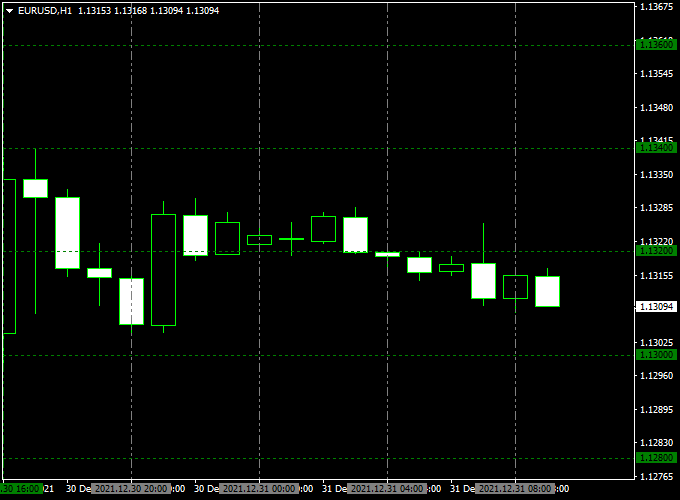
The Grid Builder indicator for MT4 draws a trading grid directly on the main chart, highlighting key round numbers.
These round numbers can act as natural support, resistance, and take-profit targets for your trades.
The indicator is ideal for scalpers and day traders looking for precise entry and exit zones.
It displays the grid and round numbers in a clear side panel, helping traders plan trades more efficiently.
Grid Builder works on any currency pair and timeframe, making it a versatile tool for Forex trading.
Free Download
Download the “grid-builder.mq4” indicator for MT4
Key Features
- Draws a trading grid on the main MT4 chart
- Displays round numbers in the chart sidebar
- Helps identify support, resistance, and take-profit zones
- Works on all timeframes and currency pairs
- Easy to use for both beginners and experienced traders
Indicator Chart
The chart shows the Grid Builder indicator on an MT4 chart.
The grid lines mark key levels, while the round numbers indicate potential targets.
Traders can use these visual cues to plan entries, exits, and take-profit levels.
Guide to Trade with Grid Builder Indicator
Buy Rules
- Enter a buy trade near the lower grid line or round number
- Confirm upward momentum with price action or trend indicators
- Target the next upper round number for take profit
Sell Rules
- Enter a sell trade near the upper grid line or round number
- Confirm downward momentum with price action or trend indicators
- Target the next lower round number for take profit
Stop Loss
- For buy trades, place a stop slightly below the lower grid line
- For sell trades, place a stop slightly above the upper grid line
- Adjust according to volatility and timeframe
Take Profit
- Set take profit at the next round number in the direction of the trade
- Consider partial profits at intermediate grid levels
- Use trailing stops if the price continues in your favor
Practical Tips
- Use the grid and round numbers to plan both entry and exit levels
- Trade in the direction of the main trend for higher accuracy
- Combine with trend indicators or oscillators for confirmation
- Focus on pairs with clear price reactions to round numbers
- Avoid trading when price is moving sideways between grid lines
Grid Builder + XHMaster Formula MT4 Trend Strategy
This MT4 trend strategy combines the Grid Builder Forex Indicator with the XHMaster Formula Indicator.
The Grid Builder highlights round numbers on the chart, helping traders easily identify key psychological support and resistance levels.
The XHMaster Formula Indicator provides a green histogram for buy signals and a red histogram for sell signals.
Combining these indicators helps traders align entries with trend direction and significant price levels.
This strategy works best on 15-minute to 1-hour charts and is suitable for major currency pairs like EUR/USD, GBP/USD, and USD/JPY.
Why this combo works
The Grid Builder shows important round-number levels, which often act as support or resistance.
The XHMaster Formula histogram confirms the trend direction, providing precise buy or sell signals near these key levels.
Together, they increase the probability of entering trades in the direction of the main trend.
Buy Entry Rules
- Price approaches or bounces from a round number highlighted by the Grid Builder.
- XHMaster Formula shows a green histogram (buy signal).
- Enter at the close of the confirming candle.
- Stop loss: set below the recent swing low near the round number.
- Take profit: set at the next round number or 25–50 pips, depending on the timeframe.
Sell Entry Rules
- Price approaches or is rejected from a round number highlighted by the Grid Builder.
- XHMaster Formula shows a red histogram (sell signal).
- Enter at the close of the confirming candle.
- Stop loss: set above the recent swing high near the round number.
- Take profit: set at the next round number or 25–50 pips, depending on the timeframe.
Advantages
- Visualizes key psychological price levels with round numbers.
- Trend confirmation from the XHMaster histogram enhances entry accuracy.
- Suitable for trend-following and swing trades.
- Can be applied to multiple currency pairs and timeframes.
Drawbacks
- False signals may occur during low volatility or sideways markets.
- Requires patience to wait for the proper alignment of signals near round numbers.
- Stop loss and take profit levels may need adjustment depending on volatility.
Example Case Study 1 — EUR/USD, 30-Minute
Timeframe: 30M. Pair: EUR/USD. Session: London open.
Price bounced from a round number, 1.1050, XHMaster shows a green histogram.
Entry: 1.1052. Stop loss: 1.1040 (12 pips). Take profit: 1.1075 (23 pips).
Trade closed successfully.
Example Case Study 2 — GBP/USD, 1-Hour
Timeframe: 1H. Pair: GBP/USD. Session: New York.
Price rejected at round number 1.2720, XHMaster shows a red histogram.
Entry: 1.2718. Stop loss: 1.2730 (12 pips). Take profit: 1.2685 (33 pips).
Trade reached the target.
Strategy Tips
- Focus on trades near round numbers highlighted by the Grid Builder for higher probability setups.
- Trade during active sessions for better liquidity and execution.
- Use proper risk management, adjusting stop loss based on round number spacing.
- Backtest the strategy on different pairs and timeframes to refine entries and targets.
Download Now
Download the “grid-builder.mq4” indicator for Metatrader 4
FAQ
How does Grid Builder help with trading?
It highlights key round numbers and grid levels, making it easier to plan entries, exits, and take-profit points.
Can it be used alone?
Yes. You can trade using the grid and round numbers, though confirming trends improves accuracy.
Does it repaint?
No. Once the grid and numbers are plotted, they remain fixed for reliable trading.
Which strategy works best with it?
It pairs well with trend-following indicators, momentum oscillators, or price action setups.
Summary
The Grid Builder indicator for MT4 provides a visual grid and key round numbers to plan trades efficiently.
It simplifies finding entry, exit, and take-profit levels while highlighting areas where price may react.
Traders can use it alone or combine it with other indicators for higher accuracy.
It is effective for scalping, day trading, and swing trading across all currency pairs.





