About the Indicator Arrows Alert Indicator
The Indicator Arrows Alert Indicator for MT5 is a comprehensive technical tool designed to simplify trend identification by merging data from several classic oscillators and volatility measures.
It functions as a confluence engine, processing inputs from the MACD, RSI, TRIX, and Bollinger Bands to generate a single directional signal.
By filtering out the noise associated with individual indicators, it aims to provide more reliable entry points that reflect a true shift in market momentum.
It is particularly effective for traders who prefer a “clean” trading environment but want the confirmation power of a sophisticated technical stack.
The indicator also provides real-time data on spreads and current settings directly on the screen, allowing for better trade execution during high-volume sessions like London and New York.
Free Download
Indicator_Arrows.mq5 Indicator (MT5)
Key Features
- Integrated multi-indicator logic combines RSI, MACD, OsMA, and TRIX for high-probability signals.
- Visual arrow alerts provide immediate notification of potential bullish or bearish trend reversals.
- Real-time spread display helps traders monitor execution costs on volatile pairs.
- Fully customizable parameters allow for the adjustment of every underlying technical component.
- On-screen dashboard displays active input settings for quick reference during the trading day.
- Optimized for low-spread pairs during major market sessions to improve net profitability.
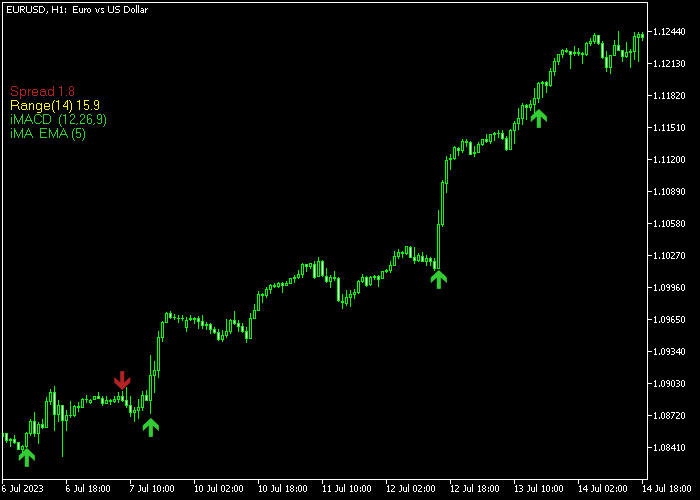
Indicator Chart
The Indicator Arrows Alert Indicator marks the chart with green and red arrows at the specific moment a trend alignment occurs.
A green arrow appears at the start of a bullish phase, while a red arrow marks the beginning of a bearish move.
These signals are positioned near price action to help you time your market entries and exits without manual calculation.
Guide to Trade with the Indicator Arrows Alert Indicator
Buy Rules
- Monitor the price chart for the appearance of a green arrow pointing upward.
- Verify that the signal occurs during a liquid trading session such as London or New York.
- Enter a buy market order at the opening of the candle following the green arrow.
- Confirm that the current spread is within an acceptable range before executing the trade.
Sell Rules
- Watch for a red arrow to appear above the price candles indicating a downward shift.
- Check that the underlying market context supports a bearish move or a trend exhaustion.
- Open a sell market order once the candle featuring the red arrow has closed.
- Avoid taking signals during low-liquidity periods to prevent slippage and false breakouts.
Stop Loss
- For buy positions, place the protective stop loss just below the most recent swing low.
- For sell trades, set the stop loss order above the previous swing high resistance zone.
- Adjust the stop distance based on the specific volatility of the currency pair being traded.
Take Profits
- Exit the trade and reverse the position if an opposing signal arrow appears on the chart.
- Set a fixed profit target based on a predetermined risk-to-reward ratio of 1:2 or higher.
- Close the trade manually if price reaches a major psychological level or historical pivot point.
Download Now
Indicator_Arrows.mq5 Indicator (MT5)
FAQ
Which technical indicators are used to generate the arrows?
The Indicator Arrows Alert Indicator uses a proprietary blend of MACD, RSI, TRIX, OsMA, and Bollinger Bands.
You can adjust the individual settings for each of these components in the MT5 input tab to better fit your specific trading style.
Can I receive alerts on my phone when an arrow appears?
Yes, the indicator supports standard MT5 notifications.
You can enable push notifications or email alerts in the settings to ensure you never miss a signal even when you are away from your trading desk.
Is this indicator suitable for 1-minute scalping?
It can be used on the M1 and M5 timeframes, especially during the London and New York overlaps.
However, it is essential to focus on pairs with the lowest spreads to ensure that the cost of trading doesn’t outweigh the small gains found on fast charts.
Does the indicator display the spread in real-time?
Yes, the indicator includes a built-in spread monitor on the left side of the screen.
This is a vital feature for traders who need to know if the market conditions are favorable for a tight entry.
Summary
The Indicator Arrows Alert Indicator is a versatile tool for those who want to leverage the power of multiple technical indicators while maintaining a clean and focused workspace.
By synthesizing data from RSI, MACD, and other core tools, it offers a balanced perspective on market momentum.
Its strength lies in its ability to provide a filtered view of the trend, making it an excellent choice for traders who value simplicity and session-specific strategies.




