About the Karpenko Cloud Indicator
The Karpenko Cloud Indicator for MT5 is a trend-following tool that visually represents market direction through colored clouds on the main chart.
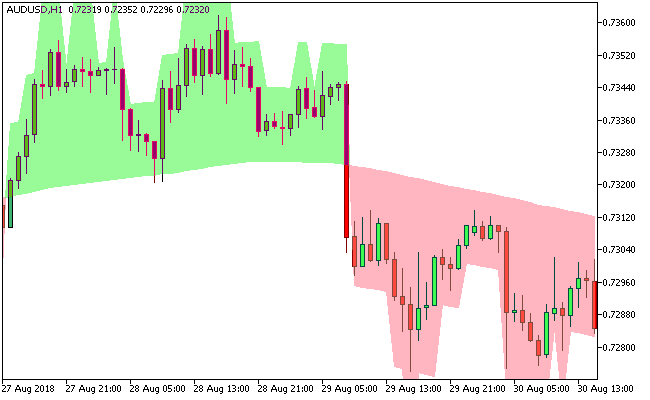
Pale green clouds indicate bullish conditions, while light pink clouds highlight bearish trends.
This simple visual system allows traders to quickly assess the market and make informed trading decisions.
The indicator relies on two input parameters: a basic moving average period and a history length, which together determine the cloud formation and sensitivity.
Non-repainting and fully reliable, the Karpenko Cloud Indicator identifies recurring market patterns, making it effective as a standalone tool for trend identification.
Its design is particularly effective in trending markets, helping traders capture sustained movements while avoiding false signals in sideways conditions.
Free Download
Key Features
- Displays colored clouds to indicate market trends: pale green for bullish, light pink for bearish.
- Two adjustable inputs: moving average period and history length.
- Non-repainting for consistent signals.
- Highlights repetitive market patterns and trend continuation.
- Suitable for all currency pairs and multiple timeframes.
- Effective for both short-term trades and long-term trending strategies.
Indicator Chart
The Karpenko Cloud Indicator overlays colored clouds directly on the main chart.
Pale green clouds signal buying opportunities, while light pink clouds signal selling opportunities.
The chart demonstrates how traders can use cloud transitions to enter and exit trades according to prevailing trends.

Guide to Trade with Karpenko Cloud Indicator
Buy Rules
- Open a buy trade when the cloud turns pale green.
- Confirm that the price action supports a bullish trend.
- Check alignment with overall market direction if desired.
- Enter the trade once conditions are confirmed.
Sell Rules
- Open a sell trade when the cloud turns light pink.
- Confirm that the price action supports a bearish trend.
- Check alignment with overall market direction if desired.
- Enter the trade once conditions are confirmed.
Stop Loss
- Place stop losses below the cloud for buy trades.
- Place stop losses above the cloud for sell trades.
- Optionally use recent swing lows or highs for additional protection.
- Adjust based on market volatility and timeframe.
Take Profit
- Close buy trades if the cloud turns light pink or momentum weakens.
- Close sell trades if the cloud turns pale green or momentum weakens.
- Optionally target previous swing highs for buys and swing lows for sells.
Download Now
FAQ
How does the Karpenko Cloud Indicator signal trends?
Pale green clouds indicate bullish trends and buying opportunities, while light pink clouds indicate bearish trends and selling opportunities.
Cloud color changes guide entry and exit decisions.
Does the Karpenko Cloud Indicator repaint?
No. Once clouds are plotted, they remain fixed, providing reliable guidance.
Is the indicator suitable for trending markets?
Yes. It is ideal for identifying and following sustained trends, but can also provide insight during range-bound periods.
Summary
The Karpenko Cloud Indicator visualizes market trends with colored clouds, making it simple to identify bullish and bearish conditions.
Its intuitive design helps traders spot trend continuation and potential reversals across multiple timeframes.
Perfect for trending markets, the indicator works on all currency pairs and trading styles.
Using cloud signals alongside well-placed stop losses, take profit levels, and trend confirmation can enhance trade accuracy and support effective risk management.




