About the Linear Weighted Moving Average (LWMA) Indicator
The Linear Weighted Moving Average (LWMA) Indicator for MetaTrader 5 is a trend tool that gives the highest weight to the most recent prices.
It reacts faster to new market moves than simple and exponential moving averages and is therefore popular with intraday traders.
Common LWMA periods include 200, 50, 20, 8, and 5, which cover swing and scalping styles.
A candlestick close above the LWMA is usually treated as bullish, while a close below the LWMA is treated as bearish.
It is particularly useful for scalpers and day traders who want early trend changes and quick bias confirmation.
The main inputs are the LWMA period and the price type.
Free Download
Key Features
- Places more weight on recent price data for a faster reaction to new market moves.
- Responds quicker than simple and exponential moving averages on the same period.
- Commonly used periods include 200, 50, 20, 8, and 5 for different trading styles.
- Best suited for scalpers and day traders who prefer fast trend signals.
Indicator Chart
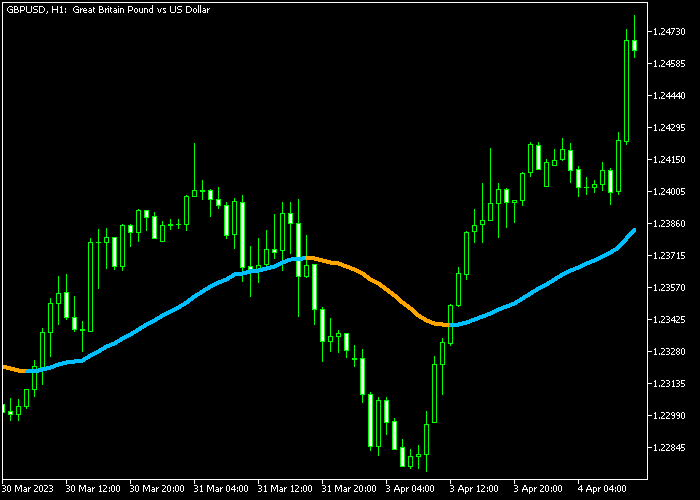
On the chart, the Linear Weighted Moving Average Indicator appears as a colored line plotted directly on the main price window.
The line often uses blue for bullish conditions and orange for bearish conditions to make trend direction easier to see.
When price trades above the rising LWMA line, you focus on buy setups, and when price trades below a falling LWMA line, you look for sells.

Guide to Trade with the LWMA Indicator
Buy Rules
- Wait for the blue LWMA signal line to appear on the price chart.
- Check that recent candles show higher lows and that the LWMA is pointing upward.
- Open a buy trade once a bullish candle closes above the line with enough room to the next resistance.
Sell Rules
- Wait for the orange LWMA signal line to appear on the price chart.
- Confirm that recent candles show lower highs and that the LWMA is sloping downward.
- Open a sell trade after a bearish candle closes below the line with room to the next support.
Stop Loss
- For buy trades, place the stop loss about 3 pips below the previous swing low.
- For sell trades, set the stop loss about 3 pips above the previous swing high.
- Avoid placing stops directly on the LWMA line, as minor pullbacks can tap the line before trend continuation.
Take Profit
- For buys, you can close at a predefined level or wait until a valid sell signal appears.
- For sells, you can exit at your target or wait until a new buy signal shows on the LWMA.
- Scaling out part of the position at key levels while letting a small portion run can help capture stronger trends.
Download Now
FAQ
Why do traders prefer the LWMA over a simple moving average?
Traders who want faster signals often prefer the LWMA because it gives more weight to recent prices.
What LWMA period works best for day trading?
Many day traders use shorter LWMA periods such as 20, 8, or 5 to track intraday swings.
These settings react quickly to new moves while still smoothing minor noise.
Can I combine the LWMA with other indicators?
Yes, the LWMA works well with tools like support and resistance, oscillators, or higher timeframe trend filters.
For example, you can trade LWMA signals only in the direction of a higher timeframe moving average.
Summary
The Linear Weighted Moving Average Indicator is a fast moving average that highlights recent price action more than older data.
It is ideal for scalpers and day traders who need quick trend information on many instruments.
Simple rules based on price closing above or below the LWMA keep entries and exits easy to follow.
Combined with support, resistance, and basic price action, it can become a solid trend filter in a short term trading strategy.




