
About the Local Time with Spread Forex Indicator
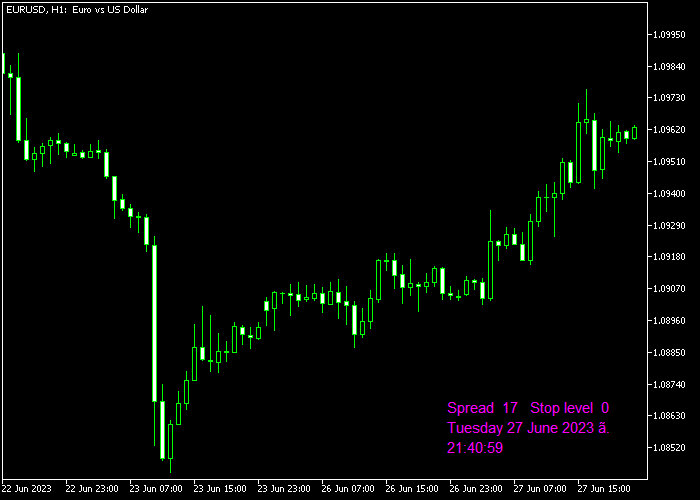
The Local Time with Spread Forex Indicator for MT5 displays your computer’s local time and the current spread directly on the trading window.
It helps traders stay aware of execution costs and session timing without switching between platforms or panels.
The indicator updates in real time, allowing you to monitor spread fluctuations during volatile market conditions.
This is especially important during news releases, session opens, and low liquidity periods.
You can customize the local time display, adjust the spread color, and configure the stop level parameter.
These options allow better visual alignment with your chart template and personal preferences.
Free Download
Key Features
- Displays real-time local computer time on the trading window.
- Shows live spread values for the active currency pair.
- Customizable spread color for better visibility.
- Adjustable stop level parameter.
- Helps monitor trading costs during volatile sessions.
- Works on all currency pairs and timeframes.
Indicator Chart
The Local Time with Spread Forex Indicator appears directly on the main price area, showing the current local time and the active spread value.
The spread updates tick by tick, allowing traders to see when transaction costs expand or contract.
This helps with timing entries during high liquidity periods and avoiding expensive execution during unstable conditions.
Guide to Trade with Local Time with Spread Forex Indicator
Buy Rules
- Wait for the spread to remain stable and within acceptable limits.
- Confirm the market is active during your preferred trading session.
- Open a buy position based on your primary trading strategy.
- Avoid entering trades when the spread suddenly widens.
Sell Rules
- Check that the spread is not expanding beyond normal levels.
- Confirm sufficient market liquidity during your session.
- Open a sell position according to your strategy rules.
- Avoid selling during abnormal spread spikes.
Stop Loss
- Place stop loss levels according to your technical setup.
- Factor in the current spread when calculating risk.
- Avoid tight stops during high spread conditions.
Take Profit
- Close the trade if spread conditions become unfavorable.
- Exit when your strategy gives a confirmed opposite signal.
- Target logical resistance or support levels.
- Maintain a minimum 1:1 risk-to-reward ratio.
Download Now
FAQ
Why is monitoring the spread important?
The spread represents the cost of entering a trade.
Wider spreads increase transaction costs and can reduce profitability, especially for scalpers and intraday traders.
Can I change how the spread value looks?
Yes, the spread color can be customized in the input settings.
This allows better visibility depending on your chart background.
What does the stop level parameter control?
The stop level setting allows you to define broker-related minimum distance requirements.
This helps you understand execution limitations before placing orders.
Is this indicator a trading system?
No, it does not generate buy or sell signals. It is a supportive tool that improves timing, cost awareness, and execution management.
Summary
The Local Time with Spread Forex Indicator is a practical execution support tool. It keeps local time and live spread data visible at all times.
Displaying real-time spread conditions directly on the trading window helps currency traders avoid entering positions during expensive market phases.
This is particularly useful during news events, session transitions, and low liquidity hours.
The customizable inputs allow you to adapt the display to your trading environment.
While it does not generate direct buy or sell signals, it strengthens trade timing and risk control.




