
About the Multi Forex Pair Pivot Point Scanner
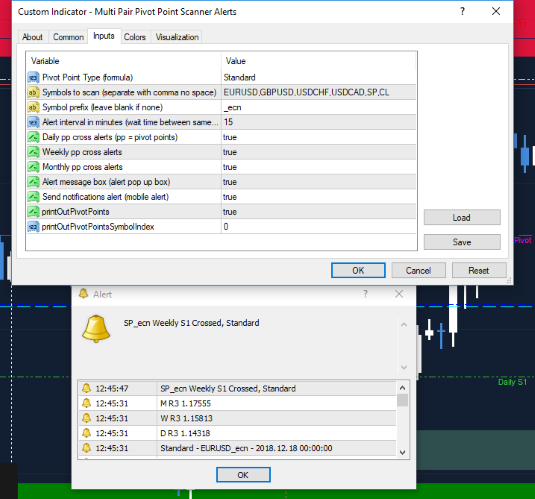
The Multi Forex Pair Pivot Point Scanner Metatrader 4 forex indicator is designed to monitor multiple currency pairs and alert traders when price crosses key pivot point levels.
It helps traders stay aware of potential bullish or bearish conditions without manually checking each chart.
The scanner supports daily, weekly, and monthly pivot points, allowing traders to align short-term price movement with higher-timeframe reference levels.
It works across multiple forex pairs at the same time, making it practical for traders who follow several markets.
Different pivot point calculation methods are included, giving users flexibility based on their preferred trading approach.
Alerts can be enabled or disabled, allowing traders to control how and when notifications are received.
Free Download
Download the “Multi Pair Pivot Point Scanner Alerts.mq4” MT4 indicator
Key Features
- Scans multiple forex pairs automatically.
- Supports daily, weekly, and monthly pivot points.
- Multiple pivot calculation types available.
- On-screen alert notifications.
- Helps identify bullish and bearish price positioning.
Indicator Chart
The chart displays price action relative to pivot point levels calculated by the scanner.
When price moves above or below a pivot point, the indicator highlights the shift, helping traders focus on pairs showing directional potential.
Guide to Trade with Multi Forex Pair Pivot Point Scanner
Buy Rules
- Monitor the scanner for price trading above the pivot point.
- Confirm bullish market behavior using additional chart analysis.
- Enter a buy trade once price holds above the pivot level.
- Focus on pairs showing consistent strength above the pivot.
Sell Rules
- Watch for price trading below the pivot point.
- Confirm bearish market conditions through price behavior.
- Enter a sell trade once price remains below the pivot level.
- Prioritize pairs showing sustained weakness below the pivot.
Stop Loss
- Place the stop loss just beyond the pivot point used for entry.
- For buy trades, set the stop slightly below the pivot level.
- For sell trades, set the stop slightly above the pivot level.
- Move the stop only after price establishes a new pivot bias.
Take Profit
- Target the next pivot-related level on the chart.
- Use previous highs or lows as profit targets.
- Scale out of positions near key reaction zones.
- Exit the trade if price returns to the pivot point.
MT4 Multi Forex Pair Pivot Point Scanner + Golden Super K Forex Trend Strategy
This strategy combines the Multi Forex Pair Pivot Point Scanner MT4 Forex Indicator with the Golden Super K Forex Trend MT4 Indicator.
The Pivot Point Scanner sends alerts when a currency pair crosses above or below key pivot points, which can be daily, weekly, or monthly.
Traders can choose between Standard, Fibonacci, Woodie, or Camarilla pivot types.
The Golden Super K confirms trend direction with a blue line for bullish trends and an orange line for bearish trends.
This combination allows traders to enter trades aligned with both pivot support/resistance and overall trend, making it suitable for intraday and swing trading.
The strategy works best on M15, H1, and H4 charts and is ideal for active traders looking for precise entries and clear trend confirmation.
Buy Entry Rules
- The Golden Super K line must be blue, indicating a bullish trend.
- The Pivot Point Scanner alerts that the price has crossed above a pivot point (daily, weekly, or monthly).
- Enter long at the open of the next candle after the pivot point alert, while the Golden Super K line remains blue.
- Place stop loss below the nearest pivot support level or recent swing low.
- Set take profit at 1.5 to 2 times the stop-loss distance or exit if Golden Super K turns orange or price crosses below a pivot point.
Sell Entry Rules
- Golden Super K line must be orange, indicating a bearish trend.
- The Pivot Point Scanner alerts that the price has crossed below a pivot point.
- Enter short at the open of the next candle after the pivot point alert, while the Golden Super K line remains orange.
- Place stop loss above the nearest pivot resistance level or recent swing high.
- Set take profit at 1.5 to 2 times the stop-loss distance or exit if Golden Super K turns blue or price crosses above a pivot point.
Advantages
- Combines pivot point support/resistance with trend confirmation for higher probability trades.
- Alerts reduce the need for constant chart monitoring and help capture key market moves.
- Works on multiple timeframes, allowing flexibility for intraday and swing trading.
- Simple visual signals from Golden Super K and pivot alerts make it beginner-friendly.
- Supports multiple pivot point types for different trading styles and preferences.
Drawbacks
- Pivot alerts can produce false signals in low-volatility or sideways markets.
- Golden Super K may lag slightly during sudden trend reversals, causing delayed entries.
- Requires monitoring across multiple pairs if using the scanner to capture opportunities.
Case Study 1
On EURUSD H1 during the London session, the Golden Super K line was blue, indicating a bullish trend.
The Pivot Point Scanner alerted that the price crossed above the daily pivot point (Standard type).
The trader entered long at the next candle with a stop loss of 12 pips below the daily pivot and a take profit of 24 pips above.
Over the next 2 hours, the price moved steadily upwards, hitting the take profit.
The trend line remained blue, and no bearish pivot alert appeared, resulting in a successful trade.
Case Study 2
On AUDJPY H4, the Golden Super K line was orange, showing a bearish trend.
The Pivot Point Scanner alerted that the price crossed below the weekly pivot (Fibonacci type).
The trader entered short at the next candle with a stop loss of 18 pips above the pivot and a take profit of 36 pips below.
Price fell steadily over several hours and reached the take profit.
The trend line remained orange, confirming the bearish trend and validating the setup.
Strategy Tips
- Use higher timeframes like H1 or H4 to capture stronger trend moves and avoid noise from smaller candles.
- Combine pivot points with multiple timeframes for confirmation to increase the probability of success.
- Avoid trading around major news releases to prevent sudden spikes from hitting stop losses.
- Always confirm pivot alerts with the trend direction indicated by Golden Super K before entering trades.
- Backtest on different pivot types (Standard, Fibonacci, Woodie, Camarilla) to find the best fit for your trading style.
- Use proper position sizing based on account risk to manage multiple trades when scanning several currency pairs simultaneously.
Download Now
Download the “Multi Pair Pivot Point Scanner Alerts.mq4” Metatrader 4 indicator
FAQ
Which pivot point types are supported?
The indicator supports Standard, Fibonacci, Woodie, and Camarilla pivot point calculations.
Does the scanner work on all currency pairs?
Yes. It can scan multiple forex pairs simultaneously.
Can alerts be turned off?
Yes. Alert notifications can be enabled or disabled from the indicator settings.
Is the scanner suitable for higher-timeframe trading?
Yes. Weekly and monthly pivot points are useful for broader market analysis and trade planning.
Summary
The Multi Forex Pair Pivot Point Scanner MT4 indicator simplifies market monitoring by tracking pivot point interactions across multiple currency pairs.
It highlights bullish and bearish price positioning relative to key levels without constant chart switching.
With support for multiple pivot calculation methods and flexible alert options, the indicator is a helpful tool for traders who rely on pivot-based market analysis.


