About the Notify Time Alert Indicator
The Notify Time Alert indicator for MT5 is a simple but useful utility tool that allows traders to receive alerts at specific times during the trading session.
Instead of constantly watching the clock or waiting for certain market sessions, the indicator automatically sends notifications when the configured time conditions are reached.
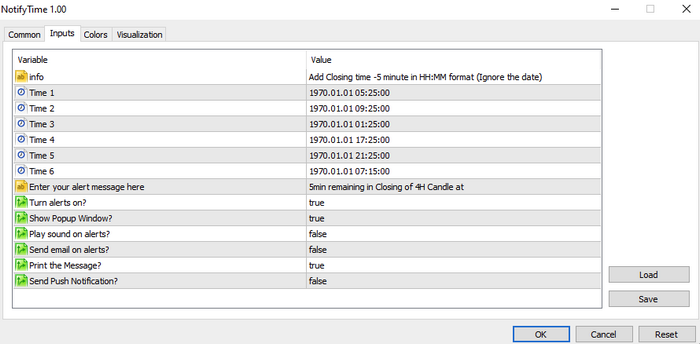
Traders can configure multiple alerts directly in the indicator inputs tab.
The tool allows up to six different time alerts, making it convenient for tracking session openings, economic events, or specific trading periods.
Once the defined time is reached, the indicator can notify the trader using several alert methods.
These include pop-up messages, sound alerts, email notifications, printed messages in the platform log, and mobile push notifications.
Free Download
NotifyTime.mq5 Indicator (MT5)
Key Features
- Allows traders to set up multiple time-based alerts.
- Supports up to six different alert schedules.
- Alerts can be delivered in five different ways.
- Pop-up notifications appear directly on the trading platform.
- Sound alerts notify traders immediately when the time is reached.
- Email alerts can be sent for remote monitoring.
- Push notifications can be delivered to mobile devices.
- Each alert method can be turned on or off individually.
Indicator Chart
The Notify Time Alert indicator runs on the chart and monitors the platform time according to the configured settings.
In the example, the tool prepares notifications when predefined times are reached, allowing traders to stay aware of important trading moments or session changes.
Guide to Trade with Notify Time Alert Indicator
Buy Rules
- Set a time alert for the start of a preferred trading session.
- Wait for the indicator to trigger the alert at the specified time.
- Check the market conditions and confirm a bullish trading setup.
- Open a buy trade if the market shows upward momentum after the alert.
Sell Rules
- Configure a time alert before a known volatile market period.
- Wait for the indicator notification when the selected time arrives.
- Analyze the chart for signs of bearish market pressure.
- Open a sell trade if price begins moving lower after the alert.
Stop Loss
- Define the stop loss level before entering the trade.
- Avoid placing the stop too close to the entry price during volatile periods.
Take Profit
- Close the trade once price reaches the next support or resistance zone.
- Use a predefined risk-to-reward ratio for consistent trade management.
- Exit the trade if the market moves sideways after the alert event.
Download Now
NotifyTime.mq5 Indicator (MT5)
FAQ
How many alerts can be configured in the indicator?
The indicator allows traders to configure up to six different time alerts directly from the inputs tab.
Can the alert methods be disabled?
Yes. Each notification type can be turned on or off individually depending on the trader’s preference.
Summary
The Notify Time Alert indicator is a practical utility for traders who want reminders during specific moments of the trading day.
By setting multiple time alerts, traders can stay prepared for important market events or session openings.
The indicator offers several notification methods, including pop-ups, sound alerts, emails, and push notifications.
This flexibility allows traders to receive alerts even when they are away from the trading platform.
When combined with a trading strategy, the tool can help traders stay disciplined and ready to react when their planned trading time arrives.





