

About the Premium FX Scalper Indicator
The Premium FX Scalper Indicator for MT4 is a signal-based trading tool designed for scalpers and active day traders.
It focuses on short-term price movement and momentum to highlight timely trade opportunities throughout the trading session.
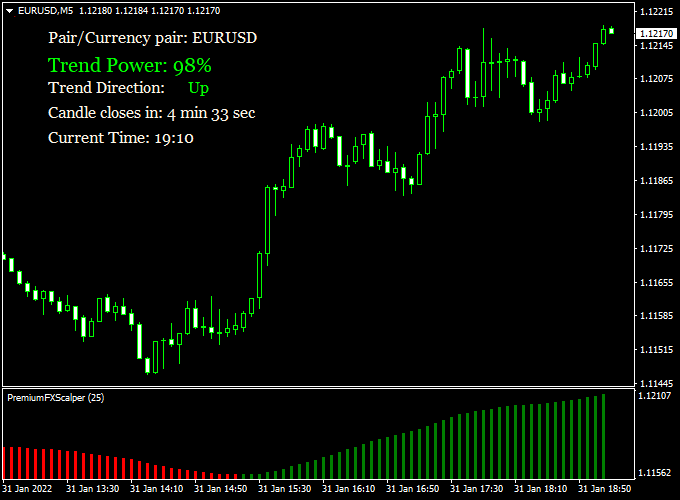
The indicator operates in a separate MT4 sub-window, where it displays colored histogram bars that represent buying and selling pressure.
Alongside the signals, it also provides supporting market data such as trend power, overall trend direction, candle close status, and current time.
This combination helps traders stay aligned with short-term momentum while remaining aware of broader market conditions.
Premium FX Scalper is lightweight and responsive, making it suitable for fast-paced trading environments.
It can be used as a standalone signal generator or as a confirmation tool within a larger trading strategy.
The indicator performs well across major currency pairs and commonly traded intraday time frames.
Free Download
Download the “PremiumFXScalper.ex4” indicator for MT4
Key Features
- Generates buy and sell signals using colored histogram bars.
- Displays trend power and short-term market direction.
- Operates in a separate chart window for focused analysis.
- Includes candle close and current time information.
- Suitable for scalping and intraday trading styles.
Indicator Chart
The Premium FX Scalper Indicator is displayed in a lower chart window as a series of colored histogram bars.
The chart shows green bars during bullish momentum and red bars during bearish momentum.
These signals help traders quickly identify short-term directional shifts and potential entry or exit points.
Guide to Trade with the Premium FX Scalper Indicator
Buy Rules
- Wait for the first green histogram bar to appear in the indicator window.
- Confirm that trend direction and trend power support upward momentum.
- Prefer entries during active trading sessions with sufficient volatility.
Sell Rules
- Wait for the first red histogram bar to appear in the indicator window.
- Confirm that trend direction and trend power support downward momentum.
- Avoid entries when histogram bars are small or inconsistent.
Stop Loss
- Place the stop loss beyond the most recent swing high or swing low.
- Keep stop distance aligned with short-term volatility.
- Ensure risk per trade remains consistent across all positions.
Take Profit
- Target nearby intraday support or resistance levels.
- Use modest profit targets suitable for scalping conditions.
- Consider closing part of the position when momentum starts to weaken.
Premium FX Scalper + ZWinner Trend Forex Day Trading Strategy
This MT4 strategy combines the Premium FX Scalper Indicator with the ZWinner Trend Forex Indicator to deliver high-precision day trading signals.
The combination focuses on early market momentum shifts while filtering out weak trades.
It’s ideal for traders who prefer short-term opportunities with clear visual confirmations.
The Premium FX Scalper identifies short bursts of volatility with histogram bars that react quickly to momentum changes.
The ZWinner Trend indicator complements it by confirming the dominant market direction with smooth histogram color transitions.
When both indicators align, the entry signals are strong and reliable, allowing traders to capture consistent intraday profits.
This method works well on the M15, M30, and H1 timeframes.
It’s suitable for both beginners and experienced day traders who want to trade actively but avoid unnecessary noise.
The system offers clear entries, simple risk control, and logical trade exits based on color-based trend confirmation.
Buy Entry Rules
- Wait for the first green histogram bar to appear on the Premium FX Scalper Indicator.
- Confirm that the ZWinner Trend Indicator also shows a green histogram, signaling a bullish trend.
- Enter a buy position at the close of the confirming candle.
- Place a stop loss below the most recent swing low or 25 pips below entry, whichever is smaller.
- Take profit at the next resistance zone or aim for 40–60 pips, depending on volatility.
Sell Entry Rules
- Wait for the first red histogram bar to appear on the Premium FX Scalper Indicator.
- Confirm that the ZWinner Trend Indicator also displays a red histogram, confirming a bearish trend.
- Enter a sell position at the close of the confirming candle.
- Place a stop loss above the most recent swing high or 25 pips above the entry, whichever is smaller.
- Take profit at the next support zone or aim for 40–60 pips, depending on market conditions.
Advantages
- Easy-to-read histogram signals that minimize confusion.
- Strong directional confirmation from two independent momentum tools.
- Highly effective for day traders seeking 1–3 setups per session.
- Works across all major forex pairs and even gold or indices.
- Helps avoid overtrading by filtering out weak counter-trend moves.
Drawbacks
- Signals may appear late during sudden news spikes.
- Sideways markets can cause false signals or small stop-outs.
- Not suitable for long-term trading or holding overnight positions.
Example Case Study 1
On EUR/USD M30, the Premium FX Scalper printed the first green histogram bar around 09:30 GMT.
The ZWinner Trend Indicator also confirmed a green histogram at the same candle close.
A buy position was opened at 1.0675 with a stop loss at 1.0650 and a take profit target of 1.0725.
The trade reached its target within 4 hours, producing a +50 pip gain as both indicators maintained green momentum through the morning session.
Example Case Study 2
On GBP/USD H1, the ZWinner Trend turned red while the Premium FX Scalper also printed its first red bar at 14:00 GMT.
A sell entry was triggered at 1.2420 with a stop loss at 1.2445 and a take profit at 1.2370.
The pair dropped steadily during the next three hours, hitting the take profit level for a +50 pip win.
The trend remained red, confirming the power of aligning both signals for momentum-based trades.
Strategy Tips
- Trade only during active sessions, such as London and New York, for stronger price movements.
- Avoid taking trades within 15 minutes before or after major economic news releases.
- Use a trailing stop once your trade moves +30 pips in profit to protect gains.
- Backtest the strategy for at least two weeks to learn how both indicators behave together on your chosen pairs.
Download Now
Download the “PremiumFXScalper.ex4” indicator for Metatrader 4
FAQ
Is Premium FX Scalper better suited for scalping or day trading?
The indicator performs well for both styles.
Lower time frames favor scalping, while higher intraday charts suit day trading setups.
Does the indicator repaint past histogram bars?
No, signals remain fixed after the candle closes.
This allows traders to review signal behavior accurately.
Can the indicator be used as a trend filter?
Yes, many traders use the histogram direction to confirm short-term trend bias.
This helps filter lower-quality setups.
Which sessions work best with this indicator?
The London and New York sessions typically provide the best conditions.
Higher liquidity improves signal responsiveness.
Summary
The Premium FX Scalper Indicator for MT4 offers an efficient way to trade short-term market momentum.
Its histogram-based signals simplify decision-making in fast-moving conditions.
The additional trend and timing data add context without overcrowding the chart.
This makes the indicator practical for active traders who value speed and clarity.
While discipline and risk control remain essential, Premium FX Scalper provides a solid framework for intraday trading.
Used correctly, it can enhance timing, consistency, and overall trading confidence.





