About the Price Alert Indicator
The Price Alert Indicator for MT4 is a fundamental utility for traders who need to monitor specific market levels without being glued to their screens all day.
This indicator functions by tracking real-time bid and ask prices against your predefined levels.
When the price touches or crosses these markers, the system can trigger sound alerts, pop-up windows, or mobile push notifications.
It is a reliable utility that enhances the standard functionality of the MT4 platform for any serious trader.
Free Download
Download the “price-alert.mq4” MT4 indicator
Key Features
- Enables the setting of multiple custom price alerts directly on the activity chart.
- Supports various notification methods including audio sounds and visual pop-up alerts.
- Allows for the monitoring of key support and resistance levels across all currency pairs.
- Features a user-friendly interface for quick level adjustments and alert resets.
Indicator Chart
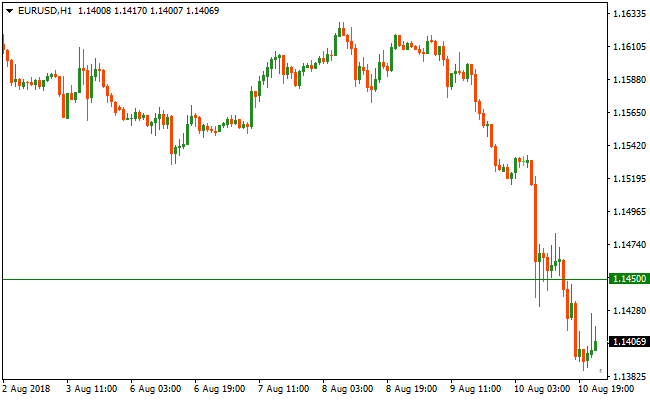
The chart shows the Price Alert Indicator tracking horizontal price levels that act as triggers for market entries.
When the price interacts with these lines, the indicator sends a notification to the trader.
This allows for precise timing when price reaches a psychological round number or a historical pivot point.
Guide to Trade with Price Alert Indicator
Buy Rules
- Identify a significant resistance level or a previous high on the activity chart.
- Set the Price Alert Indicator slightly above this level to catch the breakout.
- Wait for the notification to trigger indicating that the price has breached the zone.
- Initiate a long position once the breakout is confirmed by a bullish candle close.
Sell Rules
- Locate a critical support zone or a recent swing low on the price chart.
- Position a price alert just below this level to signal a potential breakdown.
- Analyze the market momentum immediately after the alert sounds to confirm the move.
- Execute the short trade if the price continues to trade below the broken support.
Stop Loss
- For buy trades, place the stop loss below the support level that was just broken.
- For sell trades, position the stop loss above the resistance level that failed to hold.
- Use the alert levels as a guide to determine where the market structure has shifted.
Take Profit
- Set an additional price alert near your target level to notify you of a potential exit.
- Aim for the next major technical barrier identified on a higher timeframe chart.
- Consider closing a portion of the trade when the first alert is triggered.
Price Alert and Super Arrow Indicator Forex Scalping Strategy for MT4
This MT4 scalping strategy uses the Price Alert Forex Indicator together with the Super Arrow Forex Signal Indicator to create a rule‑based entry and exit system.
The Price Alert indicator lets you set key price levels and receive alerts when price reaches them, helping you prepare ahead of time.
The Super Arrow Indicator then gives clear buy and sell signals with colored arrows to time your actual entry.
This strategy works well on M1, M5, and M15 charts, especially on major and liquid currency pairs.
It is designed for scalpers who want to plan their trades based on specific price levels and then confirm entries with precise signals.
This method helps you avoid random entries and instead focus on moments when price hits levels that matter and then confirms direction with signal arrows.
Buy Entry Rules
- Set a Price Alert level at a key support area or pending breakout level.
- Wait for price to trigger the alert by rising above your specified level.
- After the alert, wait for the Super Arrow Indicator to print a green arrow.
- Enter a buy trade at the close of the candle with the green arrow.
- Place the stop loss below the nearest support or below the alert level.
- Exit the trade when a red arrow appears.
Sell Entry Rules
- Set a Price Alert level at a key resistance area or pending breakdown level.
- Wait for price to trigger the alert by falling below your specified level.
- After the alert, wait for the Super Arrow Indicator to print a red arrow.
- Enter a sell trade at the close of the candle with the red arrow.
- Place the stop loss above the nearest resistance or above the alert level.
- Exit the trade when a green arrow appears.
Advantages
- Provides clear target levels to prepare for potential trades.
- Signal arrows help confirm momentum before entering.
- Avoids random entries by waiting for both alert and confirmation.
- Easy to use on multiple time frames.
- Suitable for both scalping and quick intraday setups.
Drawbacks
- It may generate fewer signals if the price rarely reaches the defined alert levels.
- Requires discipline to set meaningful price levels ahead of time.
- Signal arrows may lag slightly after price moves quickly.
- Not ideal if price moves erratically without clear levels.
- Needs continuous monitoring if alerts are set far from current price.
Case Study 1
On EURCHF M5, a price alert was set slightly above a minor resistance level expecting a breakout.
Price rose and triggered the alert, signaling readiness for a potential move.
Shortly after, the Super Arrow Forex Signal Indicator printed a green arrow.
A buy position was entered at the close of the arrow candle with a stop loss placed just below the breakout level.
Price continued upward with strong momentum and the trade was exited when a red arrow appeared, capturing approximately 27 pips.
Case Study 2
On USDJPY M1 during the London session, a price alert was placed just below a recent support area to catch a potential breakdown.
Price dropped and hit the alert level before the Super Arrow printed a red arrow confirming bearish momentum.
A sell trade was entered with a stop loss set above the support‑turned‑resistance level.
Price moved lower rapidly and the position was closed when the next green arrow appeared, securing around 18 pips.
Strategy Tips
- Choose key levels based on recent highs and lows rather than arbitrary price points.
- Combine price alerts with broader trend direction for higher probability trades.
- Avoid setting alerts too close to the current price to reduce noise triggers.
- Use alerts during high‑liquidity sessions to improve follow‑through after breakout or breakdown.
- Always wait for signal confirmation before entering, even after the alert sounds.
- Monitor spread and execution latency on lower time frames to protect scalping profits.
- Adjust alert levels based on dynamic support and resistance changes throughout the session.
- Review past alerts and outcomes to refine where you place alert levels over time.
Download Now
Download the “price-alert.mq4” Metatrader 4 indicator
FAQ
Can I receive alerts on my mobile phone while away from the computer?
Yes, the Price Alert Indicator can be configured to send push notifications to your mobile device.
To do this, you must enable notifications in your MT4 terminal settings and link them to your MetaQuotes ID.
Does this tool allow for alerts based on trendlines or only horizontal levels?
This specific version of the Price Alert Indicator is optimized for horizontal price levels, which are the most common triggers for support and resistance trading.
Summary
The Price Alert Indicator is an essential utility for anyone looking to optimize their time and improve their trade execution.
By automating the monitoring of key levels, it allows you to focus on high-level strategy rather than constant chart watching.
Its primary benefit is the peace of mind it provides, knowing that you will be notified the instant a trading setup becomes active.
To maximize the utility of this tool, use it to mark out institutional levels and major daily pivots.





