
About the QQE of Velocity MTF Indicator
The QQE of Velocity MTF indicator for MT5 combines the Quantitative Qualitative Estimation (QQE) with velocity analysis to generate accurate buy and sell signals.
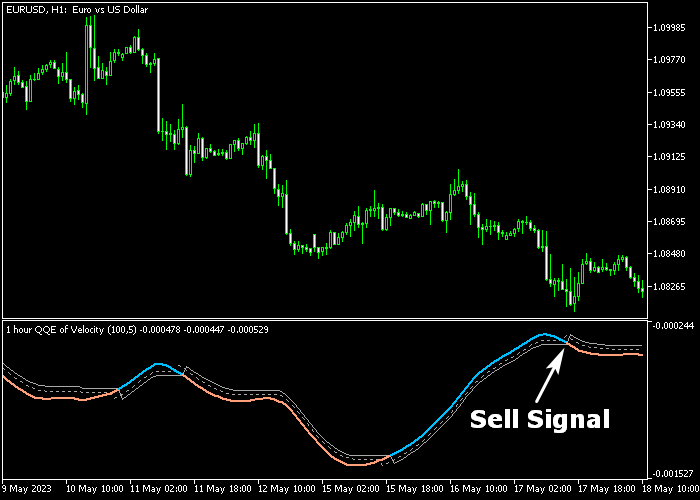
It plots an alternating colored line in a separate window beneath the main chart, making trend detection simple and visual.
A blue line indicates bullish momentum, while a brown line signals bearish conditions.
The indicator never repaints, ensuring traders can rely on the signals for entry and exit decisions.
Settings such as velocity period, timeframe, smoothing factor, fast and slow periods, applied price, and interpolate can be adjusted.
This flexibility allows traders to optimize the indicator for different currency pairs, market conditions, and trading styles.
Free Download
QQE of velocity – mtf.mq5 Indicator (MT5)
Key Features
- Displays a non-repainting colored line for trend signals.
- Blue line signals bullish trends; brown line signals bearish trends.
- Combines QQE and velocity for enhanced signal accuracy.
- Customizable velocity period, smoothing factor, and fast/slow periods.
- Adjustable timeframe, applied price, and interpolation method.
- Works with Forex, indices, commodities, and cryptocurrencies.
Indicator Chart
The QQE of Velocity MTF indicator appears in a separate chart panel beneath the main price area.
The line alternates colors: blue for bullish momentum and brown for bearish momentum.
Traders can monitor these color changes to determine market trend direction, identify entry points, and anticipate potential reversals efficiently.
Guide to Trade with QQE of Velocity MTF Indicator
Buy Rules
- Wait for the QQE Velocity line to turn blue.
- Open a buy trade once the bullish line is confirmed.
- Monitor price action for alignment with trend momentum.
- Use additional confirmation tools if desired for higher confidence.
Sell Rules
- Wait for the QQE Velocity line to turn brown.
- Open a sell trade once the bearish line is confirmed.
- Observe the trend and price movement for consistency.
- Optionally combine with support/resistance or other indicators.
Stop Loss
- For buy trades, place a stop slightly below the nearest short-term support.
- For sell trades, place a stop slightly above the nearest short-term resistance.
- Stops can be adjusted depending on volatility and risk preference.
Take Profit
- Close trades when the QQE Velocity line switches color (blue to brown or brown to blue).
- Alternatively, use a fixed take profit target according to your strategy.
Download Now
QQE of velocity – mtf.mq5 Indicator (MT5)
FAQ
What is the main purpose of the QQE of Velocity MTF indicator?
It is designed to provide trend-following signals by combining QQE and velocity analysis, helping traders identify bullish and bearish market conditions.
Can I use this indicator for short-term and long-term trading?
Yes. The indicator works across multiple timeframes, making it suitable for scalping, day trading, and swing trading strategies.
How do I interpret the line colors?
Blue indicates an uptrend and potential buy signals, while brown indicates a downtrend and potential sell signals.
Does this indicator provide reliable signals in volatile markets?
Yes. Its combination of QQE and velocity helps filter market noise and deliver consistent trend signals even during volatile sessions.
Summary
The QQE of Velocity MTF indicator delivers dependable trend signals with simple trading rules: a blue line for bullish momentum and a brown line for bearish momentum.
It helps traders identify entry points, follow ongoing trends, and anticipate reversals efficiently.
Non-repainting lines and adjustable parameters make it flexible for different trading styles, instruments, and timeframes.
This indicator is a practical tool for traders looking to combine trend detection with momentum analysis to act decisively in the Forex and wider financial markets.




