About the QWMA Indicator
The QWMA indicator for MT5 generates reliable, non-repainting trading signals using moving averages.
It adapts to market volatility and includes a speed filter for refining entries.
The indicator displays colored lines beneath the main price chart to indicate trend direction: green for uptrend, orange for downtrend, and gray for neutral or stay-out-of-market conditions.
QWMA is ideal for both new and experienced traders, offering clear guidance for trend-based trading.
Users can customize MA periods, speed, alert options, and upper/lower levels to match their preferred strategy and time frame.
Free Download
Key Features
- Non-repainting signals for accurate trend detection.
- Green, orange, and gray lines indicate uptrend, downtrend, and neutral zones.
- Speed filter adjusts sensitivity to market volatility.
- Customizable inputs including time frame, MA period, MA speed, and alert options.
- Supports mobile and email alerts for instant notifications.
- Performs well as a standalone trading tool across various market conditions.
Indicator Chart
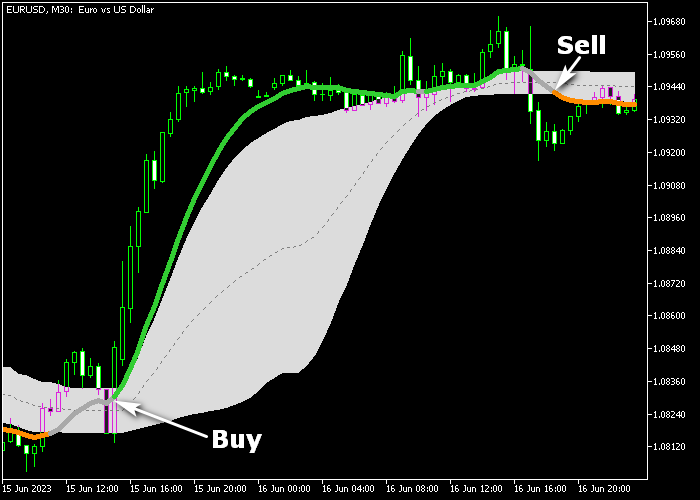
The QWMA indicator appears beneath the main price chart as green, orange, and gray lines.
Green lines signal bullish trends and buy opportunities, orange lines indicate bearish trends and sell opportunities, and gray lines suggest staying out of the market.
The chart illustrates how QWMA filters market noise and guides trend-based trades effectively.

Guide to Trade with the QWMA Indicator
Buy Rules
- A green QWMA line appears under the price chart, signaling a buy.
- Enter a buy order at the next available market price.
- Confirm the trend is upward before entering to avoid early entries.
- Stay in the trade as long as the green line continues to appear.
Sell Rules
- An orange QWMA line appears under the price chart, signaling a sell.
- Enter a sell order at the next available market price.
- Confirm the trend is downward before entering to avoid early entries.
- Stay in the trade as long as the orange line continues to appear.
Stop Loss
- Set stop loss just below the gray neutral zone for buy trades.
- Set stop loss just above the gray neutral zone for sell trades.
- Place stop loss below the previous swing low for buys, above swing high for sells.
Take Profit
- Close buy positions if an orange line appears.
- Close sell positions if a green line appears.
- Take profit near strong support or resistance zones aligned with the trend.
- Use a fixed pip or percentage target based on your time frame.
Download Now
FAQ
What do the different QWMA line colors mean?
Green lines signal an uptrend, orange lines indicate a downtrend, and gray lines suggest neutral market conditions where it’s better to stay out.
Can I adjust the indicator settings?
Yes, you can modify MA periods, speed, upper/lower levels, time frame, and alerts to suit different strategies and market conditions.
Is this indicator suitable for beginners?
Yes, QWMA is easy to trade and provides clear entry signals, making it suitable even for traders without prior experience.
How does the speed filter affect signals?
The speed filter adjusts the sensitivity of the indicator to market volatility, allowing traders to refine entries and reduce false signals.
Summary
The QWMA indicator provides clear trend signals with non-repainting lines that indicate uptrend, downtrend, and neutral conditions.
Green lines show bullish opportunities, orange lines show bearish opportunities, and gray lines suggest staying out of the market.
Customizable settings and volatility filtering make it suitable for beginners and experienced traders alike.
This tool helps traders follow trends confidently and enter trades at precise points with minimal market noise.




