About the Rapid Forex Symbol Changer Indicator
The Rapid Forex Symbol Changer for MT4 is a time-saving tool that allows traders to instantly switch between currency pairs and other market symbols without manually opening new charts.
It provides a clean, interactive dashboard that displays all symbols from your market watch.
With this indicator, you can also change the chart’s timeframe directly from the dashboard.
This makes it ideal for active traders, scalpers, or anyone who monitors multiple pairs at once.
It works seamlessly on all MT4 charts and requires no complex setup, helping you focus on trading instead of chart management.
Free Download
Download the “-U-TURN-1.1.ex4” indicator for MT4
Key Features
- Quickly switch between any currency pair or symbol
- Change chart timeframes directly from the dashboard
- Works on all MT4 charts
- Saves time for scalpers and multi-pair traders
- Simple, beginner-friendly interface
- Helps reduce clutter and improve workflow
Indicator Chart
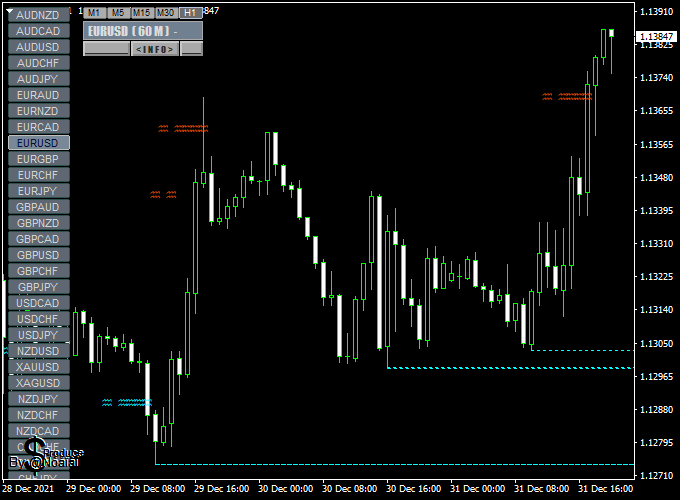
The chart shows the Rapid Forex Symbol Changer dashboard on the main MT4 window.
Click any symbol to instantly load its chart. Timeframes can also be adjusted directly from the panel, streamlining multi-pair analysis.
Guide to Trade with Rapid Forex Symbol Changer
Practical Use Tips
- Use it to quickly scan multiple pairs for trading opportunities
- Switch timeframes to confirm trends or spot breakout points
- Keep the dashboard visible to save time during fast sessions
- Combine with trend or momentum indicators for quick analysis
- Use it alongside alerts for high-priority trades
Intraday Strategy: Rapid Forex Symbol Changer + XMaster Formula (MT4)
This intraday strategy combines the Rapid Forex Symbol Changer Indicator and the XMaster Formula Indicator to allow traders to switch between currency pairs quickly while identifying high-probability intraday trades.
The Rapid Forex Symbol Changer displays a dashboard to select pairs directly on the chart, saving time for active intraday traders.
The XMaster Formula Indicator generates yellow up arrows for buy signals and yellow down arrows for sell signals.
This strategy is ideal for 5-minute to 15-minute charts.
Buy Entry Rules
- Use the Rapid Forex Symbol Changer dashboard to select a currency pair showing clear volatility and volume.
- Wait for a yellow up arrow from the XMaster Formula Indicator, signaling a buy.
- Enter a buy trade at the close of the candle where the signal appears.
- Set the stop loss just below the most recent swing low or a nearby support level.
- Set the take profit at a 1:1.5 reward-to-risk ratio, or exit if a yellow down arrow appears.
Sell Entry Rules
- Use the Rapid Forex Symbol Changer dashboard to select a currency pair with clear downward movement.
- Wait for a yellow down arrow from the XMaster Formula Indicator, signaling a sell.
- Enter a sell trade at the close of the candle where the signal appears.
- Set the stop loss just above the most recent swing high or a nearby resistance level.
- Set the take profit at a 1:1.5 reward-to-risk ratio, or exit if a yellow up arrow appears.
Advantages
- Quickly switch between multiple currency pairs using the dashboard for efficient intraday trading.
- Clear buy and sell signals reduce decision-making time.
- Works well on multiple intraday timeframes (5-min, 15-min).
- Improves trading efficiency and reduces the need to open multiple charts manually.
- Can be used on major, minor, and exotic currency pairs for diversified trading.
Drawbacks
- Requires constant monitoring for intraday trading.
- High spreads or slippage can reduce profitability, especially on short timeframes.
- Overtrading is possible if switching pairs too frequently without filtering signals.
- Performance can vary depending on currency pairs and market conditions.
Case Study 1
On the EUR/USD 5-minute chart, a yellow up arrow from the XMaster Formula Indicator appeared.
Using the Rapid Forex Symbol Changer, the trader quickly switched to this pair and entered a buy trade at 1.1850, with a stop loss at 1.1840 and take profit at 1.1865.
The trade reached the take profit within 12 minutes, yielding a 15-pip gain.
Case Study 2
On the GBP/JPY 15-minute chart, a yellow down arrow from the XMaster Formula Indicator appeared.
Using the dashboard, the trader entered a sell trade at 150.30, with a stop loss at 150.50 and a take profit at 149.80.
The trade reached the take profit in 20 minutes, capturing a 50-pip gain.
Strategy Tips
- Focus on high-liquidity sessions like London and New York overlaps for reliable signals.
- Check multiple pairs quickly using the Rapid Forex Symbol Changer dashboard to spot the best trading opportunities.
- Use additional filters like trend direction or support/resistance levels to reduce false signals.
- Consider using a trailing stop to maximize profit during strong intraday trends.
Download Now
Download the “-U-TURN-1.1.ex4” indicator for Metatrader 4
FAQ
Can I use it on any MT4 account?
Yes. It works on any account type and all MT4 charts.
Does it slow down my platform?
No. The dashboard is lightweight and designed to run smoothly even with multiple charts open.
Can it switch between custom instruments?
Yes. Any symbol in your market watch list can be loaded instantly from the dashboard.
Is it suitable for scalpers?
Absolutely. Fast symbol and timeframe switching makes it ideal for quick decision-making in fast markets.
Do I need to configure anything?
No setup is required. Install it on any chart, and the dashboard is ready to use.
Summary
The Rapid Forex Symbol Changer for MT4 is a productivity tool that saves traders time and simplifies multi-pair analysis.
Its dashboard allows instant switching between symbols and timeframes, making it ideal for scalpers and active traders.
By streamlining chart management, it lets traders focus on market opportunities instead of navigating menus.
Combined with other analysis tools, it enhances workflow efficiency and helps catch high-probability setups faster.






