About the RSX Buy Sell Signal Indicator
The RSX Buy Sell Signal Indicator for MT4 is an advanced technical tool that provides a significantly smoother and more refined version of the traditional Relative Strength Index.
It is engineered to eliminate the “jitter” and market noise often found in standard oscillators, allowing traders to perform a more accurate analysis of price momentum.
By providing cleaner data, the indicator helps prevent premature entries and allows for the placement of tighter stop losses.
It features a unique color-coded system with red, green, and gold signals that appear within its dedicated window.
This professional-grade indicator is highly responsive, enabling it to run faster without the risk of false signals caused by minor price fluctuations.
It is a versatile choice for participants who find traditional oscillators too erratic and want a more reliable guide for market timing.
Free Download
Download the “rsx-indicator.ex4” MT4 indicator
Key Features
- Delivers ultra-smooth momentum tracking by filtering out excessive market noise.
- Uses a triple-color signal system to identify buy, sell, and neutral market phases.
- Includes a fixed 50.00 center level to define the equilibrium between bulls and bears.
- Permits prompt alert triggers that allow traders to react quickly to trend shifts.
- Displays gold signals to highlight periods of market indecision and consolidation.
Indicator Chart
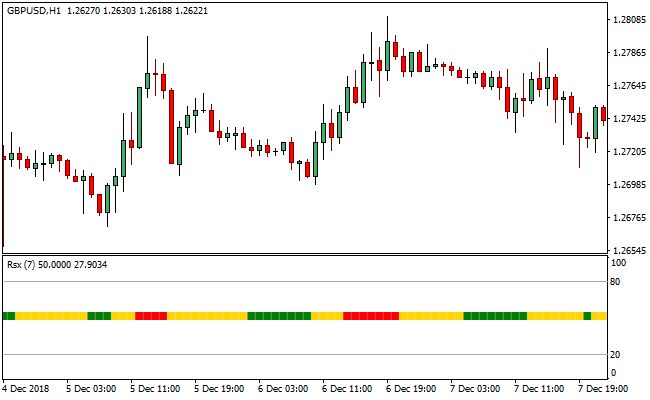
The chart shows the RSX Buy Sell Signal Indicator operating in the lower panel.
You can observe the indicator line crossing the 50.00 level and changing colors to reflect the current momentum.
Red signals indicate bullish strength, green signals represent bearish pressure, and the intermittent gold sections pinpoint areas where the market is pausing or undecided.

Guide to Trade with RSX Buy Sell Signal Indicator
Buy Rules
- Wait for the RSX Buy Sell Signal Indicator to display a red signal.
- Ensure the red signal is firmly established above the median line on the candle close.
- Execute the long position when the trend direction is confirmed by the color change.
Sell Rules
- Wait for the RSX Buy Sell Signal Indicator to display a green signal.
- Confirm the green signal is positioned correctly at the 50.00 level.
- Execute the short position once the bearish momentum is validated by the closed candle.
Stop Loss
- Place the protective stop loss a few pips below the most recent swing low for buy trades.
- Set the stop loss just above the local resistance peak for sell entries.
- Move the stop to break even if the indicator maintains its color for several candles.
Take Profit
- Close all active buy orders if the RSX Buy Sell Signal Indicator displays a green signal.
- Close all active sell orders if the RSX Buy Sell Signal Indicator displays a red signal.
- Exit positions manually if a gold signal appears, indicating the trend has lost its conviction.
RSX Indicator + Free Forex Scalping Indicator MT4 Strategy (M1 & M5)
This scalping strategy uses the RSX Buy Sell Signal Indicator together with the Free Forex Scalping Indicator MT4.
The RSX indicator gives a quick view of trend direction via a histogram: green for buy trend and red for sell trend.
The scalping indicator gives entry signals: a green histogram indicates a buy signal, and a red histogram indicates a sell signal.
On fast charts like M1 and M5, combining them helps you enter trades in the direction of the trend with a timely trigger.
This strategy is best suited for active traders comfortable with quick execution.
It works well on major and popular currency pairs with good volatility and low spreads.
The short time frames help capture small moves while limiting exposure.
Buy Entry Rules
- RSX histogram must be green (indicating buy trend).
- Free Forex Scalping Indicator histogram must turn green (buy signal) on the M1 or M5 chart.
- Enter long when both conditions occur.
- Stop loss is placed a few pips below the recent swing low (for example, 5–8 pips depending on pair volatility and spread).
- Take profit set at approximately 2 to 3 times the stop loss (for example, 10–15 pips), or watch price action and exit when momentum slows, or trend weakens.
Sell Entry Rules
- RSX histogram must be red (indicating sell trend).
- Free Forex Scalping Indicator histogram must turn red (sell signal) on the M1 or M5 chart.
- Enter short when both conditions align.
- Stop loss is placed a few pips above the recent swing high (for example, 5–8 pips).
- Take profit set at roughly 2 to 3 times the stop loss (for example, 10–15 pips), or close manually when momentum fades.
Advantages
- Clear trend direction thanks to the RSX filter.
- Fast and precise entries from the scalping indicator.
- Simple rules that reduce hesitation and overthinking.
- Works well on liquid pairs with tight spreads.
Drawbacks
- Scalping requires attention because signals form quickly.
- Spreads can reduce profit on pairs that are not very liquid.
- Needs fast order execution for best results.
Case Study 1: EURUSD M5
During the European session on EURUSD M5, the RSX histogram turned green, indicating a bullish trend.
Shortly after, the scalping indicator histogram turned green. A long position was entered.
Stop loss was placed 6 pips below the recent swing low.
Price moved up steadily as bullish momentum built.
After 14 pips gain, signs of weakening appeared (scalping indicator histogram fading).
Trade was closed, netting about 14 pips, roughly 2.3R reward-to-risk.
Case Study 2: USDJPY M1
During the Asian session on USDJPY M1, the RSX histogram showed a red trend (bearish).
The scalping histogram turned red, and a short was taken.
Stop loss was 5 pips above the recent swing high.
The pair dropped quickly in a short swoop.
After capturing 12 pips, momentum slowed, and the scalping indicator histogram flipped faintly.
The trade was exited, securing 12 pips. The quick setup on M1 reflects the fast nature of this method.
Strategy Tips
- Wait for both histograms to show the same color before opening a trade.
- Trade during active sessions like London and the first part of New York for smoother movement.
- Use consistent risk levels because scalping involves frequent trades.
- Avoid trading around high-impact news events to prevent spikes.
- If the RSX histogram changes color rapidly, wait for a stable trend before entering.
Download Now
Download the “rsx-indicator.ex4” Metatrader 4 indicator
FAQ
Why is RSX considered superior to the standard RSI?
The RSX Buy Sell Signal Indicator uses advanced smoothing algorithms to remove the lag and noise associated with RSI.
It provides a clearer signal line that is easier to read and less prone to false spikes.
What should I do when I see a gold signal?
A gold signal indicates a period of market indecision.
Professional traders usually hold their current positions if they appear after a main signal or stay flat until a clear red or green color returns.
Is this indicator suitable for high-frequency scalping?
Yes, because it can run faster without degrading in quality.
It allows scalpers to receive early alerts on momentum shifts, providing a significant advantage during fast-moving market sessions.
Summary
The RSX Buy Sell Signal Indicator offers a modernized approach to momentum trading by prioritizing smoothness and accuracy.
Its intuitive color system makes it easy to distinguish between active trends and market indecision.
While it works exceptionally well as a standalone tool, its effectiveness is maximized when used to confirm price action breakouts.
The indicator is a reliable asset for any trader seeking to reduce noise and improve entry timing.
Following its systematic rules can lead to more disciplined trading and more consistent results across various timeframes.


