
About the Schaff Trend Cycle Forex Indicator
The Schaff Trend Cycle Forex Indicator for MT4 is a practical solution for traders who want to identify the exact phase of a market trend.
Unlike standard oscillators that can stay pinned at extreme levels for too long, this system is engineered to be more responsive to actual cycle changes.
The Schaff Trend Cycle indicator for Metatrader 4 gauges overbought and oversold market conditions for any currency pair with high accuracy.
It works by tracking price velocity, allowing you to see when a move is likely to start or end.
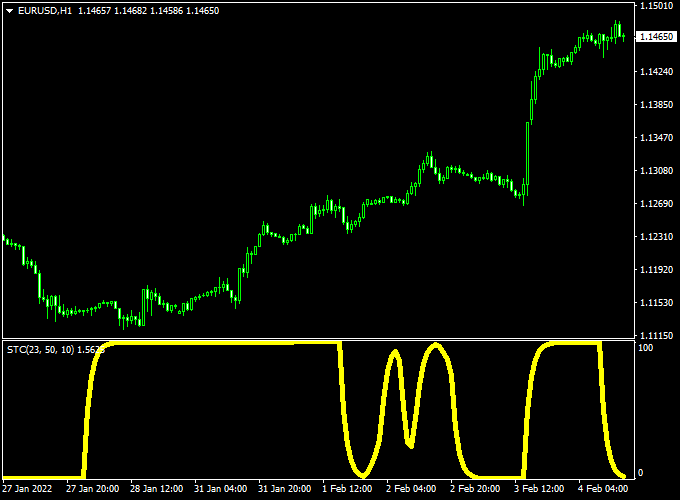
The indicator pops up in a separate MT4 chart window as a yellow colored signal line that oscillates between 0 and 100.
It is widely respected because it tends to react faster than traditional lagging indicators.
Free Download
Download the “SchaffTrendCycle.mq4” indicator for MT4
Key Features
- It utilizes a dual-calculation method that reduces lag while maintaining a smooth signal line.
- The indicator provides a fixed scale where the value 0 is oversold and 100 is overbought.
- The yellow signal line helps traders visualize the transition from accumulation to distribution.
- The system helps filter out minor price retracements, keeping you aligned with the main cycle.
Indicator Chart
The Schaff Trend Cycle indicator chart features a dedicated sub-window where the yellow line tracks the rhythmic rise and fall of market momentum.
When the line drops to the 0 level, it signals that sellers have exhausted their strength.
Conversely, when the line climbs to the 100 level, it indicates that buyers may be overextended.

Guide to Trade with the Schaff Trend Cycle Forex Indicator
Trading with this tool requires patience to wait for the indicator to hit its extreme levels before looking for an entry.
Buy Rules
- First, ensure the overall market trend is moving upward on your main chart.
- Look at the indicator window and wait for the yellow line to drop all the way down to the 0 level.
- Open your buy order as soon as the line begins to curl back up away from the 0 mark.
- Confirm the move by checking for a bullish candle close on the price chart.
Sell Rules
- Begin by verifying that the market is in a clear downtrending phase.
- Watch the oscillator window until the yellow signal line climbs up to reach the 100 level.
- Execute a sell order the moment the line starts to turn downward from the 100 peak.
- Verify the entry by looking for a bearish rejection candle at a recent resistance zone.
Stop Loss
- Place your stop loss just a few pips under the recent swing low for buy trades.
- Position your stop loss a few pips above the most recent swing high for sell trades.
- Keep your risk per trade consistent to protect your account balance from unexpected moves.
Take Profit
- Close your position when the yellow line travels across the window and reaches the opposite extreme.
- You can also exit at a 1:2 risk-to-reward ratio to ensure your wins are larger than your losses.
- Trailing your stop loss behind the recent lows or highs is another way to catch longer cycle moves.
Schaff Trend Cycle + Flat Trend Forex Scalping Strategy
This MT4 scalping strategy combines the Schaff Trend Cycle Forex Indicator with the Flat Trend Indicator.
It focuses on identifying short bursts of momentum in trending markets, allowing traders to capture quick moves on lower timeframes like M1, M5, and M15.
The Schaff Trend Cycle provides precise oscillator-based reversal timing, while the Flat Trend Indicator filters out false entries by confirming trend direction using color bars.
The Schaff Trend Cycle shows oversold and overbought levels with values between 0 and 100.
When the oscillator reaches 0 and crosses above 20, it signals a potential bullish reversal.
Conversely, when it reaches 100 and crosses below 80, it signals a potential bearish reversal.
The Flat Trend Indicator displays green bars for bullish conditions and red bars for bearish conditions.
When both indicators align, traders get reliable, high-probability scalping entries.
Buy Entry Rules
- Wait until the Schaff Trend Cycle reaches 0 and crosses above 20, showing the start of upward momentum.
- Confirm that the Flat Trend Indicator bars are green, indicating a bullish market.
- Enter a buy position on the next candle after both conditions align.
- Set a stop loss a few pips below the most recent swing low or support area.
- Take profit around 10-20 pips for M1 or M5 charts, or 25-30 pips on M15 charts.
- Close the trade early if the Flat Trend bars switch to red or if the Schaff Trend Cycle reaches 100.
Sell Entry Rules
- Wait until the Schaff Trend Cycle reaches 100 and crosses below 80, showing downward momentum.
- Confirm that the Flat Trend Indicator bars are red, indicating a bearish market.
- Enter a sell position on the next candle after both conditions align.
- Set a stop loss a few pips above the latest swing high or resistance area.
- Take profit around 10-20 pips on M1 or M5 charts, or 25-30 pips on M15 charts.
- Exit the trade if the Flat Trend bars switch to green or if the Schaff Trend Cycle dips to 0.
Advantages
- Combines oscillator timing with trend confirmation for stronger entries.
- Effective for short-term scalping on major currency pairs like EUR/USD, GBP/USD, and USD/JPY.
- Quick identification of reversals using Schaff Trend Cycle’s smooth, responsive signals.
- Flat Trend Indicator visually simplifies trend direction, reducing confusion during high-speed trading.
- Ideal for traders seeking multiple trades per session with controlled risk.
Drawbacks
- Requires discipline to avoid trading against the color of the Flat Trend Indicator.
- Profit potential per trade is small, so spreads and commissions matter more.
- Lag may occur in rapidly reversing markets where the oscillator reacts slightly late.
Example Case Study 1: EUR/USD M5 Chart
During the London session, EUR/USD dropped into oversold territory, with the Schaff Trend Cycle reaching 0.
Once it crossed above 20, the Flat Trend Indicator bars turned green.
A buy trade was opened at 1.0850, stop loss set at 1.0835 (15 pips), and take profit at 1.0872 (22 pips).
Within 40 minutes, the price reached the target as momentum accelerated upward.
This example shows how the strategy catches early reversals with confirmation.
Example Case Study 2: GBP/USD M1 Chart
On a volatile M1 chart, GBP/USD hit overbought levels with the Schaff Trend Cycle near 100.
When it crossed below 80, the Flat Trend Indicator turned red, confirming a sell setup.
A sell order was entered at 1.2760 with a stop loss at 1.2776 (16 pips) and a take profit at 1.2740 (20 pips).
The move was completed in 12 minutes, generating a clean scalp profit before the next retracement.
Strategy Tips
- Trade during active sessions (London and New York) to benefit from stronger momentum and faster execution.
- Avoid flat or consolidating markets where the Flat Trend bars constantly change colors.
- Keep spreads low by focusing on major pairs and using ECN brokers for better entry accuracy.
- Use a trailing stop once the trade is in profit to secure gains without closing too early.
- Test the setup on a demo first to find the optimal take-profit distance for each pair.
- Do not overtrade; limit trades to setups where both indicators are clearly aligned.
Download Now
Download the “SchaffTrendCycle.mq4” indicator for Metatrader 4
FAQ
Why is this indicator considered faster than a standard MACD?
The Schaff Trend Cycle uses a recursive smoothing process that allows it to react to price changes much more quickly than a traditional MACD.
This means it often identifies the start of a trend several candles earlier.
For a trader, this speed translates into better entry prices and the ability to exit before a reversal becomes too deep.
Can I use the Schaff Trend Cycle on the 15-minute chart?
Yes, this indicator is very popular among intraday traders on the 15-minute and 1-hour timeframes.
It does a great job of identifying the “ebb and flow” of the trading session.
Just make sure to align your trades with the direction of the daily trend to increase your overall success rate.
What should I do if the line stays at 100 for a long time?
When the line stays at an extreme like 100, it shows that the market is in a very strong trend.
In this case, you should not sell just because it is overbought.
Instead, wait for the yellow line to actually start dropping below the 100 level.
This confirmed downturn is a much more reliable signal that the cycle has finally ended.
Summary
The Schaff Trend Cycle for MT4 is an effective momentum tool that assists in determining the appropriate timing for market entries.
By offering a clearer view of price cycles, it helps you stay disciplined and avoid chasing the market at bad prices.
This tool helps traders maintain a consistent routine by highlighting levels where the market is statistically likely to reverse.
Using this indicator allows you to filter high-risk trades and focus on high-conviction momentum shifts.





