

About the Simple Trend Bar Indicator with Signal
The Simple Trend Bar with Signal indicator for MT5 is a versatile tool that helps traders identify potential trend reversals and entry points.
It is ideal for scalpers, day traders, and swing traders looking for a clear visual representation of market direction.
When applied to the chart, the indicator plots trend bars in two colors: green for potential buy trades and red for potential sell trades.
Traders can adjust inputs such as the period and bar colors to fit their preferred style.
The simplicity of this indicator allows for quick decision-making without overcomplicating the chart.
Free Download
simplebars_signal.mq5 Indicator (MT5)
Key Features
- Displays trend bars in green and red to indicate buy and sell opportunities.
- Customizable period and color settings for tailored trading setups.
- Works well across major currency pairs with narrow spreads.
- Easy-to-read signals that reduce indecision and hesitation.
- Compatible with other technical tools for confirmation of trades.
Indicator Chart
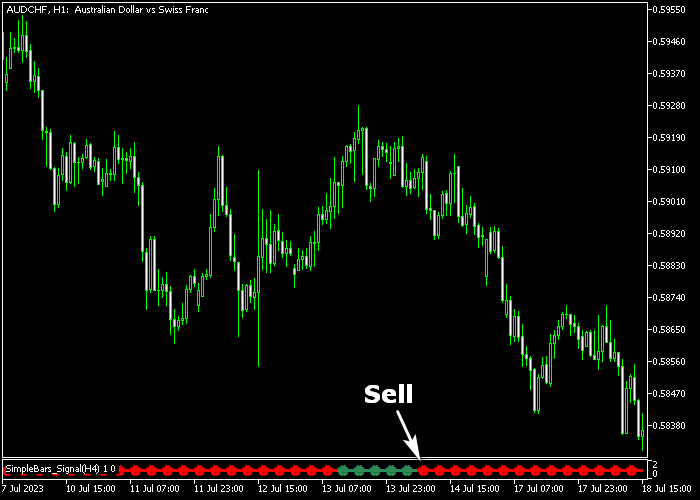
The Simple Trend Bar with Signal indicator appears beneath the main price area.
The chart shows green bars signaling buy opportunities and red bars indicating sell opportunities.
Traders can use this to track short-term trends and enter trades in alignment with market momentum.
Guide to Trade with Simple Trend Bar with Signal Indicator
Buy Rules
- Enter a buy trade when the green trend bar appears in the indicator window.
- Confirm upward momentum by observing consecutive green bars.
- Check that the trend aligns with higher time frames for additional confirmation.
- Focus on active trading sessions for better execution and volatility.
Sell Rules
- Enter a sell trade when the red trend bar appears in the indicator window.
- Look for consecutive red bars to validate downward momentum.
- Verify alignment with higher time frames to reduce false signals.
- Trade during periods of higher liquidity to improve entry timing.
Stop Loss
- For buy trades, place slightly below the nearest short-term support level.
- For sell trades, place slightly above the nearest short-term resistance level.
Take Profits
- Close buy trades if a red trend bar appears or after reaching your desired pip target.
- Close sell trades if a green trend bar appears or after hitting your pip goal.
- Monitor price action and bar sequences to maximize short-term gains.
Simple Trend Bar Indicator Day Trading Strategy for MT5
This strategy combines the Simple Trend Bar indicator with Signal for MT5 with the Turtle MTF Forex indicator for MT5 to create a clean and reliable trend-following approach.
The strategy focuses on aligning short-term signals with the broader market trend.
The Simple Trend Bar provides clear entry timing through color changes, while the Turtle MTF indicator confirms the overall direction using multi-timeframe trend analysis.
This tool displays green bars during bullish conditions and red bars during bearish conditions.
The Turtle MTF indicator plots a blue line for bullish trends and a red line for bearish trends, helping traders stay aligned with the dominant direction.
This combination reduces false entries and improves trade accuracy by ensuring trades follow the prevailing trend.
This method works best on M15, M30, and H1 charts and is suitable for traders who prefer structured day trading setups with clear confirmations.
Buy Entry Rules
- Wait for the Simple Trend Bar to turn green.
- Confirm that the Turtle MTF line is blue, indicating a bullish trend.
- Enter a buy trade at the opening of the next candle.
- Place the stop loss below the recent swing low.
- Take profit when the trend bar turns red or when the Turtle line changes direction.
Sell Entry Rules
- Wait for the Simple Trend Bar to turn red.
- Confirm that the Turtle MTF line is red, indicating a bearish trend.
- Enter a sell trade at the opening of the next candle.
- Place the stop loss above the recent swing high.
- Take profit when the trend bar turns green or when the Turtle line flips direction.
Case Study 1: Buy Trade on GBP/USD
On the M30 timeframe on GBP/USD, the Simple Trend Bar turned green, signaling a bullish setup.
At the same time, the Turtle MTF indicator showed a blue line, confirming the broader uptrend.
A buy trade was entered at the next candle open. Price moved steadily upward, supported by the ongoing trend.
The green bars remained consistent, indicating sustained buying pressure.
The position was held until the trend bar changed color, signaling a potential slowdown.
The trade was closed in profit after capturing a smooth intraday move.
Case Study 2: Sell Trade on EUR/AUD
On the H1 timeframe on EUR/AUD, the Simple Trend Bar turned red, indicating a bearish opportunity.
The Turtle MTF line was also red, confirming strong downside momentum.
A sell trade was opened at the next candle. Price declined consistently as sellers remained in control.
The red trend bars continued to appear, reinforcing the bearish structure.
The trade was closed when the trend bar shifted back to green, signaling a possible reversal.
The trade was closed with a solid 47 pip gain as the downward move lost strength.
Download Now
simplebars_signal.mq5 Indicator (MT5)
FAQ
Can the Simple Trend Bar indicator be used for swing trading?
Yes, although it is especially effective for scalping and day trading, it can also help swing traders spot longer-term trends with the right time frame adjustments.
How do I customize the trend bar colors?
The indicator allows full customization of bar colors.
Green indicates potential buy signals, and red indicates potential sell signals.
Adjust colors in the settings to suit your visual preference.
Which time frames are most effective?
Scalpers benefit from shorter time frames like 1–15 minutes, while day traders may prefer 30-minute to 1-hour charts.
Can it be combined with other indicators?
Yes, you can use it alongside oscillators or moving averages to confirm trends and reduce false signals.
Summary
The Simple Trend Bar with Signal indicator provides clear, easy-to-read trend signals for traders of all styles.
Its green and red bars simplify trade entries, and customization options make it adaptable to different strategies.
Traders can use it alone for rapid scalping decisions or with other tools to validate trend direction.
Overall, this indicator helps traders act quickly and confidently in short-term markets.





