About the Stochastic MACD Indicator
The Stochastic MACD Indicator for MT5 combines the best of both Stochastic and MACD oscillators into one powerful momentum tool.
It plots as a single line in a separate oscillator window using +10 and -10 threshold levels instead of traditional 80/20 boundaries.
This makes it perfect for identifying precise pullback entries within established trends.
When the line drops below -10 into oversold territory during uptrends, it signals potential buying opportunities as momentum shifts back toward the main trend.
Crosses above +10 in downtrends mark oversold conditions for short entries.
Configurable parameters include Stochastic period, MACD fast/slow/signal settings, applied price, and adjustable overbought/oversold levels.
Free Download
Stochastic MACD.mq5 Indicator (MT5)
Key Features
- Stochastic applied to MACD for smoother momentum readings than the standard Stochastic.
- +10/-10 threshold levels optimized for pullback trading in trends.
- Configurable MACD periods (fast, slow, signal) and Stochastic smoothing.
- Best performance when combined with trend filter indicators.
Indicator Chart
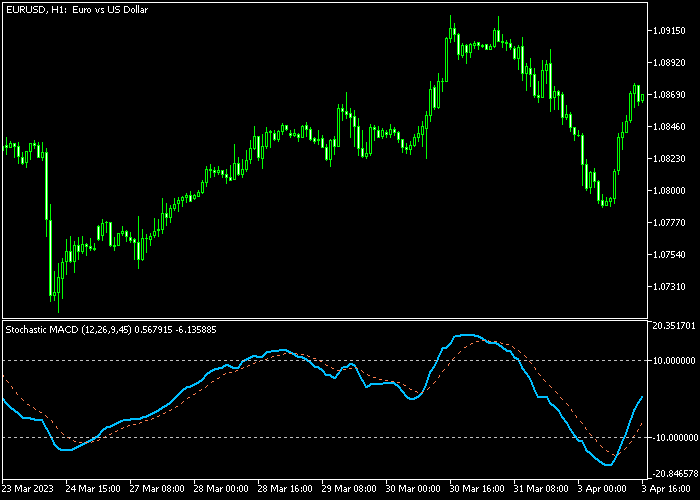
The Stochastic MACD appears as a single oscillating line in a sub-window with +10 and -10 horizontal reference lines.
The line swings between these levels showing momentum strength relative to recent price action.
Crosses back toward the centerline after hitting extremes provide the highest probability setups.
During strong trends, you’ll see repeated dips to oversold (+10 in downtrends) or spikes to overbought (-10 in uptrends) without trend reversal.
Flat oscillator readings near zero indicate ranging conditions to avoid.

Guide to Trade with the Stochastic MACD Indicator
Buy Rules
- Confirm uptrend using 50 or 200 EMA with price trading above the moving average.
- Wait for the Stochastic MACD line to drop below -10 into oversold territory.
- Enter buy when the line crosses back above -10 confirming momentum recovery.
- Strongest signals occur when multiple timeframes show oversold alignment.
Sell Rules
- Verify downtrend with price below key moving averages or trendlines.
- Look for the Stochastic MACD line to spike above +10 into the overbought zone.
- Enter sell when the line crosses back below +10 showing a momentum shift.
- Higher probability when the daily or H4 timeframe confirms overbought conditions.
Stop Loss
- For buy trades, place a stop below the previous swing low that formed before oversold reading.
- For sell trades, set a stop above the swing high preceding the overbought signal.
- Add a 3-5 pip buffer on volatile pairs to avoid premature stop-outs.
Take Profit
- First target near prior key resistance levels or 2:1 risk-reward ratio.
- Scale out half position when Stochastic MACD reaches the opposite threshold.
- Trail remaining stop to breakeven after price moves 1x ATR in your favor.
- Exit fully when the oscillator hits the opposite extreme or a bearish reversal pattern forms.
Stochastic MACD Forex Indicator MT5 Trend Bar Strategy
This strategy combines momentum and trend direction using the Stochastic MACD Forex Indicator and the Simple Trend Bar Indicator with Signal.
It focuses on capturing early reversals that align with the broader trend.
The concept is straightforward. Momentum shifts first, then price tends to follow. When both indicators align, the setup becomes more dependable.
The Stochastic MACD highlights overbought and oversold zones.
A cross back above -10 signals a potential bullish reversal. A cross below +10 signals a bearish move.
The trend bar acts as a filter by showing whether the current market direction supports the trade. This helps reduce entries against strong trends.
This approach works effectively on M15 to H1 timeframes. It fits traders who prefer clear signals and simple confirmation.
The rules remain easy to follow while still offering consistent trade setups.
Buy Entry Rules
- Wait for the Stochastic MACD to cross back above -10 from below.
- Confirm that the trend bar turns green and remains bullish.
- Enter a buy trade at the opening of the next candle.
- Place stop loss below the recent swing low or below a nearby support level.
- Close the trade when the Stochastic MACD turns downward or when the trend bar switches to red, or aim for a resistance level.
Sell Entry Rules
- Wait for the Stochastic MACD to cross below +10 from above.
- Confirm that the trend bar turns red and remains bearish.
- Enter a sell trade at the opening of the next candle.
- Place stop loss above the recent swing high or above a nearby resistance level.
- Close the trade when the Stochastic MACD turns upward or when the trend bar switches to green, or aim for a support level.
Case Study 1
On the EURUSD M15 timeframe, the Stochastic MACD dropped below -10 during a pullback.
It then crossed back above -10, indicating a shift in momentum.
At the same time, the trend bar turned green, confirming bullish direction.
A buy trade was entered at the next candle open. The stop loss was placed below the recent swing low.
Price moved upward steadily. About two hours later, the Stochastic MACD turned downward and the buy trade was closed.
Case Study 2
On the GBPUSD H1 timeframe, the Stochastic MACD moved above +10 during a correction.
It then crossed back below +10, signaling bearish momentum. The trend bar switched to red, confirming the direction.
A sell trade was entered at the next candle open. The stop loss was placed above the recent swing high.
Price moved lower. Three hours later, the Stochastic MACD turned upward and the sell trade was closed.
Download Now
Stochastic MACD.mq5 Indicator (MT5)
FAQ
Should I change the default +10/-10 threshold levels?
Default levels work well across most pairs and timeframes. Aggressive scalpers can tighten to +8/-8 for more frequent signals.
Swing traders may widen to +12/-12 for cleaner setups.
Which trend filter works best with Stochastic MACD?
50 EMA provides an excellent short-term trend filter for H1-H4 trading. 200 EMA works best for daily bias.
Does Stochastic MACD work on lower timeframes like M5 or M15?
Yes, but requires tighter stops and faster MACD settings (8,17,6). Use the H1 trend filter to avoid intraday noise.
Summary
The Stochastic MACD Indicator delivers precise overbought/oversold timing within trending markets.
+10/-10 threshold crosses identify high-probability pullback entries when combined with simple trend filters.
Configurable MACD and Stochastic parameters adapt to any timeframe or trading style.
The clear visual signals make it beginner-friendly while sophisticated enough for professional pullback trading strategies.





