About the Super Trend With Alert Indicator
The Super Trend With Alert indicator for MT5 is a widely used trend-following tool that helps traders identify buy and sell opportunities based on market direction.
It plots a colored signal line directly on the price area, allowing traders to quickly determine whether the market is bullish or bearish.
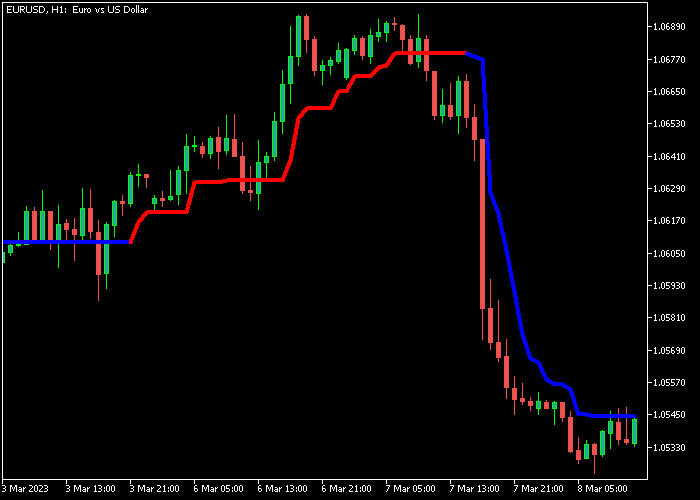
When the signal line appears red, it indicates bullish conditions. When the line switches to blue, it signals bearish momentum.
This constant state helps traders remain aligned with the dominant trend.
Traders can adjust several settings such as the calculation period, price type, and standard deviation period.
Additional alert options are also available, including sound alerts, platform notifications, email alerts, and mobile notifications.
Free Download
Super trend – simple Alert.mq5 Indicator (MT5)
Key Features
- Trend-following signal line displayed directly on the price area.
- Indicator always shows either bullish or bearish market bias.
- Customizable period and price calculation settings.
- Standard deviation parameter to adjust sensitivity.
- Compatible with all currency pairs and timeframes.
Indicator Chart
The Super Trend With Alert Indicator appears on the main price area as a colored signal line that changes depending on market direction.
A red line highlights bullish conditions while a blue line signals bearish momentum, helping traders follow the active trend.

Guide to Trade with Super Trend With Alert Indicator
Buy Rules
- Wait for the Super Trend signal line to turn red.
- Confirm that price begins moving above the bullish trend line.
- Open a buy trade once the bullish signal appears.
Sell Rules
- Wait for the Super Trend signal line to turn blue.
- Confirm that price begins moving below the bearish trend line.
- Open a sell trade once the bearish signal appears.
Stop Loss
- Place the stop loss below technical support for buy trades.
- Place the stop loss above technical resistance for sell trades.
Take Profit
- Close the buy trade when the signal line turns blue.
- Close the sell trade when the signal line turns red.
- Exit the trade for a fixed pip profit target.
Download Now
Super trend – simple Alert.mq5 Indicator (MT5)
FAQ
How does the Super Trend With Alert Indicator generate signals?
The indicator calculates trend direction using price movement and volatility.
When the trend changes, the colored signal line switches from bullish to bearish or vice versa.
Can the indicator send trading alerts?
Yes. The indicator supports several alert options including sound alerts, platform alerts, email notifications, and mobile push notifications.
What settings can be customized?
Traders can adjust the calculation period, the price type used by the indicator, and the standard deviation period that influences signal sensitivity.
Summary
The Super Trend With Alert Indicator helps traders follow market direction using a simple colored trend line that changes with momentum.
This makes it easier to stay aligned with the active trend.
The customizable settings and built-in alert system allow traders to adapt the indicator to different trading strategies and market conditions.
With proper confirmation from other tools, the Super Trend With Alert Indicator can be a valuable addition to any forex trading setup.




