
About the Total Power X Indicator
The Total Power X Indicator for MT5 is a momentum-driven trend tool that highlights buying and selling pressure in real time.
It displays a colored cloud in a separate window below the main price area, allowing traders to instantly gauge who controls the market.
When the cloud turns blue, it reflects bullish dominance. When it shifts to magenta, it signals growing bearish strength.
This transition helps traders align trades with the prevailing momentum instead of trading against it.
The indicator includes customizable settings such as the power period and color options.
Free Download
TotalPowerIndicatorX.mq5 Indicator (MT5)
Key Features
- Blue cloud signals bullish market pressure.
- Magenta cloud signals bearish market pressure.
- Adjustable power period for faster or smoother signals.
- Effective in trending and ranging markets.
Indicator Chart
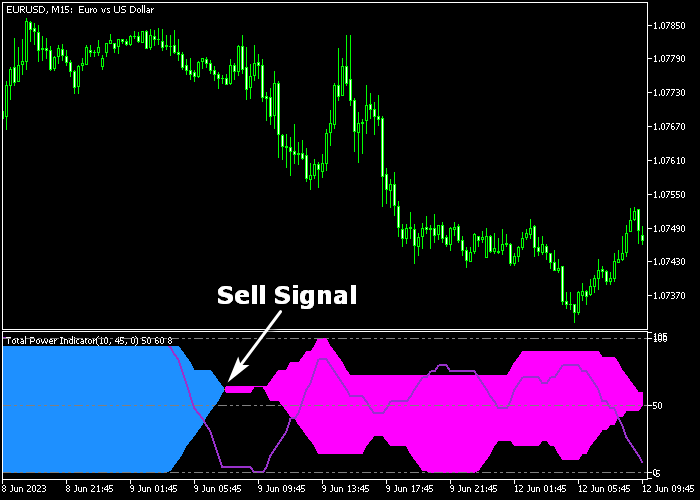
The Total Power X Indicator appears below the main price area as a blue and magenta signal cloud.
A blue cloud confirms bullish strength and supports long setups. A magenta cloud confirms bearish pressure and supports short setups.
Traders monitor these shifts to stay aligned with the dominant side of the market.
Guide to Trade with Total Power X Indicator
Buy Rules
- Wait for the cloud to turn blue in the indicator window.
- Confirm that price action supports upward momentum.
- Open a buy position at the start of the next candle.
- Avoid entries if the cloud changes color repeatedly in a tight range.
Sell Rules
- Wait for the cloud to turn magenta in the indicator window.
- Confirm that price action supports downward momentum.
- Open a sell position at the start of the next candle.
- Avoid trades during sideways consolidation.
Stop Loss
- Place the stop loss below the recent support level for buy trades.
- Place the stop loss above the recent resistance level for sell trades.
- Trail the stop if the cloud remains stable in your trade direction.
Take Profit
- Close buy trades when the cloud turns magenta.
- Close sell trades when the cloud turns blue.
- Alternatively, target a fixed risk to reward ratio such as 1:2 or 1:3.
- You may also exit near key support or resistance zones.
Total Power X Indicator and Tom Demark MA Day Trading MT5 Strategy
This strategy combines the Total Power X indicator with the Tom Demark Moving Average indicator to build a clear and fast day trading system.
The Total Power X indicator highlights momentum zones using colored clouds in a separate window, while the Tom Demark Moving Average provides a clean trend direction directly on the price.
This combination helps traders stay aligned with the dominant trend while entering trades only when momentum supports the move.
The approach works best on M5 and M15 charts, but it can also be applied on M1 for more aggressive trading.
The goal is to follow the trend defined by the moving average and use the cloud signals to time entries with precision.
This reduces hesitation and avoids trading against strong market direction.
Buy Entry Rules
- Enter a buy when the Total Power X indicator shows a blue cloud.
- Confirm that the Tom Demark Moving Average is yellow, indicating an uptrend.
- Open the trade at the close of the signal candle.
- Set a stop loss a few pips below the recent swing low.
- Take profit when the cloud turns magenta or the moving average shifts to orange.
Sell Entry Rules
- Enter a sell when the Total Power X indicator shows a magenta cloud.
- Confirm that the Tom Demark Moving Average is orange, indicating a downtrend.
- Open the trade at the close of the signal candle.
- Set a stop loss a few pips above the recent swing high.
- Take profit when the cloud turns blue or the moving average shifts to yellow.
Case Study 1: EUR/JPY Bullish Intraday Move
On a 5-minute EUR/JPY chart, the Total Power X indicator formed a blue cloud, signaling bullish momentum building in the market.
At the same time, the Tom Demark Moving Average turned yellow, confirming that price was in an uptrend.
A buy trade was opened at the close of the confirmation candle with a stop loss placed just below the recent swing low.
Price continued to rise steadily as both indicators remained aligned.
The trade was closed when the cloud began to shift toward magenta, indicating a bearish trend reversal.
Case Study 2: USD/CHF Bearish Continuation
On a 1-minute USD/CHF chart, the Total Power X indicator displayed a magenta cloud, indicating increasing selling pressure.
At the same time, the Tom Demark Moving Average turned orange, confirming a bearish trend.
A sell trade was entered at the close of the signal candle with a stop loss just above the recent swing high.
The price moved lower with strong momentum as sellers remained in control.
The short position was closed when the cloud started turning blue, capturing a fast 17 pip scalp during the downward move.
Download Now
TotalPowerIndicatorX.mq5 Indicator (MT5)
FAQ
Can the Total Power X Indicator be used for scalping?
Yes. On lower timeframes such as M5 or M15, the indicator reacts quickly to shifts in momentum.
Reducing the power period increases responsiveness but also increases signal frequency.
What does the power period setting change?
The power period controls how sensitive the cloud is to price movement.
Lower values generate faster color changes, while higher values smooth out fluctuations and reduce noise.
Does the indicator repaint after a candle closes?
Once a candle closes and confirms the cloud color, the signal remains stable under normal market conditions.
The cloud changes only when momentum genuinely shifts.
Summary
The Total Power X Indicator offers a straightforward way to track buying and selling pressure through a dynamic blue and magenta cloud.
It adapts to different trading styles and timeframes without complicating execution.
Traders can enhance results by combining it with support and resistance analysis and disciplined risk management.
With proper settings and confirmation, it becomes a reliable momentum companion for active market participants.





