
About the Trailing Stop Level Indicator
The Trailing Stop Level indicator for MT5 converts price volatility into a dynamic trend-following tool that provides timely buy and sell signals.
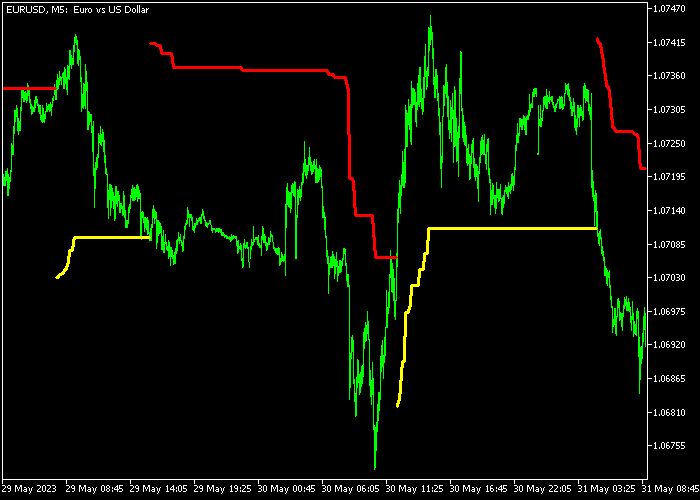
Displayed as a dual-colored line on the price chart, it shows yellow for bullish trends and red for bearish trends.
This technical tool is highly customizable, allowing adjustment of the percent parameter and line style.
Its adaptive design ensures a faster response to price changes, making it ideal for traders seeking precise entry and exit points on short or medium-term timeframes.
Free Download
Trailing_Stop_Level.mq5 Indicator (MT5)
Key Features
- Calculates optimal exit points based on percentage-based price fluctuations.
- Provides real-time trend identification through intuitive yellow and red color shifts.
- Functions as both a trend-following entry signal and a risk management tool.
- Allows traders to lock in profits automatically by trailing stops behind price action.
Indicator Chart
The chart displays the Trailing Stop Level indicator plotted as a continuous line that tracks price movement.
When the line is yellow and positioned below the candles, the market is in a bullish phase.
Conversely, a red line appearing above the candles confirms a bearish trend.
Traders can use these levels to set initial stop losses and adjust them as the trend develops.
Guide to Trade with Trailing Stop Level Indicator
Buy Rules
- A buy signal arises when the yellow trailing stop level line appears in the chart.
- Open a buy trade once the price successfully breaks and closes above the red line.
- Confirm that the line has shifted color to yellow to ensure bullish momentum.
- Maintain the position as long as the price remains above the yellow trailing line.
Sell Rules
- A sell signal arises when the red trailing stop level line appears in the chart.
- Open a sell trade immediately after the price closes below the yellow line.
- Look for the line to turn red to confirm that sellers have taken control.
- Keep the sell order active until the indicator shifts back to a bullish state.
Stop Loss
- Place your stop loss below the yellow line and trail up your stop loss.
- For sell orders, place the stop loss above the red line and trail it down.
- Continuously move the stop level to the current position of the indicator line.
Take Profit
- The buy or sell trade will be automatically closed when your trailing stop loss is hit.
- Alternatively, set a fixed profit target at a major technical resistance or support level.
- Liquidate the trade manually if the price shows a sharp rejection at a psychological level.
Download Now
Trailing_Stop_Level.mq5 Indicator (MT5)
FAQ
How does the percent parameter affect the indicator signals?
The percent setting determines the sensitivity of the trailing level.
A higher percentage creates a wider gap, reducing noise during long trends, while a lower percentage makes the line more responsive for scalping.
Can I use this indicator as a standalone strategy?
While the indicator provides both entry and exit levels, it is most effective when combined with a volume oscillator.
This helps confirm that the trend shift has enough momentum to sustain a move.
Is this indicator suitable for volatile news events?
The indicator adapts to volatility, but during extreme news events, price gaps can occur.
It is best to use the trailing levels to lock in gains once the initial volatility has settled.
Summary
The Trailing Stop Level indicator provides a streamlined approach to technical analysis by merging trend detection with momentum filtering.
It allows traders to navigate different market conditions by visually separating bullish impulses from bearish pressure.
By automating the exit process through dynamic levels, it helps maintain discipline and protects capital during trending markets.




