
About the TRIX Candle Keltner Signal Indicator
The TRIX Candle Keltner Signal Indicator for MT5 combines momentum and volatility into one focused trading tool.
It blends the TRIX oscillator with a Keltner-style cloud to highlight short-term trading opportunities.
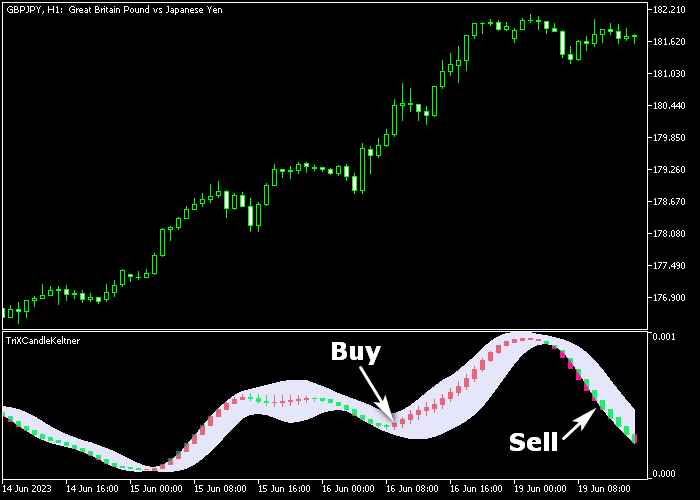
The indicator appears in a separate window where a dynamic cloud surrounds bullish and bearish candles.
Green candles reflect upward pressure, while red candles show downward momentum.
The cloud acts as a trend filter and helps define active trading zones.
By merging momentum strength with volatility boundaries, the indicator delivers timely entries during trending phases.
Traders can adjust the momentum period, TRIX period defaulted at 14, and visual style to match their preferred market conditions.
Free Download
TriXCandleKeltner.mq5 Indicator (MT5)
Key Features
- Combines TRIX momentum with a Keltner-based cloud filter.
- Displays green candles for bullish setups.
- Displays red candles for bearish setups.
- Cloud highlights active momentum zones.
- Customizable momentum and TRIX period settings.
- Designed for short-term trading opportunities.
Indicator Chart
The TRIX Candle Keltner Signal Indicator is shown in a dedicated window below the main price area.
A cloud defines the active trading zone while green and red candles signal trend direction.
The first color change within the cloud often marks the start of a potential move.
Guide to Trade with TRIX Candle Keltner Signal Indicator
Buy Rules
- Wait for the first green candle to form inside the cloud.
- Confirm that bullish momentum is building.
- Open a buy trade at the close of the green candle.
- Check that overall market flow supports upside continuation.
Sell Rules
- Wait for the first red candle to form inside the cloud.
- Confirm that bearish momentum is increasing.
- Open a sell trade at the close of the red candle.
- Ensure downside pressure remains consistent.
Stop Loss
- Place the stop loss 3 pips below the latest support zone for buy trades.
- Place the stop loss 3 pips above the latest resistance zone for sell trades.
- Adjust stops according to recent volatility conditions.
Take Profit
- Target 15 to 35 pips for short-term setups.
- Close buy trades when a red candle appears inside the cloud.
- Close sell trades when a green candle appears inside the cloud.
- You may also trail profits while momentum remains intact.
Download Now
TriXCandleKeltner.mq5 Indicator (MT5)
FAQ
What role does the cloud play in this indicator?
The cloud acts as a volatility filter. Trades are typically taken when candles form within it, signaling active momentum conditions.
Why is the TRIX period set to 14 by default?
The period of 14 balances responsiveness and smoothing. Traders can reduce it for faster signals or increase it for more stable readings.
Is this indicator suitable for scalping?
Yes. It is designed for short-term trading and performs well on lower timeframes when markets show consistent movement.
Can I adjust the momentum period separately?
Yes. The momentum period is fully customizable, allowing traders to fine tune signal sensitivity based on their strategy.
Summary
The TRIX Candle Keltner Signal Indicator merges momentum and volatility into a focused cloud-based system.
The combination of colored candles and a dynamic band helps traders spot emerging moves early.
With adjustable settings and straightforward visual signals, it supports active trading strategies that rely on short-term trend continuation and timely reversals.




