
About the Two-Pole Super Smooth Filter Indicator
The Two-Pole Super Smooth Filter forex MT4 indicator is a moving-average based trading indicator with an adjustable smoothing filter.
When price action stays above the Two-Pole Super Smooth Filter indicator, it signals an uptrend.
When price action moves below the Two Pole Super Smooth Filter indicator, it signals a downtrending market.
For the best trading results, use this trend-following indicator together with an oscillator.
For example, MACD or the Slow Stochastic works well in this setup.
The default CutoffPeriod value can be modified directly from the indicator’s Inputs tab.
Adjusting this setting allows you to fine-tune the indicator to better match your trading style.
This forex indicator performs best when identifying and trading short-term opportunities, such as scalping and intraday trading.
Free Download
Download the “two-pole-super-smoother-filter.mq4” MT4 indicator
Key Features
- Identifies trend direction with a smooth moving average filter.
- Signals uptrends when price stays above the indicator and downtrends when below.
- Customizable CutoffPeriod for sensitivity adjustment.
- Works well with oscillators like MACD or Slow Stochastic for confirmation.
- Effective for scalping and intraday trading strategies.
- Reduces false signals and market noise for cleaner trend analysis.
Indicator Chart
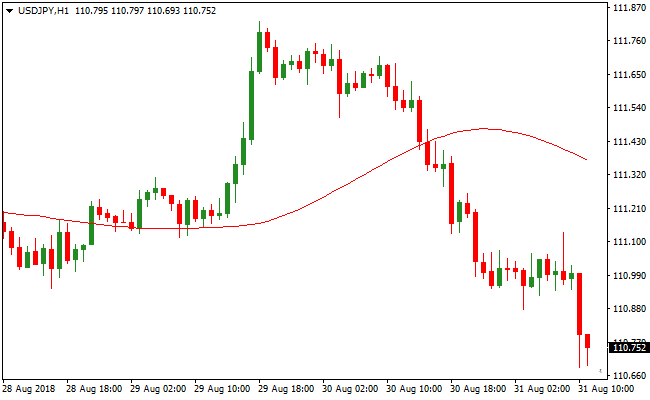
The chart displays the Two Pole Super Smooth Filter indicator applied to the USDJPY currency pair.
Price action above the indicator line highlights an uptrend, while price below shows a downtrend.
Traders can use the filter to focus on trend-aligned entries and combine it with an oscillator for confirmation.
Guide to Trade with the Two-Pole Super Smooth Filter Indicator
Buy Rules
- Wait for price action to move and stay above the Two Pole Super Smooth Filter line.
- Confirm the trend direction with an oscillator such as MACD or Slow Stochastic.
- Enter a buy trade at the close of a bullish confirmation candle.
Sell Rules
- Wait for price action to move below the Two Pole Super Smooth Filter line.
- Confirm bearish momentum using an oscillator.
- Enter a sell trade at the close of a bearish confirmation candle.
Stop Loss
- Place the stop loss just below a recent minor swing or support level for buy trades.
- Place the stop loss just above a recent minor swing or resistance level for sell trades.
- Move the stop loss to break-even once the trade moves in your favor by a set number of pips.
Take Profit
- Close the trade when price crosses the filter line in the opposite direction.
- Alternatively, target nearby support or resistance zones for exits.
- Partial profits can be taken when price reaches a predetermined pip target.
- Let trades run if the trend remains strong and aligned with the filter.
Two-Pole Filter and Elite Pro Scalper Forex Scalping Strategy for MT4
This MT4 scalping strategy combines the smooth trend detection of the Two Pole Super Smooth Filter indicator with the fast entry precision of the Elite Pro Scalper indicator.
The objective is to scalp short price movements while trading strictly in the direction of the prevailing market bias.
The Two-Pole Super Smooth Filter acts as a reliable trend filter.
When price remains above the red filter line, market conditions are bullish. When price stays below the red line, the market is considered bearish.
This helps traders avoid countertrend trades and focus only on high probability setups.
The Elite Pro Scalper indicator provides clear buy and sell arrows that signal potential entry points.
Blue arrows indicate buy opportunities, while red arrows indicate sell opportunities.
When these signals align with the trend direction defined by the Two-Pole Filter, the probability of a successful scalp increases.
This strategy is designed for fast paced trading on M1, M5, and M15 charts.
It performs best on liquid instruments such as EURUSD, GBPUSD, USDJPY, and major crosses.
It is suitable for disciplined scalpers who prefer quick trades with controlled risk.
Buy Entry Rules
- Price must be trading clearly above the red line of the Two-Pole Super Smooth Filter.
- The Elite Pro Scalper indicator must print a blue arrow on the chart.
- Enter the buy trade at the close of the candle where the blue arrow appears.
- Stop loss is placed a few pips below the most recent swing low or slightly below the red filter line.
- Take profit is set between 5 and 15 pips depending on the timeframe and market volatility.
Sell Entry Rules
- Price must be trading clearly below the red line of the Two-Pole Super Smooth Filter.
- The Elite Pro Scalper indicator must print a red arrow on the chart.
- Enter the sell trade at the close of the candle where the red arrow appears.
- Stop loss is placed a few pips above the most recent swing high or slightly above the red filter line.
- Take profit is set between 5 and 15 pips depending on the timeframe and market volatility.
Advantages
- Strong trend filtering reduces the number of low quality countertrend trades.
- Clear arrow signals simplify entry decisions and execution speed.
- Low exposure time minimizes overnight and news related risks.
- Effective on very low timeframes for active scalpers.
- Works well across different market sessions with sufficient volatility.
Drawbacks
- Scalping requires fast execution and low spreads to remain profitable.
- Not suitable for traders who prefer slow paced or long term trading styles.
Case Study 1
On USDJPY M5 during the Asian session, price stayed consistently above the red line of the Two-Pole Super Smooth Filter.
After a brief pullback, the Elite Pro Scalper printed a blue arrow near support.
A buy trade was entered at candle close. The stop loss was placed below the recent low.
Price moved steadily upward and reached a 10 pip take profit within minutes.
Case Study 2
On GBPUSD M1 during the London open, price was trading below the red filter line, confirming bearish conditions.
Shortly after a minor retracement, a red arrow appeared from the Elite Pro Scalper indicator.
A sell trade was opened at confirmation. The stop loss was set above the last swing high.
The market continued lower and hit the 13 pip take profit target quickly.
Strategy Tips
- Always trade in the direction defined by the Two-Pole Super Smooth Filter to maintain trend alignment.
- Use the Elite Pro Scalper arrows only as entry timing signals, not as standalone trade decisions.
- Focus on high liquidity sessions such as London and New York for cleaner price movement.
- Avoid trading during major economic news releases to reduce sudden volatility spikes.
- Keep position sizes consistent and risk per trade low to manage the high frequency nature of scalping.
- Close trades manually if momentum slows before reaching the take profit target to protect gains.
Download Now
Download the “two-pole-super-smoother-filter.mq4” Metatrader 4 indicator
FAQ
How does the Two-Pole Super Smooth Filter differ from a standard moving average?
Unlike a simple moving average, this indicator applies a smoothing filter that reduces short-term price fluctuations.
Can I adjust the sensitivity for different trading styles?
Yes, the CutoffPeriod input allows you to make the filter more responsive for scalping or smoother for intraday trading.
What is the best way to combine it with other indicators?
Traders often use it with oscillators like MACD or Slow Stochastic. The filter defines trend direction, while the oscillator confirms entries, reducing the chance of false trades.
Summary
The Two-Pole Super Smooth Filter indicator for MT4 provides a reliable way to identify market trends with minimal noise.
Its smoothing filter ensures that signals reflect genuine trend direction, reducing false breakouts.
Traders can adjust the CutoffPeriod to suit scalping or intraday setups, and combining it with an oscillator strengthens trade confirmation.
Its adaptability across currency pairs and timeframes makes it a versatile tool for short-term trading.
Overall, the indicator simplifies trend trading, helping traders focus on high-probability opportunities while maintaining clear risk management.


