About the XO Indicator
The XO Indicator for MT5 is a trend-following tool designed to deliver quick buy and sell signals for scalpers and day traders.
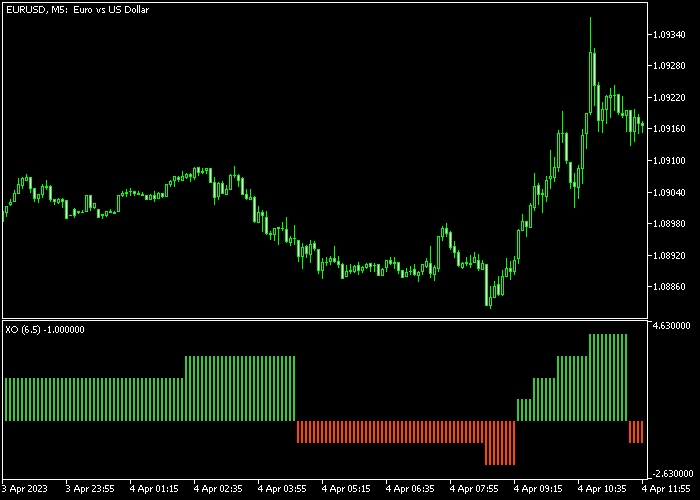
Green boxes indicate bullish momentum, while red boxes indicate bearish momentum.
This indicator is most effective on low-spread currency pairs.
It is optimized for fast-paced trading, such as scalping or intraday strategies, though it can be applied to longer-term trading with caution.
This tool helps traders stay aligned with the trend and act quickly on momentum changes.
Customizable inputs include box size, applied price, and display style.
Free Download
Key Features
- A trend-following oscillator displayed in a separate chart window.
- Best used on low-spread currency pairs.
- Customizable box size, applied price, and style settings.
- Fast signals for quick entry and exit decisions.
- Helps traders identify trend direction and momentum changes efficiently.
- Simple visual design suitable for both beginners and experienced traders.
Indicator Chart
The XO Indicator displays green and red boxes oscillating above and below the zero line in a separate chart window.
Green boxes indicate bullish momentum and potential buy entries, while red boxes indicate bearish momentum and potential sell entries.
Traders can use the box colors to quickly track trend changes.

Guide to Trade with the XO Indicator
Buy Rules
- Wait for the first green box to appear above the zero line.
- Recognize the green box as a bullish signal.
- Open a buy trade when the green box is confirmed.
- Monitor the trend as long as the green boxes continue appearing.
Sell Rules
- Wait for the first red box to appear below the zero line.
- Recognize the red box as a bearish signal.
- Open a sell trade when the red box is confirmed.
- Monitor the trend as long as the red boxes continue appearing.
Stop Loss
- For buy trades, place the stop loss a few pips below the most recent short-term support.
- For sell trades, place the stop loss a few pips above the most recent short-term resistance.
- Consider trailing the stop as the trend develops.
Take Profit
- Set a fixed take profit target according to your trading plan (e.g., 8-25 pips for intraday or scalping).
- Manage trades actively to lock in profits if momentum slows.
- Optionally, close trades when the opposite colored box appears (green for sell trades, red for buy trades) as an additional exit signal.
Download Now
FAQ
How do the green and red boxes work?
Green boxes indicate bullish momentum and potential buy entries, while red boxes indicate bearish momentum and potential sell entries.
Which trading styles work best?
The XO Indicator is ideal for scalping and intraday trading. Swing traders can use it cautiously on higher timeframes.
Can I adjust the indicator settings?
Yes, box size, applied price, and style can be customized to suit your trading preferences and timeframe.
Is it beginner-friendly?
Yes, the visual green and red boxes make it easy for beginners to follow trends and identify trade opportunities quickly.
Summary
The XO indicator provides fast, trend-following signals using green and red boxes on a separate oscillator.
Traders can easily identify bullish and bearish momentum for scalping and intraday trading.
Stop loss and take profit levels are managed independently, giving traders flexibility to protect capital and lock in profits.
The indicator’s customizable settings allow adaptation to any preferred timeframe or trading style.
With simple visual signals and fast updates, XO helps traders make timely decisions and stay aligned with market trends efficiently.




