
About the Scalper Signal Indicator
The Scalper Signal indicator for MT4 is a true scalping indicator and works great if you are looking to capture 5-15 pips/trade.
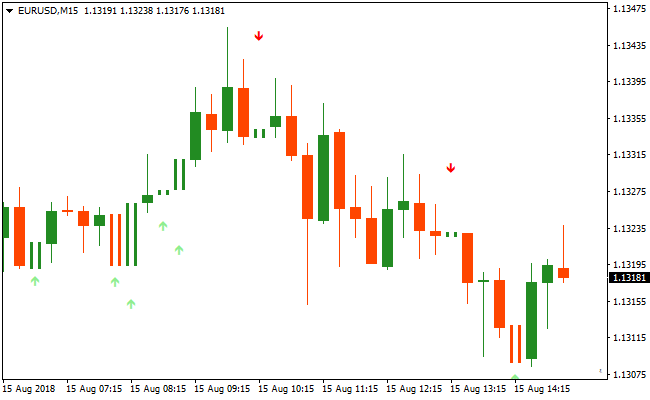
The Scalper Signal indicator displays buy and sell arrows on the main chart.
Green arrows to buy the currency pair and red arrows to sell the pair.
Use it on the shorter timeframes, for example the 5 minute and 15 minute chart would fit.
It’s strongly recommended to use it together with a trend following forex indicator.
For instance, the 50 EMA or 75 SMA would fit in this case.
Price above the 50 EMA or 75 SMA (bullish trend)? Only trade the green arrows and avoid the red arrows.
Price below the 50 EMA or 75 SMA (bearish trend)? Only trade the red arrows and avoid the green arrows.
Free Download
Download the “scalper-signal.mq4” MT4 indicator
Key Features
- Plots buy and sell arrows directly on the price chart.
- Green arrows for bullish entries, red arrows for bearish entries.
- Optimized for short-term scalping strategies.
- Works effectively when combined with a trend filter.
Indicator Chart
The chart displays the Scalper Signal Indicator on the main price window.
Green arrows appear for potential buy entries and red arrows for potential sell entries.
Traders use the chart to quickly identify and act on high-probability scalping signals while staying aligned with the dominant trend.
Guide to Trade with the Scalper Signal Indicator
Buy Rules
- Confirm price is trading above the 50 EMA or 75 SMA.
- Wait for the first green arrow to appear.
- Open a buy position at the close of the signal candle.
- Only take buy signals in line with the overall trend.
Sell Rules
- Confirm price is trading below the 50 EMA or 75 SMA.
- Wait for the first red arrow to appear.
- Open a sell position at the close of the signal candle.
- Only take sell signals that follow the trend direction.
Stop Loss
- Place the stop a few pips beyond recent swing highs or lows.
- Use volatility-based stops for fast-moving markets.
- Trail the stop slightly behind price if the trade moves in your favor.
- Reduce position size if the stop needs to be wider than usual.
Take Profit
- Target small, quick gains of 5–15 pips per trade.
- Close the trade if an opposite arrow appears before reaching the target.
- Optionally use nearby support or resistance as exit points.
- Consider scaling out partially if price shows strong momentum in your favor.
Scalper Signal Indicator and Volty Channel Signals Forex Scalping Strategy
This MT4 scalping strategy combines precise entry signals from the Scalper Signal Metatrader 4 Forex Indicator with trend direction confirmation from the Volty Channel Signals Metatrader 4 Forex Indicator.
The Scalper Signal indicator gives clear buy and sell arrows directly on the chart, with green arrows indicating a buy setup and red arrows indicating a sell setup.
The Volty Channel Signals indicator displays a blue line for bullish market conditions and a red line for bearish conditions.
Combining these two helps traders find short-term scalping opportunities that align with the prevailing trend.
This strategy is designed for lower timeframes such as M1, M5, and M15.
It works for traders who want quick entry and exit rules while keeping trades aligned with trend direction.
By requiring both a trend filter and a signal entry, traders can reduce false signals and focus on capturing fast intraday movements.
Buy Entry Rules
- The Volty Channel Signals line must be blue, indicating bullish market conditions.
- Wait for the first green arrow from the Scalper Signal indicator to appear on the chart.
- Enter a buy scalping position at the close of the candle where the green arrow appears while the Volty Channel line remains blue.
- Place the stop loss below the recent minor swing low or a nearby support level.
- Set a take profit target of 5–15 pips depending on the timeframe and current volatility.
- Exit the trade early if the Volty Channel line turns red before hitting the take profit.
Sell Entry Rules
- The Volty Channel Signals line must be red, indicating bearish market conditions.
- Wait for the first red arrow from the Scalper Signal indicator to appear on the chart.
- Enter a sell scalping position at the close of the candle where the red arrow appears while the Volty Channel line remains red.
- Place the stop loss above the recent minor swing high or a nearby resistance level.
- Set a take profit target of 5–15 pips depending on the timeframe and current volatility.
- Exit the trade early if the Volty Channel line turns blue before reaching the take profit.
Advantages
- Signals are easy to interpret, allowing for quick decision-making on lower timeframes.
- Combining trend confirmation with entry arrows reduces the risk of false trades.
- Works effectively on multiple timeframes, making it versatile for different scalping styles.
- Suitable for a wide range of currency pairs, offering frequent trading opportunities.
- Helps traders stay aligned with the overall market trend, minimizing countertrend entries.
Drawbacks
- Frequent monitoring is necessary due to the fast-paced nature of scalping on lower timeframes.
- May generate false entries during sideways or low-volatility market conditions.
- Limited profit per trade due to the short-term focus of scalping strategies.
- Requires strict discipline to avoid overtrading when multiple signals appear in quick succession.
Case Study 1
On NZDUSD M1 during the Asian session, the Volty Channel Signals line was blue, indicating bullish conditions.
Shortly after, a green arrow appeared from the Scalper Signal indicator.
A buy position was opened and later closed for 9 pips as price moved up sharply and approached a short-term resistance area, capturing a quick intraday uptick.
Case Study 2
On USDCAD M15 during the London session, the Volty Channel Signals line turned red, signaling bearish trend bias.
A red arrow then appeared from the Scalper Signal indicator.
A sell position was entered and closed for 25 pips when price slid down toward a nearby support level, taking advantage of the intraday downward momentum.
Strategy Tips
- Wait for clear alignment between the trend line color and signal arrows to increase the probability of success.
- Use shorter timeframes like M1 and M5 for faster scalping, and M15 for slightly larger intraday moves.
- Focus on major currency pairs with lower spreads for tighter risk control and better scalping opportunities.
- Place stop losses just beyond recent price swings to protect trades from minor retracements.
- Consider taking partial profits near key price levels while letting the remainder run if trend conditions persist.
- Be patient and only take signals that meet all entry criteria to avoid unnecessary losses.
Download Now
Download the “scalper-signal.mq4” Metatrader 4 indicator
FAQ
Which timeframes are best for the Scalper Signal Indicator?
Lower timeframes such as M5 and M15 work best due to the quick nature of scalping opportunities.
Can the indicator be used without a trend filter?
Yes, but using a trend filter like the 50 EMA improves accuracy and reduces countertrend losses.
How many pips should I aim for per trade?
The indicator is optimized for short-term gains, typically 5–15 pips per trade, depending on market volatility.
Summary
The Scalper Signal Indicator provides a simple and effective method to trade short-term momentum on MT4.
Its arrow-based signals allow traders to act quickly while focusing on high-probability scalping moves.
By combining it with a trend-following indicator, traders can avoid countertrend trades and increase the success rate of small, fast trades.
Its design makes it suitable for scalpers, day traders, and anyone looking to capture quick market moves efficiently.





