

About the Half Trend Alert Indicator
The Half Trend Alert indicator for MT5 is a popular trend-following tool that generates straightforward buy and sell signals directly on the price area.
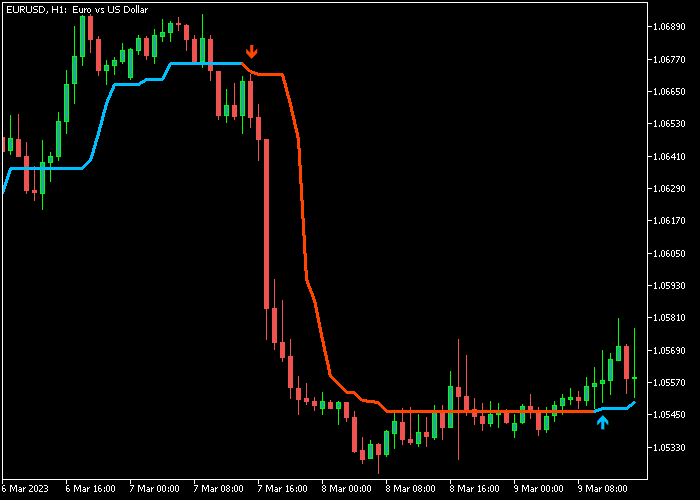
It appears as a bi-colored trend line that changes color depending on market direction, accompanied by arrows that highlight potential entry points.
When the market shifts into a bullish phase, the indicator prints a blue arrow and the trend line turns blue.
When bearish pressure takes control, a red arrow appears and the line turns red.
The indicator follows overall market momentum and adapts well to different trading styles.
Beginners often use it to identify simple trend entries, while experienced traders combine it with support and resistance levels or price action confirmation.
Built-in alerts and customizable settings make it easy to adapt to various trading environments.
Free Download
Half Trend New Alert.mq5 Indicator (MT5)
Key Features
- A bi-colored trend line that reflects bullish and bearish market direction.
- Automatic buy and sell arrows that highlight potential entry signals.
- Trend-following logic designed to capture early market reversals.
- Customizable amplitude setting to adjust sensitivity.
- Optional alerts, sound notifications, and email alerts.
- Works on multiple currency pairs and timeframes.
- Simple visual layout that makes signals easy to follow.
Indicator Chart
The Half Trend Alert Indicator appears directly on the price area as a colored trend line that shifts between blue and red depending on market direction.
Blue arrows mark bullish signals while red arrows highlight bearish opportunities, helping traders recognize potential trend changes.
Guide to Trade with Half Trend Alert Indicator
Buy Rules
- Wait for a blue buy arrow to appear on the price area.
- Confirm that the Half Trend line turns blue and begins pointing upward.
- Open a buy trade at the close of the signal candle.
- Avoid entries if the signal appears directly inside strong resistance.
Sell Rules
- Wait for a red sell arrow to appear on the price area.
- Confirm that the Half Trend line switches to red and starts moving downward.
- Open a sell trade at the close of the signal candle.
- Avoid entries if the signal forms directly above strong support.
Stop Loss
- Place the stop loss a few pips below the blue Half Trend line for buy trades.
- Place the stop loss a few pips above the red Half Trend line for sell trades.
- Never trade without a predefined risk level.
Take Profit
- Close the buy trade when a red sell arrow appears.
- Close the sell trade when a blue buy arrow appears.
- Alternatively, target nearby support or resistance zones.
- Traders can also trail the stop loss as the trend develops.
MT5 Half Trend Alert Indicator MT5 + Clever Forex Scalper Indicator Strategy
This forex scalping strategy combines the Half-Trend Alert Indicator with the Clever Forex Scalper Indicator to identify directional market movement and refine short-term execution entries.
The Half Trend Alert Indicator defines the dominant micro trend using color-based directional shifts, while the Clever Forex Scalper Indicator provides precise entry timing through signal arrows.
This combination is designed for traders focused on intraday scalping on M5 and M15 timeframes, where quick confirmation and strict exit rules are required.
The strategy works by aligning trend direction first, then using scalping signals only in the same direction.
The Half Trend Alert Indicator filters out counter-trend trades, while the scalper indicator improves timing accuracy.
This approach is suitable for traders who prefer structured entries with clear invalidation rules and fast decision execution.
Buy Entry Rules
- The Half Trend Alert Indicator shows a blue arrow indicating an active buy trend.
- Wait for a blue buy signal arrow from the Clever Forex Scalper Indicator aligned with the trend direction.
- Enter buy trade immediately after the scalper confirmation candle closes.
- Stop loss is placed below the most recent swing low formed before the entry signal.
- Take profit is set when Half Trend Alert indicator changes to a red sell trend arrow, which triggers a full exit of the buy position.
Sell Entry Rules
- The Half Trend Alert Indicator shows a red arrow indicating an active sell trend.
- Wait for a red sell signal arrow from the Clever Forex Scalper Indicator aligned with the trend direction.
- Enter the sell trade after the signal candle closes and confirms momentum continuation.
- Stop loss is placed above the most recent swing high formed before the entry signal.
- Take profit is executed when the Half Trend Alert indicator switches to a blue buy trend arrow, which closes the entire sell position.
Case Study 1 Buy Scenario
The market was moving in a down phase before the Half Trend Alert Indicator printed a blue arrow indicating a new buy trend phase.
After this shift, price retraced slightly and the Clever Forex Scalper Indicator printed a blue buy signal arrow.
A buy position was opened after candle close confirmation.
The trade was later closed when the Half Trend indicator printed a red sell trend arrow, which confirmed the end of the bullish phase and triggered the exit rule for the buy position.
Case Study 2 Sell Scenario
The Half Trend Indicator displayed a red arrow confirming a bearish trend on the lower timeframe.
After a minor pullback, the Clever Forex Scalper Indicator generated a red sell signal arrow in alignment with the trend.
A sell trade was executed after candle confirmation.
The position was closed when the Half Trend Alert indicator switched to a blue buy trend arrow, indicating a full trend reversal and triggering the exit condition for the sell setup.
Download Now
Half Trend New Alert.mq5 Indicator (MT5)
FAQ
What does the amplitude setting control?
The amplitude setting controls the sensitivity of the Half Trend calculation.
A lower value produces faster signals but may increase false entries, while a higher value smooths the trend line and produces fewer signals.
Does the indicator provide alerts?
Yes. The indicator includes several alert options such as pop-up alerts, sound alerts, email notifications, and push notifications to your mobile device.
Which timeframes work best with the Half Trend Alert Indicator?
The indicator can operate on any timeframe, but many traders prefer M15, M30, H1, and H4 because these periods tend to filter out smaller market fluctuations.
Can the indicator be combined with other tools?
Yes. Many traders combine the Half Trend signals with support and resistance levels, moving averages, or price action patterns to improve trade confirmation.
Summary
The Half Trend Alert Indicator offers a straightforward way to follow market direction and identify possible trend reversals.
The colored trend line and arrow signals help traders react quickly when momentum shifts.
Its customizable settings and alert options allow traders to adapt the indicator to different strategies and trading styles.
Beginners benefit from the simple signals, while experienced traders can integrate it into more advanced analysis.
When used with proper risk management and additional confirmation, the Half Trend Alert Indicator can become a reliable tool for identifying trend opportunities in the forex market.





