
About the Daily Drawdown Indicator
The Daily Drawdown Indicator for MT5 is a practical risk management tool that calculates and displays the total drawdown generated by all trades executed during the current trading day.
It helps traders monitor their daily performance and maintain strict control over losses.
Drawdown represents the decline in account equity caused by losing trades.
In trading, monitoring daily drawdown is essential because it shows how much capital has been lost during a single trading session.
This indicator automatically calculates the daily drawdown percentage and displays it directly on the trading interface.
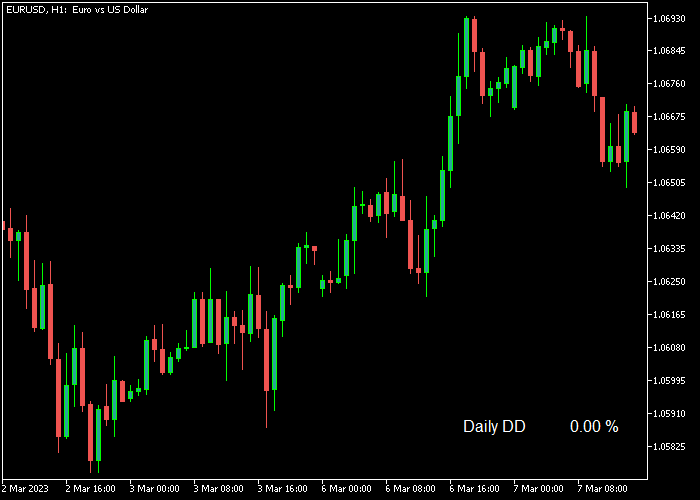
The value appears in the lower right corner of the price area as “Daily DD %”, allowing traders to quickly check their current loss level while managing positions.
By keeping the drawdown visible at all times, traders can stay disciplined and avoid overtrading after a losing streak.
Free Download
Daily Drawdown.mq5 Indicator (MT5)
Key Features
- Automatically calculates the daily drawdown percentage.
- Displays the value directly on the trading interface.
- Helps traders monitor daily performance and losses.
- Useful for maintaining strict risk management rules.
- Supports all buy and sell trades executed during the day.
- Simple display that remains visible while trading.
- Optional setting to activate or deactivate the daily drawdown calculation.
Indicator Chart
The Daily Drawdown Indicator appears in the lower right corner of the price area and displays the current daily drawdown percentage.
This value updates automatically as trades open and close, helping traders track their daily loss level while analyzing the market.
Guide to Trade with Daily Drawdown Indicator
Buy Rules
- Check the Daily DD percentage before opening a new trade.
- Avoid opening buy trades if the daily drawdown is already close to your maximum loss limit.
- Enter a buy trade only when your risk level for the day remains within acceptable limits.
- Continue monitoring the drawdown value after entering the trade.
Sell Rules
- Review the Daily DD percentage before opening a sell position.
- Avoid selling if your daily drawdown is already approaching your maximum risk limit.
- Open a sell trade only if the current drawdown level allows additional risk.
- Monitor the drawdown value as market conditions change.
Stop Loss
- Place stop losses based on your trading strategy or nearby support and resistance.
- Ensure each trade risk fits within your daily drawdown limits.
- Avoid increasing position size when drawdown levels rise.
Take Profit
- Close trades when your strategy reaches its profit target.
- Secure profits early if the day has already produced strong gains.
- Avoid excessive trading once the daily drawdown level becomes significant.
- Focus on consistent results rather than recovering losses aggressively.
Download Now
Daily Drawdown.mq5 Indicator (MT5)
FAQ
Why is tracking daily drawdown important?
Tracking drawdown helps traders control risk and avoid large single-day losses.
It also supports disciplined trading decisions and better performance monitoring.
Can the Daily Drawdown indicator be turned on or off?
Yes. The indicator includes an input setting that allows traders to activate or deactivate the daily drawdown monitoring feature.
Summary
The Daily Drawdown Indicator is a simple yet valuable tool for monitoring daily trading performance.
By displaying the current drawdown percentage directly on the platform, traders can immediately see how much risk they have taken during the day.
This awareness helps prevent emotional trading decisions and encourages disciplined risk management.
Traders can quickly decide whether to continue trading or pause after reaching their planned daily loss threshold.
With its straightforward display and automatic calculation, the Daily Drawdown Indicator is a useful addition for traders who want better control over their daily trading results.





