
About the Dolly Graphics Indicator
The Dolly Graphics Indicator for MT5 is a full-featured Forex trading system that provides clear buy and sell signals along with suggested stop losses and take profit targets.
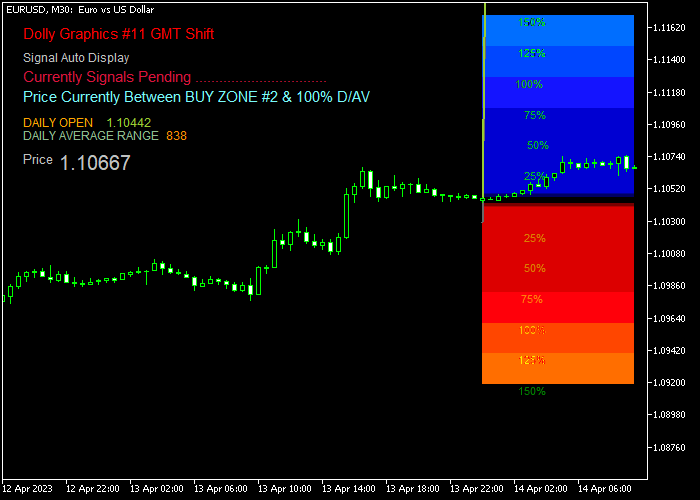
Signals appear directly on the main price chart as colored trading zones, making it easy for traders to identify trade opportunities at a glance.
Blue zones indicate potential buy trades, while red zones highlight possible sell trades.
The indicator also adds helpful comments to the most recent signals, such as “pending,” “buy,” or “sell”.
It also provides additional information including the daily open price, daily average range, and the current price of the currency pair.
Traders should monitor the indicator closely at the start of the London and American sessions, when the most reliable signals tend to appear.
Several customizable inputs allow traders to adjust GMT shift, alerts, auto signals, display comments, colors for buy and sell zones, and targets for both buy and sell trades.
Free Download
Dolly_Graphics_v11-GMTShift.mq5 Indicator (MT5)
Key Features
- Displays buy and sell signals directly on the main price chart.
- Blue zones indicate buy signals; red zones indicate sell signals.
- Provides suggested stop loss and take profit levels.
- Adds comments to recent trading signals for clarity.
- Shows additional info like daily open price, daily average range, and currency pair price.
- Customizable GMT shift and session settings.
- Alerts and auto signal options available.
- Supports all Forex pairs and timeframes.
Indicator Chart
The Dolly Graphics Indicator appears on the main price chart as blue and red trading zones.
Blue zones highlight buy opportunities, red zones indicate sell opportunities, and the chart comments show the status of the most recent signals.
Guide to Trade with Dolly Graphics Indicator
Buy Rules
- Wait for a new blue buy zone to appear on the chart.
- Open a buy trade once the signal is confirmed.
- Place the stop loss at the suggested Dolly Graphics SL price.
- Close the trade at the suggested take profit target or follow the signal updates.
Sell Rules
- Wait for a new red sell zone to appear on the chart.
- Open a sell trade once the signal is confirmed.
- Place the stop loss at the suggested Dolly Graphics SL price.
- Close the trade at the suggested take profit target or follow the signal updates.
Stop Loss
- Use the stop loss price suggested by the Dolly Graphics indicator for each trade.
- Adjust slightly if needed based on market volatility and recent swing points.
- Keep the stop loss consistent with the suggested level for effective risk management.
- Consider trailing the stop if the trade moves strongly in your favor.
Take Profit
- Close buy trades at the Dolly Graphics suggested take profit for long positions.
- Close sell trades at the Dolly Graphics suggested take profit for short positions.
- Optionally take partial profits if the price nears important support or resistance zones.
- Adjust exits only if market conditions change significantly from the initial signal.
Download Now
Dolly_Graphics_v11-GMTShift.mq5 Indicator (MT5)
FAQ
Do I need another indicator to use Dolly Graphics?
No. Dolly Graphics provides complete signals including entries, stop losses, and take profit targets.
How do the colored zones work?
Blue zones represent buy opportunities, and red zones represent sell opportunities. Zones appear around the price area to guide entries.
When are the best times to use this indicator?
Check for new signals at the start of the London and American trading sessions, when market activity is high and signals are most reliable.
Can I customize the indicator?
Yes. Inputs such as GMT shift, alerts, auto signals, comments display, colors, and target levels for both buy and sell trades can all be adjusted.
Summary
The Dolly Graphics Indicator offers a complete Forex trading system with visual buy and sell zones, suggested stop losses, and take profit levels.
Its clear signals and chart comments make it easy to follow trades without confusion.
By monitoring the indicator during active sessions and using the suggested risk management levels, traders can execute trades more confidently.
Customizable inputs allow it to fit a variety of trading styles and Forex pairs, making it a versatile tool for both beginners and experienced traders.





