About the Weekly Time Bar Indicator
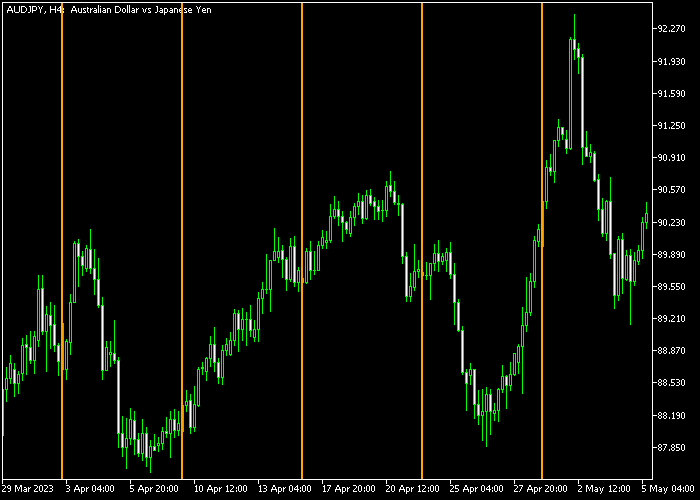
The Weekly Time Bar indicator for MT5 marks the start of each trading week with a vertical line on the price chart.
This allows traders to quickly assess how price moved during the previous week and identify overall trends.
The indicator can be customized to match your charting preferences, including line style, width, and color.
It works on any instrument available in MT5, making it a versatile tool for both forex and other markets.
Traders can use it as a standalone visual guide or alongside other technical indicators to confirm trend direction and weekly support/resistance levels.
Free Download
Time_Bar_Custom_Weekly.mq5 Indicator (MT5)
Key Features
- Draws a vertical line on the chart at the start of each week.
- Customizable line style, width, and color for personal charting preferences.
- Provides a clear overview of weekly price trends.
- Can be combined with other indicators for trend analysis or support/resistance planning.
Indicator Chart
The Weekly Time Bar appears as a vertical line across the price chart at the beginning of each week.
Traders can quickly see the price trend for that week and use the lines to gauge momentum, plan entries, and align trades with weekly highs and lows.
Guide to Trade with Weekly Time Bar Indicator
Buy Rules
- Observe price movement after the weekly line is drawn.
- Look for bullish continuation above key weekly levels.
- Consider buying if price holds above the previous week’s support.
- Combine with trend indicators for confirmation before entering.
Sell Rules
- Observe price movement after the weekly line is drawn.
- Look for bearish continuation below key weekly levels.
- Consider selling if price holds below the previous week’s resistance.
- Confirm with trend indicators before opening a sell trade.
Stop Loss
- For buy trades, place a stop loss slightly below the prior week’s support level.
- For sell trades, place a stop loss slightly above the prior week’s resistance level.
- Use weekly high and low levels for additional risk control.
Take Profit
- Close buy trades near the top of the week’s high or key resistance levels.
- Close sell trades near the bottom of the week’s low or key support levels.
- Optionally, use a fixed pip profit target of your preference.
Download Now
Time_Bar_Custom_Weekly.mq5 Indicator (MT5)
FAQ
Can the Weekly Time Bar be customized?
Yes, you can adjust the line style, width, and color to match your charting preferences for better visibility.
Does it provide trading signals?
It doesn’t generate explicit buy or sell signals. It’s mainly a visual tool to track weekly trend structure and align trades with weekly price action.
How can I use it effectively?
Combine the weekly lines with other trend or support/resistance indicators to time entries and exits or evaluate the strength of weekly price movements.
Summary
The Weekly Time Bar Indicator for MT5 provides a simple but powerful way to monitor weekly price trends.
Vertical lines mark the start of each week, giving traders a quick overview of market behavior and helping plan trades around key weekly levels.
Customizable styling and compatibility with all instruments make it an easy-to-use tool for trend visualization and trade alignment.





