

About the Ultra Trend Indicator
The Ultra Trend indicator for MT5 provides traders with dynamic buy and sell signals suitable for scalping, day trading, and swing trading.
It analyses the price action and highlights the prevailing market trend at any moment using a colored cloud overlay.
Green clouds suggest bullish conditions, while orange clouds indicate bearish conditions.
The visual signals make spotting trend opportunities fast and intuitive.
Traders can customize several settings including start period, step, instances, Ultra Trend smoothing period, and smoothing phase.
The indicator adapts to all timeframes and instruments such as Forex pairs, indices, stocks, and metals.
By combining cloud signals with market context, traders can time their entries and exits effectively to align with strong trends.
Free Download
Ultra trend.mq5 Indicator (MT5)
Key Features
- Colored cloud indicates trend direction: green for buy, orange for sell.
- Analyzes price action to provide timely trend signals.
- Customizable start period, step, instances, and smoothing settings.
- Helps traders enter trades aligned with strong market trends.
Indicator Chart
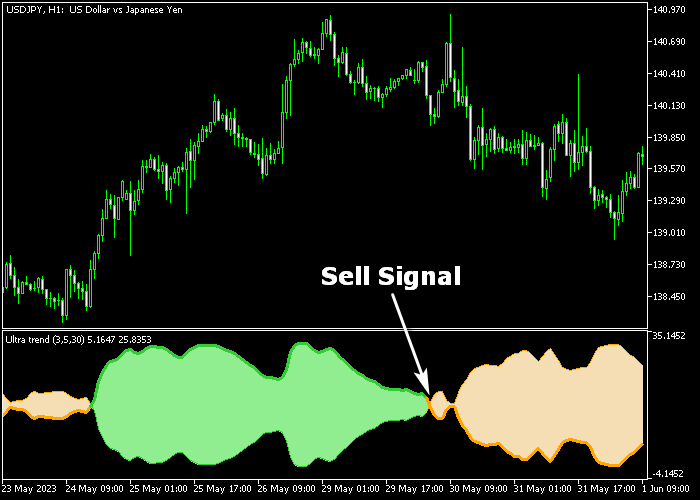
The Ultra Trend indicator appears in a separate window below the main price chart as a colored cloud.
Green clouds indicate bullish conditions and potential buy opportunities. Orange clouds indicate bearish conditions and potential sell opportunities.
The chart shows trend direction at a glance and allows traders to react quickly to changing market momentum.
Guide to Trade with Ultra Trend Indicator
Buy Rules
- Wait for a green cloud to appear on the chart.
- Confirm that the trend is upward by observing price movement.
- Open a buy trade when momentum supports the signal.
- Monitor the cloud for any reversal into orange.
Sell Rules
- Wait for an orange cloud to appear on the chart.
- Confirm that the trend is downward by observing price action.
- Open a sell trade when momentum supports the signal.
- Monitor the cloud for any reversal into green.
Stop Loss
- For buy trades, place a stop loss 2-3 pips below the nearest technical support.
- For sell trades, place a stop loss 2-3 pips above the nearest technical resistance.
- Adjust stops based on volatility or recent swing highs and lows.
Take Profit
- Close buy trades when the cloud turns orange or at a chosen profit target.
- Close sell trades when the cloud turns green or at a chosen profit target.
- Follow cloud direction to avoid closing trades too early.
Ultra Trend MT5 Strategy with Hull Moving Average for London and New York Sessions
This strategy combines the Ultra Trend Indicator with the Hull Moving Average (HMA) to create a clean session-based trading system for London and New York markets.
The Ultra Trend indicator provides momentum direction using a subwindow cloud.
A green cloud signals bullish pressure, while an orange cloud signals bearish conditions.
The Hull Moving Average is used as a fast trend filter on the main chart.
A green HMA line indicates bullish structure, while a red HMA line signals bearish direction.
Because HMA reacts quickly to price changes, it works well for intraday session trading where momentum shifts often occur.
This strategy is designed for M15 and M30 charts during high liquidity periods such as the London open and New York session overlap.
These sessions often provide stronger directional moves and cleaner setups.
Buy Entry Rules
- Wait for the Ultra Trend indicator to show a green cloud in the subwindow.
- Confirm that the Hull Moving Average is green and sloping upward.
- Enter a buy trade at the close of the confirmation candle during the London or New York session.
- Place the stop loss below the most recent swing low or below the HMA line for extra protection.
- Trail the stop loss below the HMA line as price continues upward.
- Exit the trade when the Ultra Trend cloud turns orange or when price closes below the HMA.
Sell Entry Rules
- Wait for the Ultra Trend indicator to show an orange cloud in the subwindow.
- Confirm that the Hull Moving Average is red and sloping downward.
- Enter a sell trade at the close of the confirmation candle during the London or New York session.
- Place the stop loss above the most recent swing high or above the HMA line for protection.
- Trail the stop loss above the HMA line as price moves lower.
- Exit the trade when the Ultra Trend cloud turns green or when price closes above the HMA.
Case Study 1: Buy Trade Example (GBP/USD London Session M15)
During the London session, the Ultra Trend indicator shifted into a green cloud, showing growing bullish momentum.
At the same time, the Hull Moving Average turned green and started sloping upward, confirming trend alignment.
A buy trade was opened at the candle close.
The stop loss was placed below the recent swing structure and then trailed under the HMA line as price moved higher.
The long trade was closed when the Ultra Trend cloud changed to orange, indicating that bullish momentum had ended and the session move was fading.
Case Study 2: Sell Trade Example (USD/JPY New York Session M15)
During the New York session, the Ultra Trend indicator displayed an orange cloud, signaling bearish pressure.
The Hull Moving Average turned red and began sloping downward, confirming downside trend direction.
A sell trade was opened at the candle close.
The stop loss was placed above the recent swing high and trailed above the HMA line as price continued lower.
The short trade was closed for 43 pips when the Ultra Trend cloud turned green, indicating a shift in momentum and the end of the bearish session move.
Download Now
Ultra trend.mq5 Indicator (MT5)
FAQ
How does the Ultra Trend indicator signal a trend?
Green clouds indicate bullish trends, orange clouds indicate bearish trends. The cloud overlay shows the prevailing trend at a glance.
Which settings should I adjust for sensitivity?
Traders can modify start period, step, instances, and smoothing settings to make signals more responsive or smooth, depending on trading style.
Is this indicator suitable for short-term trading on M1 and M5 charts?
Yes, it works well for scalping and day trading. It also adapts to longer-term swing trades when using higher timeframes.
Summary
The Ultra Trend indicator is a versatile tool for trend-based trading.
Its colored cloud provides immediate visual signals for buy and sell opportunities.
Customizable settings allow traders to adapt the indicator to any instrument or timeframe.
By observing cloud color and trend direction, traders can enter trades aligned with market momentum.
It is suitable for traders looking to make informed decisions with minimal technical analysis time.





