
About the Corrected Momentum Indicator
The Corrected Momentum Indicator for MT5 measures the strength and direction of market momentum.
It transforms standard momentum readings into a smoothed oscillator that responds more quickly to price movements.
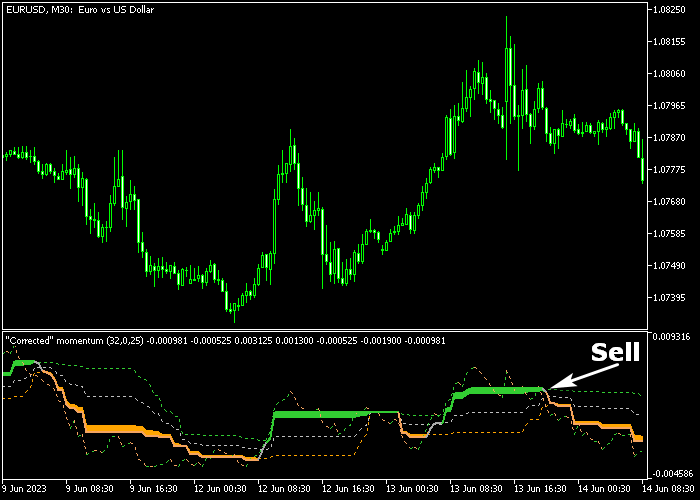
The indicator appears in a separate window below the main price area, with green zones signaling bullish momentum and orange zones signaling bearish momentum.
Traders can identify potential trade entries quickly without relying on price alone.
The tool is effective for scalping, day trading, and swing trading.
Its smoothing reduces false signals while retaining responsiveness to changes in momentum.
Settings such as momentum period, smoothing factor, and alert options can be customized to fit different instruments and timeframes.
Free Download
Corr_momentum.mq5 Indicator (MT5)
Key Features
- Smoothed momentum oscillator for faster signal response.
- Green zones indicate bullish momentum and potential buy entries.
- Orange zones indicate bearish momentum and potential sell entries.
- Customizable momentum period and smoothing factor.
- Optional alerts and push notifications.
Indicator Chart
The Corrected Momentum Indicator shows blue and orange zones beneath the price.
Green zones highlight rising momentum for potential buys, while orange zones indicate falling momentum for potential sells.
Traders can monitor the duration and intensity of the zones to judge market strength.
Transitions from blue to orange or vice versa signal shifts in momentum that may lead to trade opportunities.

Guide to Trade with Corrected Momentum Indicator
Buy Rules
- Wait for the green zone to appear in the oscillator.
- Enter a buy position as soon as the blue zone begins forming.
- Follow the direction of the blue zone while it remains active.
- Monitor momentum to confirm the strength of the trend.
Sell Rules
- Wait for the orange zone to appear in the oscillator.
- Enter a sell position as soon as the orange zone begins forming.
- Follow the direction of the orange zone while it remains active.
- Monitor momentum to confirm the strength of the trend.
Stop Loss
- For buy trades, place the stop below the recent swing support.
- For sell trades, place the stop above the recent swing resistance.
Take Profit
- Close buy trades when the orange zone appears, indicating a shift in momentum.
- Close sell trades when the green zone appears, indicating a momentum shift.
- Use the opposite signal as a guide for optimal exit timing.
MT5 Corrected Momentum Forex Indicator Day Trading Strategy
This day trading strategy combines the Corrected Momentum Forex Indicator for MT5 with the Super Signals Channel V3 Indicator for MT5.
It is designed to capture intraday trends by aligning momentum signals with clear channel direction.
The Corrected Momentum indicator provides clean and reliable momentum signals by reducing noise and highlighting true price acceleration.
The Super Signals Channel V3 indicator plots dynamic channel lines that show the direction of the trend and key support and resistance zones.
This makes it easier to follow the dominant market direction and avoid trading against it.
This combination works best on M5, M15, and M30 timeframes.
It suits day traders who want structured entries during active sessions such as London and New York.
Buy Entry Rules
- Wait for the Corrected Momentum indicator to move into the green zone.
- Confirm that the Super Signals Channel is sloping upward, showing a clear bullish trend.
- Enter a buy trade at the opening of the next candle.
- Place the stop loss below the lower channel boundary or the most recent swing low.
- Take profit when the momentum changes direction or shifts out of the green zone, or close near a resistance level.
Sell Entry Rules
- Wait for the Corrected Momentum indicator to move into the orange zone.
- Confirm that the Super Signals Channel is sloping downward, indicating a bearish trend.
- Enter a sell trade at the opening of the next candle.
- Place the stop loss above the upper channel boundary or the most recent swing high.
- Take profit when the momentum changes direction or shifts out of the orange zone, or close near a support level.
Case Study 1: Buy Trade Setup
On the M15 timeframe, price started forming higher highs and higher lows.
The Super Signals Channel clearly sloped upward, confirming a bullish environment.
At the same time, the Corrected Momentum indicator entered the green zone, signaling strong upward momentum.
A buy trade was entered at the next candle. The stop loss was placed below the lower channel line.
Price continued rising steadily within the channel.
The trade was closed when the momentum changed direction, indicating a short-term bearish trend reversal.
Case Study 2: Sell Trade Setup
On the M5 timeframe, price moved downward within a clearly defined descending channel.
The Super Signals Channel showed a consistent downward slope.
The Corrected Momentum indicator entered the orange zone, confirming bearish momentum.
A sell trade was opened at the next candle. The stop loss was placed above the upper channel boundary.
Price dropped quickly as the trend continued.
The position was closed when the momentum changed direction, locking in profits before a reversal.
Download Now
Corr_momentum.mq5 Indicator (MT5)
FAQ
How does the Corrected Momentum Indicator differ from standard momentum indicators?
It smooths momentum readings to reduce false signals while remaining responsive to market changes. This provides earlier and more reliable trade entries.
Which markets and timeframes are best?
The indicator works well on all MT5 instruments. Lower timeframes suit scalping, while 1-hour and daily charts are suitable for swing trading.
Can the indicator be customized?
Yes. Traders can adjust momentum period, smoothing factor, and alerts to fit their preferred trading style.
Summary
The Corrected Momentum Indicator identifies shifts in market momentum with blue and orange zones.
Its smoothed design reduces false signals while maintaining responsiveness.
Buy and sell entries are easy to interpret, making it suitable for scalping, intraday, and swing trading.
Adjustable settings allow adaptation to different instruments and timeframes.
Using the opposite zone as the exit signal helps traders capture trends effectively.
Overall, this lightweight oscillator is a practical tool for monitoring momentum and making informed trading decisions.





