

About the Precision Trend Indicator
The Precision Trend Indicator for MT5 is designed to forecast market direction using a filtered momentum approach.
It highlights emerging trends while reducing market noise through an internal sensitivity filter.
The indicator appears in a separate window below the main price area as a histogram.
Green bars indicate bullish pressure. Orange bars indicate bearish pressure.
This visual format allows traders to assess the dominant direction quickly.
Unlike overly reactive tools, Precision Trend focuses on stability.
The built-in sensitivity setting helps limit false shifts during consolidation.
Traders can adjust the precision trend period and sensitivity to align with short-term or swing trading strategies.
It suits traders who want straightforward trend confirmation without overcomplicating their analysis.
Free Download
Precision_Trend_vhisto8.mq5 Indicator (MT5)
Key Features
- Histogram-based trend display in a separate window.
- Green bars for bullish momentum.
- Orange bars for bearish momentum.
- Built-in sensitivity filter to reduce false signals.
- Adjustable precision trend period.
- Customizable sensitivity parameter.
- Suitable for intraday and swing trading.
- Lightweight and responsive across timeframes.
Indicator Chart
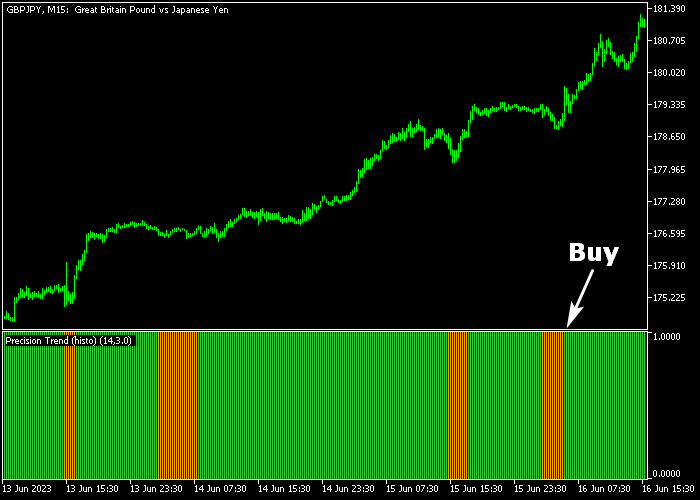
The Precision Trend Indicator displays alternating green and orange histogram bars in the window below the main price area.
When green bars appear after orange bars, bullish momentum is building. When orange bars replace green bars, sellers are gaining control.
The histogram makes trend transitions easy to identify.
Guide to Trade with Precision Trend Indicator
Buy Rules
- Wait for the first green Precision Trend bar to appear.
- Confirm the previous bars were orange to signal a shift.
- Open a buy market order at the close of the signal bar.
- Ensure higher timeframe direction supports the trade.
Sell Rules
- Wait for the first orange Precision Trend bar to appear.
- Confirm the previous bars were green to signal a reversal.
- Open a sell market order at the close of the signal bar.
- Check that downside momentum is building before entry.
Stop Loss
- For buy trades, place the stop below the most recent support zone.
- For sell trades, place the stop above the most recent resistance zone.
- Avoid tightening the stop prematurely.
Take Profit
- Close buy trades when the histogram prints the first orange bar.
- Close sell trades when the histogram prints the first green bar.
- Alternatively, secure profits at a minimum 1.5 to 1 risk to reward ratio.
- Advanced traders may scale out at key support or resistance levels.
Precision Trend MT5 Scalping Strategy with Blau T3 Ergodic Oscillator
This scalping strategy combines the Precision Trend Forex Indicator with the Blau T3 Ergodic Candlestick Oscillator to find quick intraday opportunities during high activity periods.
It focuses on identifying when momentum and trend align so traders can enter trades that have a higher chance of moving quickly in their favor.
The Precision Trend indicator highlights trend strength using colored histogram bars.
It is effective for spotting clean directional shifts and avoiding sideways conditions.
The Blau T3 Ergodic Oscillator offers a sensitive momentum reading while smoothing out noise.
When the oscillator moves above the zero level, it confirms buying pressure.
When it crosses back below zero, it signals selling pressure. Using these together helps avoid premature entries.
This strategy works best on M1 and M5 charts during the London and New York sessions when movement is fast and frequent.
Buy Entry Rules
- Wait for at least two consecutive green bars on the Precision Trend histogram.
- Confirm that the Blau T3 oscillator is above the zero level.
- Enter a buy trade at the opening of the next candle.
- Place a stop loss below the recent minor swing low.
- Take profit when the Blau T3 oscillator crosses back below zero or when Precision Trend turns orange.
Sell Entry Rules
- Wait for at least two consecutive orange bars on the Precision Trend histogram.
- Confirm that the Blau T3 oscillator is below the zero level.
- Enter a sell trade at the opening of the next candle.
- Place the stop loss above the recent minor swing high.
- Take profit when the Blau T3 oscillator crosses above zero or when Precision Trend turns green.
Case Study 1: EURUSD M1 Buy Setup
During the London session on EURUSD M1, price showed a sequence of green bars on the Precision Trend histogram, indicating growing bullish pressure.
Soon after, the Blau T3 oscillator crossed above zero, confirming that momentum had shifted upward.
A buy trade was entered at the next candle open. Price rose with swift upward moves.
The trade stayed active until the Blau T3 oscillator crossed back below zero, signaling that bullish momentum was fading.
The position was closed at that point, capturing a solid short-term gain before the market retraced.
Case Study 2: GBPJPY M5 Sell Setup
During the New York session on GBPJPY M5, the Precision Trend histogram printed two consecutive orange bars, indicating that sellers were gaining control.
Shortly after this sequence, the Blau T3 oscillator dropped below zero, confirming bearish momentum.
A sell trade was opened at the next candle. Price moved lower over the following few bars.
Later, when the Precision Trend histogram turned green and the Blau T3 oscillator crossed back above zero, the trade was immediately exited for a 12 pip loss.
Download Now
Precision_Trend_vhisto8.mq5 Indicator (MT5)
FAQ
What makes Precision Trend different from other histogram indicators?
It uses a built-in sensitivity filter that limits rapid color changes during ranging periods. This helps traders avoid reacting to minor price fluctuations.
Which settings should short-term traders adjust?
Short-term traders can reduce the precision trend period to increase responsiveness. They may also slightly adjust sensitivity to match volatile sessions.
Can it be used as a standalone system?
Yes. The histogram provides both direction and entry timing. However, combining it with support and resistance analysis can further improve trade selection.
Summary
The Precision Trend Indicator delivers filtered momentum signals through a clean histogram format.
Green and orange bars highlight shifts in market control without overwhelming the trader.
Its adjustable period and sensitivity allow flexibility across trading styles.
It performs reliably during volatile sessions and higher timeframes where trends develop with strength.
With consistent execution and thorough testing, it can develop into a reliable trend confirmation tool within any trading strategy.





