
About the Ticks Indicator
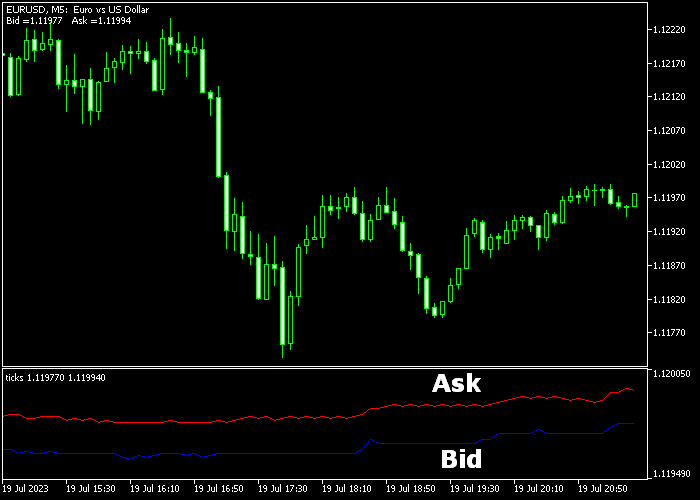
The Ticks indicator for MT5 creates a dedicated tick chart that updates with each market movement.
It plots bid and ask prices in real time, helping traders track price fluctuations more precisely.
The bid price is displayed as a blue line, while the ask price is shown as a red line.
It allows traders to monitor spreads, liquidity, and order flow in a clear format.
The indicator lets you adjust the number of ticks displayed and the point increments.
This flexibility allows fine-tuning for different trading styles and market conditions.
Free Download
Key Features
- Dedicated tick chart for real-time price tracking.
- Blue line for bid price and red line for ask price.
- Adjustable number of ticks and point increments.
- Visualizes spread changes instantly.
- Ideal for scalping and short-term trading strategies.
Indicator Chart
The Ticks indicator displays a live tick chart in a separate window below the main price area.
The blue bid line and red ask line update dynamically with each market tick.
This provides an accurate view of micro price movements, helping traders make precise entry and exit decisions.
The chart is particularly useful for observing spread behavior during active trading sessions.
Guide to Trade with the Ticks Indicator
Buy Rules
- Identify narrowing spread or bullish price movement on the tick chart.
- Confirm alignment with the higher timeframe trend for direction.
- Open a buy trade when the bid price shows a strong upward movement.
- Monitor the ask line behavior for confirmation of momentum.
Sell Rules
- Identify narrowing spread or bearish price movement on the tick chart.
- Confirm alignment with the higher timeframe trend for direction.
- Open a sell trade when the ask price shows strong downward movement.
- Monitor bid line behavior for confirmation of momentum.
Stop Loss
- Set stop loss based on nearby micro-support or resistance levels.
- Ensure stops respect the current bid/ask spread.
Take Profits
- Close buy trades when price momentum slows or reverses on the tick chart.
- Close sell trades when price momentum slows or reverses on the tick chart.
- Alternatively, target fixed pip gains for scalping.
Ticks Indicator and MACD MT5 Scalping Strategy
This scalping strategy pairs the Ticks Indicator MT5 with the MACD Indicator for MT5 to create high‑precision M1 entries.
The Ticks Indicator gives real‑time price movement feedback by updating with each tick so you can see true micro price action as it unfolds.
The MACD histogram then adds a clean momentum filter.
When the histogram is above zero you look for buys, and when it is below zero you look for sells.
This strategy is intended for scalpers who trade on the one‑minute chart during the most active periods of the trading day. It is best used on major pairs with tight spreads.
Buy Entry Rules
- Look for the MACD histogram to be above zero indicating bullish momentum.
- Confirm with the Ticks Indicator showing increasing upticks or a spike in tick activity upward.
- Enter a buy when a clear uptick cluster forms after the histogram crosses above zero.
- Place the stop loss a few pips below recent micro swing lows on the M1 chart.
- Take profit after a quick 5 to 15 pips or when the MACD histogram begins to shrink toward zero.
Sell Entry Rules
- Look for the MACD histogram to be below zero indicating bearish momentum.
- Confirm with the Ticks Indicator showing increasing downticks or a spike in tick activity downward.
- Enter a sell when a clear downtick cluster forms after the histogram crosses below zero.
- Place the stop loss a few pips above recent micro swing highs on the M1 chart.
- Take profit after a quick 5 to 15 pips or when the MACD histogram begins to shrink toward zero.
Case Study 1
On the EUR/USD M1 chart during the London session, the MACD histogram moved above zero as price gained momentum.
At the same time, the Ticks Indicator showed a rapid series of upticks on the tick chart, signaling strong short‑term buying activity.
A buy entry was placed at the close of that uptick cluster.
Price moved upward quickly and the trade was closed for an 8 pip gain when the MACD histogram began to shrink toward zero and upticks faded.
Case Study 2
On USD/JPY M1 during New York hours, the MACD histogram dropped below zero, indicating bearish momentum.
The Ticks Indicator then displayed a strong cluster of downticks, suggesting sellers are dominating micro price action.
A sell trade was entered immediately as the downtick cluster peaked.
Price slid lower, and the position was exited for a 13 pip profit when the histogram started to lose strength and the downtick frequency decreased.
Download Now
FAQ
How does this indicator help with scalping?
It shows real-time bid and ask movements, allowing scalpers to track spreads and short-term momentum for precise entries and exits.
Can the number of ticks be adjusted?
Yes. Traders can increase or decrease the number of ticks displayed to control chart detail and manage visual noise.
Can it be used alongside other indicators?
Yes. It pairs well with trend, support/resistance, or momentum indicators to refine entry and exit timing.
Summary
The Ticks indicator provides a precise view of bid and ask price movements in real time.
Its dedicated tick chart helps traders monitor micro price action and spreads accurately.
With adjustable tick and point settings, it supports scalpers and intraday traders looking for better timing and improved trade execution.
Combining it with other technical tools enhances decision-making in fast-moving markets.





