

About the Chart Symbol Changer Indicator
The Chart Symbol Changer indicator for MT5 allows traders to quickly switch between charts using a convenient symbol changer dashboard.
This tool saves time by letting you load any chart directly without opening multiple windows manually.
You can customize the symbol list to include your preferred currency pairs, indices, or other instruments.
The indicator supports all timeframes and works with any trading instrument available on your MT5 broker’s platform.
Free Download
Chart Symbol Changer for MT5.mq5 Indicator (MT5)
Key Features
- Quickly switch between charts using the symbol changer dashboard.
- Customizable symbol list for easy access to preferred instruments.
- Simplifies chart navigation and saves time during trading sessions.
- Easy to install and configure with adjustable inputs.
- Improves workflow for scalping, day trading, and multi-instrument strategies.
Indicator Chart
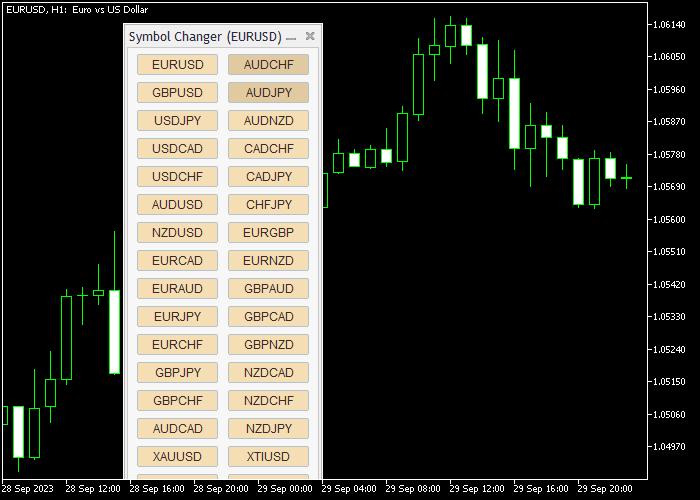
The Chart Symbol Changer indicator appears on the main price area as a dashboard panel.
It displays your selected symbols and allows instant switching between charts.
Traders can navigate efficiently, keep track of multiple instruments, and respond quickly to market opportunities.
Guide to Trade with Chart Symbol Changer Indicator
Buy Guidance
- Use the dashboard to quickly navigate to charts where potential buy setups are forming.
- Combine with trend-following or reversal indicators to confirm bullish opportunities.
- Analyze price action and other technical tools before entering a buy trade.
- Focus on efficiency and speed when monitoring multiple symbols for buy signals.
Sell Guidance
- Use the symbol changer to access charts with potential sell setups quickly.
- Combine with technical indicators such as moving averages or oscillators to confirm bearish signals.
- Analyze market structure and price action before placing sell trades.
- Monitor multiple instruments efficiently to catch high-probability sell opportunities.
Chart Symbol Changer and Trend Manager MT5 Day Trading Strategy
This day trading strategy combines the Chart Symbol Changer Indicator for MT5 and the Trend Manager Indicator MT5 to help traders quickly scan multiple pairs and trade strong intraday trends.
The Chart Symbol Changer allows fast switching between currency pairs, making it easier to find active setups during the trading session.
The Trend Manager indicator provides clear direction using sea-green bars for bullish conditions and magenta bars for bearish conditions.
This combination is effective for day traders who want to stay flexible and take advantage of multiple opportunities across different pairs on 15-minute, 30-minute, and 1-hour charts.
Buy Entry Rules
- Use the Chart Symbol Changer to scan multiple currency pairs and identify those showing strong upward movement.
- Confirm the trend using the Trend Manager indicator. Sea-green bars must be visible, indicating bullish conditions.
- Enter a buy trade when a fresh sea-green bar appears after a small pullback or consolidation.
- Place the stop loss below the recent swing low or below the start of the bullish move.
- Set the take profit at the next resistance level or use a risk-reward ratio such as 1:1.5 or 1:2, depending on market conditions.
- Alternatively, close the trade when the Trend Manager bars change from sea-green to magenta, signaling a potential reversal.
Sell Entry Rules
- Use the Chart Symbol Changer to quickly switch and find pairs showing strong downward movement.
- Confirm the trend using the Trend Manager indicator. Magenta bars must be present, indicating bearish conditions.
- Enter a sell trade when a new magenta bar appears after a brief pullback.
- Place the stop loss above the recent swing high or above the start of the bearish move.
- Set the take profit at the next support level or use a risk-reward ratio such as 1:1.5 or 1:2.
- Alternatively, close the trade when the Trend Manager bars switch from magenta to sea-green, indicating a possible trend change.
Cast Study 1
On the EUR/GBP 30-minute chart, the Chart Symbol Changer helped identify a pair with strong upward momentum.
The Trend Manager displayed consistent sea-green bars, confirming a bullish trend.
After a short pullback, a fresh sea-green bar appeared, signaling a continuation.
A buy trade was entered with the stop loss placed below the recent swing low.
Price moved steadily upward and reached the next resistance level, where the take profit was secured.
The trade also showed the option to hold longer until the bars changed color for extended gains.
Cast Study 2
On the NZD/USD 15-minute chart, the Chart Symbol Changer allowed quick identification of a bearish setup.
The Trend Manager showed magenta bars, confirming a downtrend.
After a brief consolidation, a new magenta bar appeared, signaling a sell opportunity.
A sell trade was placed with the stop loss above the recent swing high.
Price dropped toward the next support level, hitting the take profit target.
The position could also have been managed by exiting when the bars shifted color, demonstrating flexible trade management for day trading.
Download Now
Chart Symbol Changer for MT5.mq5 Indicator (MT5)
FAQ
Can I customize the symbols displayed on the dashboard?
Yes, you can edit the symbol panel list to include your preferred forex pairs, indices, or other instruments.
Which timeframes are supported?
The indicator works on all timeframes, allowing you to switch between charts efficiently without limitation.
Can I use this indicator with any trading instrument?
Yes, it supports all instruments offered by your MT5 broker, including forex, commodities, and indices.
Does it generate trading signals?
No, the Chart Symbol Changer Indicator does not produce buy or sell signals. It is purely a navigation and workflow tool.
Summary
The Chart Symbol Changer Indicator for MT5 streamlines chart navigation by allowing traders to switch symbols instantly.
Its customizable dashboard improves workflow efficiency, especially when monitoring multiple instruments or timeframes.
While it does not generate trading signals, it enhances speed and convenience in chart analysis.
Suitable for scalpers, day traders, and swing traders, this indicator is a practical tool for improving trading efficiency and responsiveness.





