
About the Ehlers Laguerre Filter Indicator
The Ehlers Laguerre Filter indicator for MT5 is a simplified version of the classic Laguerre oscillator.
It produces clear buy and sell signal lines on the main chart, forming a crossover system suitable for multiple trading styles.
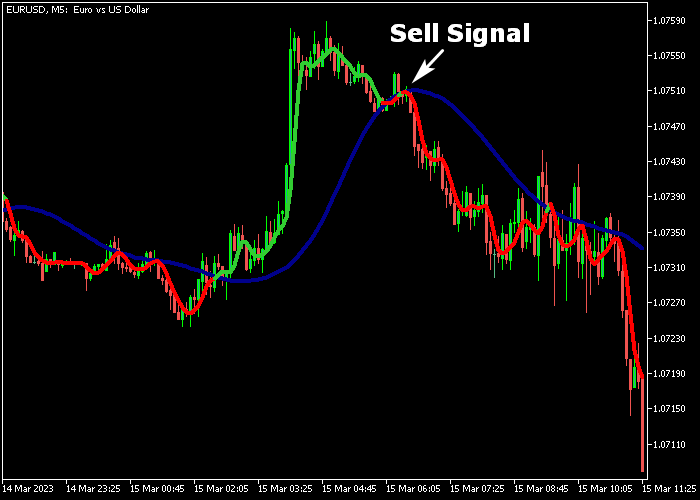
Green lines indicate bullish momentum, while red lines indicate bearish momentum.
The indicator is designed to help identify trend changes and potential entry points without relying on complex analysis.
The gamma period and visual settings can be adjusted to refine signals.
You can experiment with these inputs to match your preferred trading timeframe or strategy.
Free Download
EhlersLaguerreFilter.mq5 Indicator (MT5)
Key Features
- Simplified Laguerre oscillator for easy trend identification.
- Green and red signal lines for bullish and bearish trends.
- Visual crossover system suitable for multiple trading styles.
- Adjustable gamma period to fine-tune sensitivity.
- Customizable line colors and styles for clarity.
- Provides clear entry points without additional indicators.
Indicator Chart
The Ehlers Laguerre Filter plots colored signal lines directly on the main chart.
Green lines indicate potential bullish setups, red lines indicate bearish setups.
Crossovers between these lines can be used to confirm trend changes and potential trade entries.
Guide to Trade with Ehlers Laguerre Filter Indicator
Buy Rules
- Enter a buy position when a green signal line appears on the chart.
- Confirm that momentum aligns with upward price movement.
- Wait for the signal line to stabilize before opening the trade.
- Use the crossover and previous swing points as confirmation for timing.
Sell Rules
- Enter a sell position when a red signal line appears on the chart.
- Confirm that downward momentum is present.
- Wait for the signal line to stabilize before opening the trade.
- Use the crossover and previous swing points as confirmation for timing.
Stop Loss
- For buy trades, place the stop below the nearest support cluster.
- For sell trades, place the stop above the nearest resistance cluster.
- Alternatively, use the recent price volatility range multiplied by 1.2 as a dynamic stop.
Take Profit
- Exit buy trades near previous resistance or when a red signal line appears.
- Exit sell trades near previous support or when a green signal line appears.
- Alternatively, exit trades using a fixed reward-to-risk ratio according to your strategy.
Ehlers Laguerre Filter MT5 + MACD Day Trading Strategy
This day trading strategy combines the Ehlers Laguerre Filter Indicator with the MACD Indicator to follow clean trend direction and confirm momentum shifts.
It is designed to capture intraday moves when both trend and momentum align.
The Ehlers Laguerre Filter shows the main market direction through color changes.
A green line signals bullish conditions, while a red line signals bearish conditions.
This helps traders stay aligned with the dominant trend instead of trading against price structure.
The MACD confirms momentum by using zero-line crossings.
When MACD moves above zero, it signals bullish momentum. When it moves below zero, it signals bearish momentum.
This strategy works best on M15 and H1 charts during London and New York sessions, when price moves are more directional and less random.
Buy Entry Rules
- Wait for the Ehlers Laguerre Filter to turn green, showing bullish trend direction.
- Confirm that MACD crosses above the zero line.
- Enter a buy trade at the next candle open after both conditions align.
- Place a stop loss below the most recent swing low formed during the current trend.
- Close the trade when the Laguerre Filter turns red or when MACD crosses below zero.
Sell Entry Rules
- Wait for the Ehlers Laguerre Filter to turn red, showing bearish trend direction.
- Confirm that MACD crosses below the zero line.
- Enter a sell trade at the next candle open after both conditions align.
- Set the stop loss above the most recent swing high formed during the current trend.
- Close the trade when the Laguerre Filter turns green or when MACD crosses above zero.
Case Study 1 (EURUSD – M15)
On EURUSD M15, the Laguerre Filter turned green, indicating a shift into bullish conditions.
Shortly after, MACD crossed above the zero line, confirming upward momentum.
A buy trade was entered at the next candle open.
The stop loss was placed 3 pips below the recent swing low.
The trade was closed when the Laguerre Filter turned red, showing a full shift from bullish to bearish conditions.
Case Study 2 (GBPJPY – H1)
On GBPJPY H1, the Laguerre Filter turned red, showing bearish trend direction.
Shortly after, MACD crossed below the zero line, confirming downside momentum.
A sell trade was entered at the next candle open.
The stop loss was placed 3 pips above the recent swing high.
The trade was closed when MACD crossed back above zero, showing a short-term shift from bearish to bullish conditions.
Download Now
EhlersLaguerreFilter.mq5 Indicator (MT5)
FAQ
How does the Ehlers Laguerre Filter indicator generate signals?
The indicator uses simplified Laguerre oscillation to draw green and red signal lines. Crossovers and line colors indicate bullish or bearish market conditions.
Can the gamma period be adjusted?
Yes. The gamma input allows fine-tuning of the signal sensitivity, which can affect how early or late signals appear.
How should stop loss and take profit be set?
Stops should be placed beyond the nearest swing high/low, while take profit can follow opposite signals or key support/resistance zones.
Summary
The Ehlers Laguerre Filter indicator provides a simple yet effective system to identify trend changes.
Its colored signal lines allow clear entries and exits, while adjustable gamma settings let you tailor sensitivity to your preferred strategy.
Using separate stop loss and take profit levels ensures proper risk management and maximizes the potential of each trade, making this indicator suitable for traders seeking straightforward trend signals.