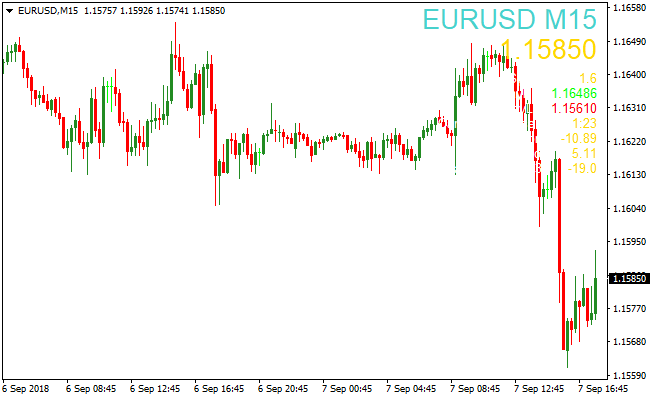
About the Market Information Indicator
The Market Information indicator for MT4 provides key trading details directly on your main chart.
It shows the currency pair name, current timeframe, live quote, and spread in a clear and easy-to-read format.
Daily high and low prices are also displayed, helping traders quickly assess market conditions without switching windows.
This indicator is ideal for traders who need constant market awareness and want to combine it with other trading strategies.
Free Download
Download the “market-info-indicator.mq4” MT4 indicator
Key Features
- Displays the currency pair and current timeframe in large font.
- Shows the live bid/ask quote and spread in real time.
- Highlights the daily high and low prices for quick reference.
- Reduces the need to switch between MT4 windows.
Indicator Chart
The Market Information indicator shows the currency pair, timeframe, current quote, spread, and daily high/low directly on the main MT4 chart.
This display allows traders to monitor market conditions at a glance and make informed trading decisions without opening multiple windows or tools.

Guide to Trade with Market Information Indicator
Buy Rules
- Use the daily high and low as reference levels for potential buy setups.
- Consider buying if price approaches the daily low with bullish signals from your strategy.
- Check the spread to ensure favorable trading conditions.
- Confirm trade with additional trend or price action indicators.
Sell Rules
- Use the daily high and low as reference levels for potential sell setups.
- Consider selling if price approaches the daily high with bearish signals from your strategy.
- Check the spread to avoid costly entries.
- Confirm trade with trend indicators or other technical signals.
Stop Loss
- Place stop loss slightly beyond the daily high for sell trades.
- Place stop loss slightly below the daily low for buy trades.
Take Profit
- Close trades near the opposite daily high or low.
- Alternatively, exit when your trend indicator signals a reversal.
- Consider partial profit-taking at key support/resistance levels.
MT4 Strategy: Market Information + Kaufman Bands Day Trading Method
This MT4 day trading strategy combines the Market Information Indicator and the Kaufman Bands Indicator to capture intraday trend moves.
The Market Information Indicator provides essential data such as the currency pair, timeframe, current quote, and spread, allowing traders to quickly evaluate trading conditions.
The Kaufman Bands Indicator generates blue dotted lines for buy trends and yellow dotted lines for sell trends, providing clear entry signals based on short-term momentum.
This strategy is designed for M15, M30, and H1 charts, offering reliable day trading opportunities.
By combining market data with trend signals, traders can focus on higher probability intraday trades while avoiding low liquidity or high-spread periods.
This method is ideal for traders seeking structured day trading setups across multiple currency pairs.
Buy Entry Rules
- The Kaufman Bands indicator shows a blue dotted line, confirming a bullish trend.
- Check the Market Information indicator for low spread and active market conditions.
- Enter the trade immediately after both conditions are met.
- Place a stop loss below the recent swing low.
- Take profit when the blue dotted line turns yellow or after capturing 20-30 pips.
Sell Entry Rules
- The Kaufman Bands indicator shows a yellow dotted line, confirming a bearish trend.
- Check the Market Information indicator for low spread and active market conditions.
- Enter the trade immediately after both conditions are met.
- Place a stop loss above the recent swing high.
- Take profit when the yellow dotted line turns blue or after capturing 20-30 pips.
Advantages
- Combines trend signals with market condition data for more reliable intraday entries.
- Works effectively on multiple timeframes suitable for day trading.
- Helps avoid false breakouts and unfavorable market conditions.
- Can be applied to multiple major and minor currency pairs.
Drawbacks
- Requires patience to wait for trend and market conditions to align.
- Not suitable for very short-term scalping strategies.
- Overtrading risk exists if traders take every signal without discipline.
Case Study 1: EURUSD M30
During the London session, EURUSD displayed a blue Kaufman Bands dotted line indicating a buy signal, while the Market Information indicator confirmed low spread and active conditions.
A buy trade was entered with a stop below the recent swing low.
Price moved upward steadily, and the trade was closed when the blue line turned yellow, capturing a 25 pip profit.
Combining trend signal with market data ensured a high-probability intraday trade.
Case Study 2: AUDJPY H1
AUDJPY formed a yellow Kaufman Bands dotted line signaling a sell trade, with the Market Information indicator confirming favorable conditions.
A sell trade was executed with a stop above the recent swing high.
Price moved downward during the session and the trade was closed after 22 pips, when the line turned blue.
Strategy Tips
- Focus on major pairs during active London and New York sessions for stronger trend moves.
- Confirm both trend direction and favorable market conditions before entering trades.
- Use stop losses at logical support or resistance points to manage risk effectively.
- Take profits either when the signal line changes color or after reaching 20-30 pip targets.
- Check higher timeframes briefly to ensure the intraday trend aligns with broader market direction.
Download Now
Download the “market-info-indicator.mq4” Metatrader 4 indicator
FAQ
What information does this indicator display?
It shows the currency pair, timeframe, current quote, spread, and the daily high and low directly on the main MT4 chart.
Can it be used on any currency pair or timeframe?
Yes. The indicator works on all currency pairs and any timeframe without affecting performance.
Does it require other indicators for trading?
No. It provides information only, but combining it with trend, price action, or pattern indicators can improve decision-making.
Can I adjust the display settings?
Yes. You can customize font size, color, and position on the chart through the indicator’s input menu.
Summary
The Market Information indicator for MT4 delivers essential trading details directly on your main chart.
By showing the currency pair, timeframe, live quote, spread, and daily high/low, it keeps traders informed and ready to act.
It is flexible, lightweight, and works on all currency pairs and timeframes.
It ensures that all key market information is visible at a glance, supporting faster and more confident trading decisions.





