

About the QQE of Velocity MTF Indicator
The QQE of Velocity MTF indicator for MT5 combines the Quantitative Qualitative Estimation (QQE) with velocity analysis to generate accurate buy and sell signals.
It plots an alternating colored line in a separate window beneath the main chart, making trend detection simple and visual.
A blue line indicates bullish momentum, while a brown line signals bearish conditions.
The indicator never repaints, ensuring traders can rely on the signals for entry and exit decisions.
Settings such as velocity period, timeframe, smoothing factor, fast and slow periods, applied price, and interpolate can be adjusted.
This flexibility allows traders to optimize the indicator for different currency pairs, market conditions, and trading styles.
Free Download
QQE of velocity – mtf.mq5 Indicator (MT5)
Key Features
- Displays a non-repainting colored line for trend signals.
- Blue line signals bullish trends; brown line signals bearish trends.
- Combines QQE and velocity for enhanced signal accuracy.
- Customizable velocity period, smoothing factor, and fast/slow periods.
- Adjustable timeframe, applied price, and interpolation method.
- Works with Forex, indices, commodities, and cryptocurrencies.
Indicator Chart
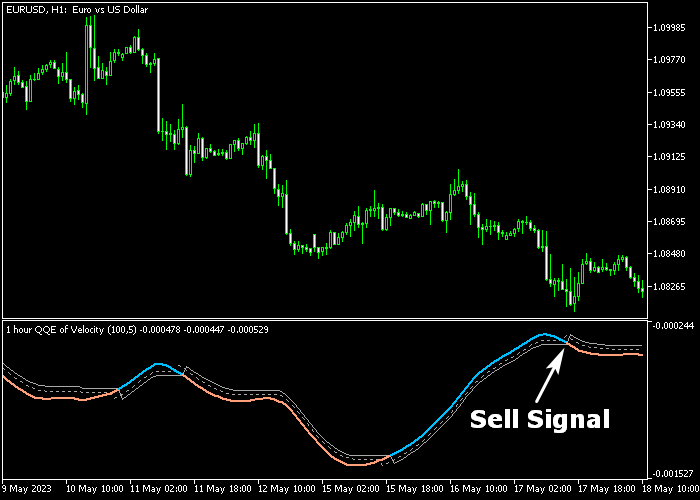
The QQE of Velocity MTF indicator appears in a separate chart panel beneath the main price area.
The line alternates colors: blue for bullish momentum and brown for bearish momentum.
Traders can monitor these color changes to determine market trend direction, identify entry points, and anticipate potential reversals efficiently.
Guide to Trade with QQE of Velocity MTF Indicator
Buy Rules
- Wait for the QQE Velocity line to turn blue.
- Open a buy trade once the bullish line is confirmed.
- Monitor price action for alignment with trend momentum.
- Use additional confirmation tools if desired for higher confidence.
Sell Rules
- Wait for the QQE Velocity line to turn brown.
- Open a sell trade once the bearish line is confirmed.
- Observe the trend and price movement for consistency.
- Optionally combine with support/resistance or other indicators.
Stop Loss
- For buy trades, place a stop slightly below the nearest short-term support.
- For sell trades, place a stop slightly above the nearest short-term resistance.
- Stops can be adjusted depending on volatility and risk preference.
Take Profit
- Close trades when the QQE Velocity line switches color (blue to brown or brown to blue).
- Alternatively, use a fixed take profit target according to your strategy.
QQE of Velocity MTF Indicator Day Trading Strategy for MT5
This strategy combines the QQE of Velocity MTF Indicator with the Trend Manager Indicator to create a structured day trading system based on momentum confirmation and trend strength alignment.
The QQE of Velocity MTF Indicator generates directional signals using a smoothed momentum calculation.
A blue line signals bullish momentum and a buy opportunity, while a brown line signals bearish momentum and a sell opportunity.
This helps identify early shifts in market direction by tracking velocity changes in price movement.
The Trend Manager Indicator confirms trend strength using colored bars.
Consecutive sea-green bars indicate a strong bullish trend, while consecutive magenta bars indicate a bearish trend.
This helps filter out weak or sideways market conditions and ensures trades are taken in active trends.
This strategy is designed for M15 and H1 charts, making it suitable for intraday trading on major pairs such as EURUSD, GBPUSD, USDJPY, and also volatile pairs like GBPJPY and XAUUSD.
Buy Entry Rules
- Wait for the QQE of Velocity MTF line to turn blue, indicating bullish momentum.
- Confirm that the Trend Manager shows consecutive sea-green bars, confirming a bullish trend.
- Enter a buy trade at the close of the signal candle or next candle open.
- Place stop loss below the most recent swing low or below the last magenta-to-sea-green transition zone.
- Close the trade when the QQE line turns brown or when Trend Manager bars switch to magenta.
Sell Entry Rules
- Wait for the QQE of Velocity MTF line to turn brown, indicating bearish momentum.
- Confirm that the Trend Manager shows consecutive magenta bars, confirming a bearish trend.
- Enter a sell trade at the close of the signal candle or next candle open.
- Place stop loss above the most recent swing high or above the last sea-green-to-magenta transition zone.
- Close the trade when the QQE line turns blue or when Trend Manager bars switch to sea-green.
Case Study 1: EURUSD M15 Buy Setup
On EURUSD M15, price started to recover after a minor pullback within an existing uptrend.
The Trend Manager began printing consecutive sea-green bars, confirming bullish pressure building in the market.
Shortly after, the QQE of Velocity MTF line turned blue, confirming momentum alignment.
A buy trade was entered at the close of that candle.
The stop loss was placed below the most recent swing low and under the previous consolidation area to protect against short-term noise.
Price continued moving upward in structured waves, respecting minor pullbacks while Trend Manager remained sea-green.
The buy trade was closed when the QQE line turned brown, indicating weakening bullish momentum.
Case Study 2: GBPJPY H1 Sell Setup
On GBPJPY H1, price failed to break a resistance zone and started forming lower highs.
The Trend Manager switched to consecutive magenta bars, confirming bearish trend conditions.
The QQE of Velocity MTF line then turned brown, confirming downward momentum.
A sell trade was entered at the close of the confirmation candle.
The stop loss was placed above the most recent swing high and above the previous bullish rejection area to allow for volatility spikes.
Price moved downward steadily with minor retracements but remained aligned with magenta Trend Manager bars.
The short trade was closed when the QQE line switched back to blue, signaling a possible trend reversal.
Download Now
QQE of velocity – mtf.mq5 Indicator (MT5)
FAQ
What is the main purpose of the QQE of Velocity MTF indicator?
It is designed to provide trend-following signals by combining QQE and velocity analysis, helping traders identify bullish and bearish market conditions.
Can I use this indicator for short-term and long-term trading?
Yes. The indicator works across multiple timeframes, making it suitable for scalping, day trading, and swing trading strategies.
How do I interpret the line colors?
Blue indicates an uptrend and potential buy signals, while brown indicates a downtrend and potential sell signals.
Does this indicator provide reliable signals in volatile markets?
Yes. Its combination of QQE and velocity helps filter market noise and deliver consistent trend signals even during volatile sessions.
Summary
The QQE of Velocity MTF indicator delivers dependable trend signals with simple trading rules: a blue line for bullish momentum and a brown line for bearish momentum.
It helps traders identify entry points, follow ongoing trends, and anticipate reversals efficiently.
Non-repainting lines and adjustable parameters make it flexible for different trading styles, instruments, and timeframes.
This indicator is a practical tool for traders looking to combine trend detection with momentum analysis to act decisively in the Forex and wider financial markets.





