
About the Slingshot Signal Oscillator Indicator
The Slingshot Signal Oscillator for MT5 is a momentum-based tool that helps traders identify potential buy and sell opportunities.
The indicator is designed using the Slingshot trading method and plots colored bars in a separate sub-window beneath the price chart.
Green or light-green bars represent bullish momentum, while orange or red bars indicate bearish pressure.
The oscillator fluctuates around a zero level, which helps traders determine the overall trend direction.
When the oscillator crosses back above the zero line, the market is considered to be in an upward trend.
Conversely, a move below zero signals a downward trend.
This simple approach allows traders to gauge both trend strength and timing for entries and exits.
The indicator parameters, such as period, applied price, signal period, and signal price, can be adjusted.
This flexibility allows the oscillator to adapt to different trading styles and timeframes.
Free Download
Key Features
- Momentum oscillator that highlights trend direction using colored bars.
- Green/light-green bars signal bullish momentum.
- Orange/red bars signal bearish momentum.
- Oscillator moves above and below a zero level to indicate trend changes.
- Adjustable period, applied price, signal period, and signal price.
- Helps traders spot entry points, trend shifts, and potential reversals.
Indicator Chart
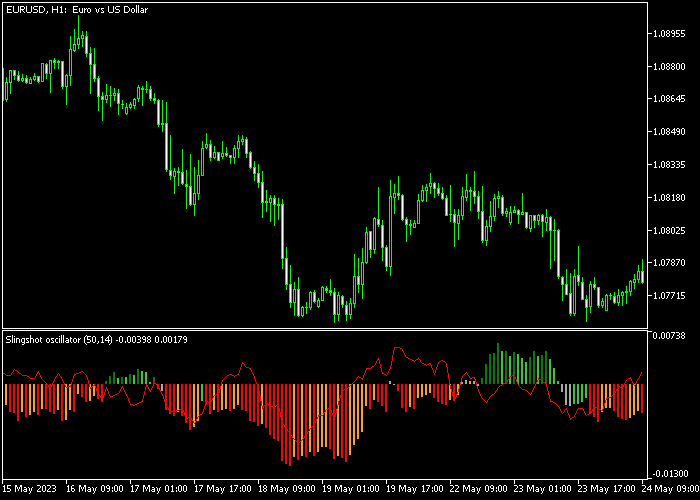
The Slingshot Signal Oscillator displays colored bars in a sub-window below the main chart.
Green and light-green bars reflect bullish trends and potential buy setups, while orange and red bars indicate bearish momentum and potential sell opportunities.

Guide to Trade with Slingshot Signal Oscillator
Buy Rules
- Wait for the first green bar to appear above the zero level.
- Confirm that price starts showing upward movement.
- Open a buy trade after the initial bullish bar forms.
- Stay in the position while green bars continue above zero.
Sell Rules
- Wait for the first red bar to appear below the zero level.
- Confirm that price begins moving downward.
- Open a sell trade once the bearish bar forms.
- Remain in the trade while red bars continue below zero.
Stop Loss
- Set the stop loss 2-3 pips below the previous swing low for buy trades.
- Set the stop loss 2-3 pips above the previous swing high for sell trades.
- Another method is placing the stop just beyond the last oscillator reversal point.
Take Profit
- Close buy trades when a red bar appears below zero or target a risk/reward ratio of at least 1.5.
- Close sell trades when a green bar appears above zero or target a risk/reward ratio of at least 1.5.
- Trailing the stop as the trend continues can also lock in gains.
Slingshot Signal Oscillator Asian Session Forex Strategy for MT5
This strategy combines the Slingshot Signal Oscillator Indicator with the Guppy Zones Forex Indicator to create a focused scalping approach designed specifically for the Asian session.
It aims to capture small, consistent moves during low volatility conditions.
The Slingshot Signal Oscillator provides clear momentum shifts using histogram bars around the zero level.
The Guppy Zones Indicator defines the underlying trend by comparing short-term and long-term moving averages.
When both indicators align, entries become more reliable even in slower market conditions.
The Asian session often produces tighter ranges and slower price action.
This makes it ideal for controlled scalping, especially on pairs like USDJPY, AUDUSD, and EURJPY.
This strategy keeps entries selective and avoids overtrading.
Buy Entry Rules
- Wait for the first green bar of the Slingshot Signal Oscillator to appear above the zero level.
- Confirm that the short-term moving averages in the Guppy Zones are positioned above the long-term averages, indicating a buy trend.
- Enter a buy trade at the close of the signal candle.
- Place a stop loss just below the recent consolidation low or below the Guppy Zones area.
- Take profit when the oscillator prints the first red bar below zero or when price stalls near a resistance zone.
Sell Entry Rules
- Wait for the first red bar of the Slingshot Signal Oscillator to appear below the zero level.
- Confirm that the short-term moving averages in the Guppy Zones are below the long-term averages, indicating a sell trend.
- Enter a sell trade at the close of the signal candle.
- Place a stop loss just above the recent high or above the Guppy Zones structure.
- Take profit when the oscillator prints the first green bar above zero or when price reacts at a support level.
Case Study 1: Oscillator Breakout in Asian Session
On USDJPY M5 during the Tokyo session, price moved in a tight range before momentum increased slightly.
The first green bar appeared above zero on the Slingshot Signal Oscillator, signaling a shift in direction.
The Guppy Zones already showed short-term averages above long-term averages, confirming a mild uptrend.
A buy trade was entered at candle close.
The stop loss was placed below the recent range low.
Price moved gradually upward in small steps, which is typical for the Asian session.
The trade was closed when the first red bar appeared below zero, securing a modest but consistent scalping gain.
Case Study 2: Guppy Zones Trend Continuation
On AUDUSD M1, price stayed below the Guppy Zones during a quiet session, confirming a sell trend.
The short-term moving averages remained under the long-term group, showing sustained bearish pressure.
After a brief pullback, the Slingshot Signal Oscillator printed its first red bar below zero.
A sell trade was opened immediately.
The stop loss was placed above the Guppy Zones. Price slowly drifted downward with low volatility.
The trade was closed when a green bar appeared, marking a temporary momentum shift.
Download Now
FAQ
How does the Slingshot Signal Oscillator generate signals?
The indicator uses momentum changes to produce colored bars.
Green/light-green bars above zero indicate bullish momentum, while orange/red bars below zero indicate bearish pressure.
Which timeframes work best for this indicator?
The indicator works on any timeframe.
Shorter timeframes may produce more frequent signals, while longer timeframes help capture broader trend movements.
Can this indicator be used alone?
Yes. Many traders use it as a standalone trend and momentum tool.
Others combine it with support and resistance levels or other technical indicators to confirm trades.
Summary
The Slingshot Signal Oscillator offers a simple way to monitor market momentum and identify buy or sell opportunities.
Colored bars above or below the zero level make trend direction easy to follow.
With adjustable settings, the indicator can adapt to different trading styles and timeframes.
Using it alongside proper risk management and confirmation methods can improve trade timing and trend-following effectiveness.





