About the Trend Lord Indicator
The Trend Lord Indicator Metatrader 4 forex indicator is a trend-direction tool based on the angle of a moving average.
Rather than plotting the average directly on price, it transforms its direction into a visual bar chart displayed in a separate indicator window.
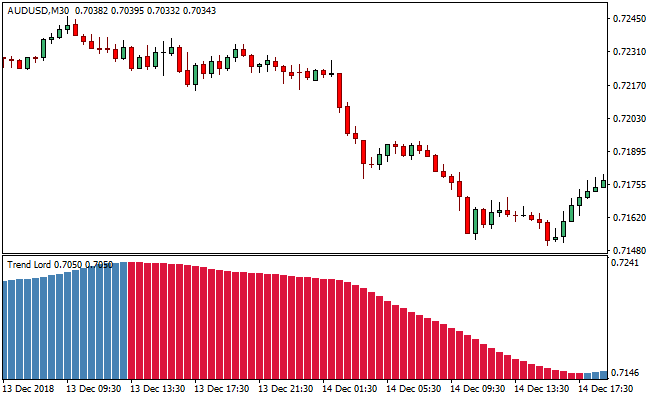
When the moving average slopes upward, the Trend Lord indicator turns steel blue, signaling bullish market conditions.
When the slope turns downward, the indicator changes to crimson, reflecting bearish sentiment.
This makes it easy to assess market direction at a glance.
The indicator focuses purely on trend direction and momentum.
Simplifying moving average behavior into color-coded bars helps traders stay aligned with prevailing price movement without cluttering the main chart.
Free Download
Download the “trend-lord-indicator.ex4” MT4 indicator
Key Features
- Based on the angle of a moving average.
- Displayed as a bar chart in a separate window.
- Steel blue bars indicate bullish trends.
- Crimson bars indicate bearish trends.
- Simple visual interpretation of trend direction.
Indicator Chart
The chart shows the Trend Lord Indicator plotted in a separate window below the price chart.
Rising steel blue bars reflect upward trend momentum, while falling crimson bars highlight downward trend conditions.
This visual format helps traders confirm trend direction quickly.
Guide to Trade with Trend Lord Indicator
Buy Rules
- Wait for the Trend Lord bar chart to turn steel blue.
- Confirm that the bars are rising within the indicator window.
- Enter a buy trade after the color change.
- Remain in the trade while steel blue bars persist.
Sell Rules
- Wait for the Trend Lord bar chart to turn crimson.
- Confirm that the bars are falling within the indicator window.
- Enter a sell trade after the color shift.
- Stay in the trade while crimson bars continue.
Stop Loss
- Place the stop loss at a fixed distance below the entry candle for buy trades.
- Place the stop loss at a fixed distance above the entry candle for sell trades.
- Use recent market volatility to determine the distance.
- Keep the stop unchanged until the indicator color shifts.
Take Profit
- Target nearby support or resistance zones.
- Allow profits to run while bar color remains unchanged.
- Scale out near extended price moves.
- Close the trade when the bar color flips.
Trend Lord Indicator + SuperTrend MTF Forex Strategy for MT4
This strategy merges the signals from the Trend Lord MT4 Forex Indicator with the trend filtering of the SuperTrend MTF Forex Signal Indicator.
The Trend Lord shows steel‑blue bars for a bullish signal and crimson bars for a bearish signal.
The SuperTrend MTF draws a green line during a buy‑trend and a red line for a sell‑trend.
The idea is to enter trades only when both indicators align: Trend Lord gives an immediate bar‑based signal, and SuperTrend confirms the broader trend direction.
This makes it useful for scalping or short‑term trades on M5 or M15 charts.
Strong move setups on liquid pairs give the best results.
Buy Entry Rules
- SuperTrend line must be green (indicating bullish trend).
- Trend Lord must display a steel‑blue bar (bullish signal).
- Enter long at the open of the next candle after the steel‑blue bar appears while SuperTrend remains green.
- Place a stop loss a few pips below the recent swing low or just below the low of the signal bar.
- Set take profit at 1.5× to 2× the stop‑loss distance, or exit if SuperTrend turns red or Trend Lord shows a crimson bar.
Sell Entry Rules
- SuperTrend line must be red (indicating bearish trend).
- Trend Lord must display a crimson bar (bearish signal).
- Enter short at the open of the next candle after the crimson bar appears while SuperTrend remains red.
- Place a stop loss a few pips above the recent swing high or just above the high of the signal bar.
- Set take profit at 1.5× to 2× the stop‑loss distance, or exit if SuperTrend turns green or Trend Lord shows a steel‑blue bar.
Advantages
- Combines a trend filter (SuperTrend) with fast bar‑based signals (Trend Lord) for better alignment and clearer entries.
- Suitable for scalping or short‑term intraday trades on M5/M15.
- Defined entry, stop loss, and take profit rules help maintain discipline and reduce emotional decision‑making.
- The dual confirmation reduces the risk of false signals compared to using a single indicator.
- Works across multiple major currency pairs when volatility is reasonable, and spreads are tight.
- Strategy adapts to changing market conditions: if the trend shifts, SuperTrend repositioning automatically filters out bad entries.
Drawbacks
- On shorter timeframes, price noise can cause frequent signal flips, increasing the risk of stop-outs or whipsaws.
- Small pip targets may be eaten by spread or slippage, especially during volatile sessions or with wide spreads.
- Relying on two indicators might result in fewer trades compared to single‑indicator setups, requiring patience for quality setups.
Case Study 1
On EURUSD M5 during the London session, SuperTrend was green, and Trend Lord switched from neutral to a steel‑blue bar after a small pullback.
The trader entered long at the next candle with a stop loss 7 pips below the recent swing low and a take profit 14 pips above.
Over the next 17 minutes price climbed steadily and hit the take profit.
SuperTrend stayed green throughout, and no crimson bar appeared.
This resulted in a clean scalp following both trend and momentum confirmation.
Case Study 2
On GBPJPY M15 during the New York session, SuperTrend turned red after a retracement and Trend Lord printed a crimson bar confirming bearish momentum.
The trader entered short at the next candle with a stop loss 12 pips above the recent swing high and a take profit 24 pips below.
Over the next 25 minutes price moved downward sharply and hit the take profit.
SuperTrend remained red, and no steel‑blue bar appeared in between.
This trade capitalized on a trending move that aligned with both indicators.
Strategy Tips
- Focus on major and liquid currency pairs such as EURUSD, GBPJPY, USDJPY, or AUDUSD for tighter spreads and reliable moves.
- Avoid trading when the market is flat or sideways; wait for clear trend confirmation via SuperTrend before taking any signal.
- Be patient; skip setups that do not meet both criteria. It is better to wait for clean alignment than force a trade.
- Manage position size carefully because scalping often involves multiple trades; keep lot size modest to avoid large drawdowns from occasional losses.
- Use higher timeframes, such as H1 or H4, to check overall market context and avoid trades that oppose dominant multi-hour trends even if indicators align on short-term frames.
Download Now
Download the “trend-lord-indicator.ex4” Metatrader 4 indicator
FAQ
What does the color of the Trend Lord bars represent?
Steel blue bars indicate an upward-sloping moving average, while crimson bars signal a downward-sloping average.
Is this indicator plotted on the main chart?
No. It appears in a separate window below the price chart as a bar histogram.
Can Trend Lord be used as a trend filter?
Yes. Many traders use it to confirm trend direction before taking entries from other strategies.
Summary
The Trend Lord MT4 indicator converts moving average direction into an easy-to-read color-coded bar chart.
This approach allows traders to assess trend direction quickly without analyzing complex price data.
Its simplicity, visual clarity, and focus on trend momentum make the Trend Lord indicator a useful companion for traders who prefer clean and straightforward trend confirmation tools.





