
About the Forex Breakout Zones Indicator
The Forex Breakout Zones Indicator for MT5 is designed to help traders identify high-probability breakout areas directly on the chart.
It marks potential buy and sell zones with two horizontal lines that act as clear breakout levels.
The indicator appears in the main chart window, providing a visual guide for traders to enter trades when price breaks out of these zones.
A close above the upper line signals a potential buy, while a close below the lower line signals a potential sell.
Because it reacts to price action, the indicator can be used for both scalping and swing trading strategies.
Traders can experiment with the settings and input values to adjust sensitivity, making it flexible for different timeframes and currency pairs.
Free Download
breakout-zones-indicator.mq5 (MT5)
Key Features
- Identifies potential buy and sell breakout zones on the chart.
- Displays two horizontal lines for clear entry levels.
- Works for all timeframes and currency pairs.
- Signals are based on price closing above or below breakout zones.
- Customizable settings allow traders to adjust sensitivity.
- Suitable for scalping, intraday, and swing trading strategies.
Indicator Chart
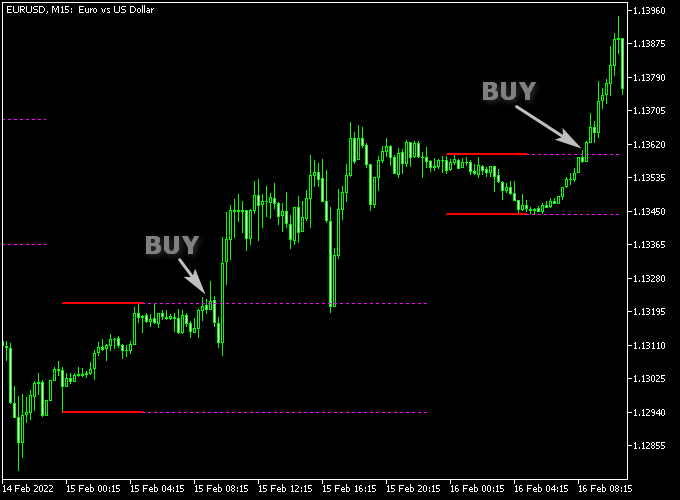
The Breakout Zones Indicator shows two horizontal lines marking potential breakout areas.
The example illustrates how price reacts when it closes above the upper line for a buy or below the lower line for a sell, providing clear trade entry signals.
Guide to Trade with Breakout Zones Indicator
Buy Rules
- Wait for a candlestick to close above the upper breakout line.
- Confirm that bullish momentum is building.
- Check that price is not immediately reversing after the breakout.
- Open a buy trade once the breakout is confirmed.
Sell Rules
- Wait for a candlestick to close below the lower breakout line.
- Confirm that bearish momentum is increasing.
- Check that price is not immediately reversing after the breakout.
- Open a sell trade once the breakout is confirmed.
Stop Loss
- Place the stop loss just below the breakout zone for buy trades.
- Place the stop loss just above the breakout zone for sell trades.
Take Profit
- Close the buy trade near the previous swing high.
- Close the sell trade near the previous swing low.
- Exit early if momentum reverses against the trade.
- Optionally trail the trade to capture extended breakout moves.
Breakout Zones MT5 + ADX VMA Indicator Strategy
This strategy combines the Breakout Zones indicator with the ADX VMA indicator to trade structured breakouts with trend strength confirmation.
It is applied on M5 and M15 charts where price alternates between consolidation and expansion phases.
The Breakout Zones indicator identifies key support and resistance zones formed during consolidation.
A buy trade is triggered when a candle closes above the upper breakout line, while a sell trade is triggered when a candle closes below the lower breakout line.
This defines the start of a directional breakout move.
The ADX VMA indicator confirms trend direction and strength.
A green histogram signals bullish conditions, while a violet histogram signals bearish conditions.
This helps filter breakout trades that lack momentum support.
Trades are only executed when the breakout direction matches the ADX VMA trend color, ensuring alignment between price structure and trend strength.
Buy Entry Rules
- Wait for the ADX VMA indicator to show a green histogram.
- Enter a buy trade when a candle closes above the upper breakout line.
- Confirm that price holds above the breakout zone after entry.
- Place the stop loss below the breakout zone or the nearest support area.
- Close the trade when the histogram turns violet or when price closes back inside the zone.
Sell Entry Rules
- Wait for the ADX VMA indicator to show a violet histogram.
- Enter a sell trade when a candle closes below the lower breakout line.
- Confirm that price holds below the breakout zone after entry.
- Place the stop loss above the breakout zone or the nearest resistance area.
- Close the trade when the histogram turns green or when price closes back inside the zone.
Case Study 1: EURUSD M5 Buy Trade
On EURUSD M5, price consolidated inside a clearly defined breakout zone during a low volatility phase.
The ADX VMA indicator shifted to a green histogram, confirming bullish conditions.
A buy trade was opened after a candle closed above the upper breakout line and the stop loss was placed below the breakout zone.
Our buy trade was closed later that day for a 12 pip loss when price dropped back inside the breakout zone.
Case Study 2: GBPJPY M15 Sell Trade
On GBPJPY M15, price moved within a tight consolidation range marked by the breakout zones indicator.
The ADX VMA indicator showed a violet histogram, confirming bearish conditions.
A sell trade was entered after a candle closed below the lower breakout line. The stop loss was placed above the breakout zone.
It was closed 4 hours later for a 42 pip gain when the ADX VMA histogram shifted to green, indicating a bullish trend change.
Download Now
breakout-zones-indicator.mq5 (MT5)
FAQ
How do the breakout zones work?
The indicator marks two horizontal lines as potential breakout zones.
Price closing above or below these lines signals a potential entry for buy or sell trades.
Can the indicator be adjusted?
Yes. Traders can experiment with different settings and input values to modify the sensitivity of the breakout zones.
Which timeframes are suitable for this indicator?
The indicator works on all timeframes.
Short-term traders can use lower timeframes for quick breakouts, while swing traders can focus on higher timeframes for broader breakout signals.
Summary
The Breakout Zones Indicator provides clear breakout levels on the chart, helping traders identify potential buy and sell opportunities.
Its horizontal lines make it simple to see where price may move strongly, and the signals work well across multiple timeframes.
By combining easy-to-read breakout zones with flexible settings, the indicator is suitable for scalpers, day traders, and swing traders.
It helps traders plan entries, manage risk, and define take profit levels effectively, improving confidence when trading breakout setups.





